
iOS 18.2 Includes Revamped Mail App With Built-In Categorization - MacRumors
Skip to Content

iOS 18.2 Includes Revamped Mail App With Built-In Categorization

With the iOS 18.2, iPadOS 18.2, and macOS Sequoia 15.2 betas that came out today, Apple introduced an updated version of the Mail app with built-in categorization.
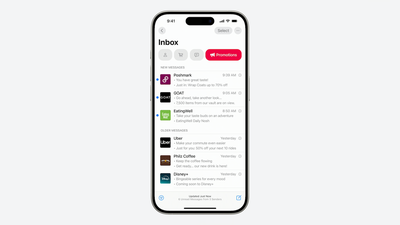
iOS 18 Mail Categorization
Mail Categories organize your incoming emails into different sections. Important emails are shown in a "Primary" category, with orders, newsletters, social notifications, and deals organized into three other sections.

The "Transactions" section includes receipts, orders, and deliveries, and it makes it easy to find orders that you've placed and shipping information for those orders.

The "Updates" section includes newsletters, alerts for things like doctor's appointments and correspondence, and other subscription emails. Apple's "Promotions" category includes special offers and deal emails.

Categorization appears to be a work in progress at this time, which is not surprising as this is a beta. Emails may be mis-categorized or might show up in multiple categories, but that's likely something that Apple will address over time.

Devices that have Apple Intelligence support will show priority emails in the Primary inbox, so you can see what's most important first. If an email in the Transactions, Updates, or Promotions section includes time-sensitive information, it will also be in the Primary section of the inbox.

Categories is the default view after updating to the new software, but in the upper right corner of the Mail app, you can swap back to a list view that shows all emails in chronological order, without separation into categories.

The Mail app has an "About Categories" section where you can see how your messages have been categorized over the course of the last week, but there is no option to tell the Mail app if you believe an email has been put into the wrong category.


Related Forums: iOS 18, iPadOS 18

Popular Stories

iOS 26

iOS 26.4 Adds Two New Features to CarPlay

Tuesday March 24, 2026 1:55 pm PDT by
iOS 26.4 was released today, and it includes a couple of new features for CarPlay: an Ambient Music widget and support for voice-based chatbot apps. To update your iPhone 11 or newer to iOS 26.4, open the Settings app and tap on General → Software Update. CarPlay will automatically offer the new features so long as the iPhone connected to your vehicle is running iOS 26.4 or later....
Apple Business hero

Apple Unveils 'Apple Business' All-in-One Platform

Tuesday March 24, 2026 8:53 am PDT by
Apple today announced Apple Business, a new all-in-one platform that unifies device management, productivity tools, and customer outreach features. The service is designed to be a consolidated replacement for several of Apple's existing business-focused offerings, including Apple Business Essentials, Apple Business Manager, and Apple Business Connect. It provides organizations with a single...
AirPods Pro Firmware Feature

Apple Releases New Firmware for AirPods Pro 3, AirPods Pro 2 and AirPods 4

Tuesday March 24, 2026 12:31 pm PDT by
Apple today released new firmware for the AirPods Pro 2, AirPods Pro 3, and the AirPods 4. The firmware has a version number of 8B39, up from 8B34 on the AirPods Pro 3, 8B28 on the AirPods Pro 2, and 8B21 on the AirPods 4. There is no word on what's included in the firmware, but Apple has a support document with limited notes. Most updates are limited to bug fixes and performance...

Top Rated Comments

jz0309 Avatar
19 months ago
I hope that this "categorization" is an opt-in feature, don't want an app doing this for me ... if it is not optional, either no 18.2 or no apple mail client anymore
Score: 12 Votes (Like | Disagree)
10anta Avatar
19 months ago

How’s that possible in Todays world!
- Unsubscribe from any marketing and mailing lists, send to junk any that don’t respect that
- Read and delete/archive anything not needing an action
- Flag the limited few requiring a response/retrieval
Score: 8 Votes (Like | Disagree)
john123 Avatar
19 months ago

Leveraging the power of Apple Intelligence to organize and restructure our stored information is so powerful and meaningful. All of us will soon be tooled with superhero productivity skills.
I legit can't tell if this was sarcasm or serious. I'm about 85/15.
Score: 8 Votes (Like | Disagree)
10anta Avatar
19 months ago
As a person with zero e-mails in my inbox, I’m not sure I need this

Obviously some people are rather different
Score: 8 Votes (Like | Disagree)
spaxxedout Avatar
19 months ago
File photo of society if email didn’t support formatting or embedded images and only used HTML for links.


Attachment Image
Score: 7 Votes (Like | Disagree)
turbineseaplane Avatar
19 months ago
My life got so much better when I switched to Fastmail and no longer have to worry about client side app interoperability and feature changes and tweaks on the device side.

I really love having all that just be server side full-time and no matter where I access things it’s always the same

Original Gmail really got that right out of the gate
Score: 7 Votes (Like | Disagree)















