

Multiple iPhone owners today noticed a pronunciation processing issue that causes the word "Trump" to momentarily show up when using dictation to send a message with the word "racist."
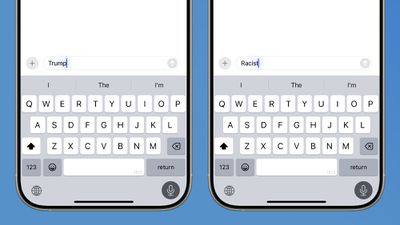
In some cases, when speaking the word racist through the iPhone's built-in dictation feature, the iPhone briefly interprets the spoken word as "Trump" and "Trump" text shows up in the Messages app before being corrected to the actual word (racist) as Apple's processing interprets what was said.
Speaking the word racist with dictation doesn't always show "Trump" first, though it did show up more often than other words in our testing. We also saw "Rhett" and "Rouch" appear before the iPhone corrects to racist.
A video depicting the bug has been circulating on TikTok and other social networks. An Apple spokesperson told The New York Times that the issue was due to a phonetic overlap between the two words. It is not clear if this dictation issue existed prior to today and was just now noticed, or if there was some internal change that caused it. Apple said that it is working on a fix.
Former Apple Siri team member John Burkey told The New York Times that there is "probably" code in Apple's systems that is causing the iPhone to write Trump when someone speaks the word racist. "This smells like a serious prank," he said, though he also claimed that it is not clear if it was added into Apple's code or seeded into data that Apple uses for its AI features.
Note: Due to the political or social nature of the discussion regarding this topic, the discussion thread is located in our Political News forum. All forum members and site visitors are welcome to read and follow the thread, but posting is limited to forum members with at least 100 posts.




















