
iPhone 16e Has an Action Button: Here's Everything It Can Do - MacRumors
Skip to Content

iPhone 16e Has an Action Button: Here's Everything It Can Do

Apple's new entry-level iPhone 16e has inherited the Action button first seen on the iPhone 15 Pro and now found on all iPhone 16 models. The Action button replaces the traditional Ring/Silent switch – a staple of the iPhone since it launched in 2007. For users unfamiliar with the Action button, here's a rundown of its functions – including one that is (currently) exclusive to iPhone 16e.
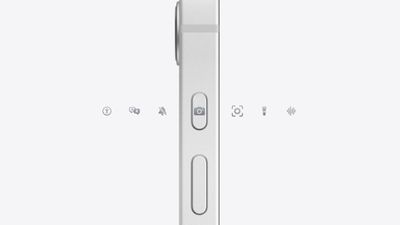
iphone 16e action button
The Action button replaces the single-function switch used to toggle between ring and silent, offering additional options so users can choose between quickly accessing the camera or flashlight, activate Voice Memos, Focus modes, Translate, and accessibility features like Magnifier. Users can also associate it with Shortcuts for more options.

A press-and-hold gesture with fine-tuned haptic feedback ensure the new Action button launches the intended action, which you can customize in Settings and assign to different actions.

Action Button Functions

Here's what the Action button can be programmed to do:

  • Accessibility: Access to various accessibility settings, such as VoiceOver, Zoom, AssistiveTouch, Live Speech, and more.
  • Shortcuts: Open your favorite app, or run a shortcut created in or downloaded from the Shortcuts app, such as sending a message, playing a playlist, or controlling smart home devices.
  • Silent Mode: Like the Ring/Silent switch on existing iPhone models, you can toggle silent mode on or off, which will mute or unmute the ringer and alerts.
  • Camera: Take a photo, selfie, video, portrait, or portrait selfie with a single press of the Action button.
  • Flashlight: Turn on or off the flashlight on the back of the device.

  • Focus: Activate or deactivate a Focus mode.
  • Magnifier: Activate the Magnifier app to use the iPhone's camera as a magnifying glass to zoom in on small text or objects.
  • Translate: Launch the Translate app and start a conversation or text translation with a single press of the Action button.
  • Voice Memos: Start or stop recording a voice memo with the Voice Memos app.

Action Button Control Center Options

In iOS 18, you can assign the Action button to one of the dozens of controls available in the Control Center gallery, allowing the Action button to invoke Dark Mode, Airplane Mode, Personal Hotspot, and more.
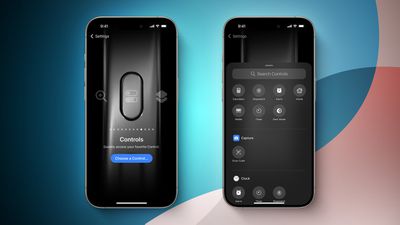
iOS 18 Control Center Toggles for Action Button Feature
Available Control Center actions in iOS 18 include:

  • Calculator
  • Stopwatch
  • Alarm
  • Home
  • Timer
  • Dark Mode
  • Scan Code
  • Airplane Mode
  • Cellular Data
  • Personal Hotspot
  • Dark Mode
  • Quick Note
  • Remote
  • Wallet
  • Tap to Cash
  • Ping My Watch
  • Visual Intelligence

The last assignable Action button option in the list, Visual Intelligence, is an Apple Intelligence feature that was previously exclusive to iPhone 16 models with a Camera Control button, which the iPhone 16e does not have. It was thought that the extra button was necessary to activate the feature, but on iPhone 16e, Visual Intelligence can be assigned to the device's Action button or enabled via Control Center.

On iPhone 16 models, Visual Intelligence lets you use the camera to learn more about places and objects around you. It can also summarize text, read text out loud, translate text, search Google for items, ask ChatGPT, and more. Apple has confirmed that Visual Intelligence is also coming to the iPhone 15 Pro in a future software update.


Related Forum: iPhone

Popular Stories

iOS 26

iOS 26.4 Adds Two New Features to CarPlay

Tuesday March 24, 2026 1:55 pm PDT by
iOS 26.4 was released today, and it includes a couple of new features for CarPlay: an Ambient Music widget and support for voice-based chatbot apps. To update your iPhone 11 or newer to iOS 26.4, open the Settings app and tap on General → Software Update. CarPlay will automatically offer the new features so long as the iPhone connected to your vehicle is running iOS 26.4 or later....
Apple Business hero

Apple Unveils 'Apple Business' All-in-One Platform

Tuesday March 24, 2026 8:53 am PDT by
Apple today announced Apple Business, a new all-in-one platform that unifies device management, productivity tools, and customer outreach features. The service is designed to be a consolidated replacement for several of Apple's existing business-focused offerings, including Apple Business Essentials, Apple Business Manager, and Apple Business Connect. It provides organizations with a single...
AirPods Pro Firmware Feature

Apple Releases New Firmware for AirPods Pro 3, AirPods Pro 2 and AirPods 4

Tuesday March 24, 2026 12:31 pm PDT by
Apple today released new firmware for the AirPods Pro 2, AirPods Pro 3, and the AirPods 4. The firmware has a version number of 8B39, up from 8B34 on the AirPods Pro 3, 8B28 on the AirPods Pro 2, and 8B21 on the AirPods 4. There is no word on what's included in the firmware, but Apple has a support document with limited notes. Most updates are limited to bug fixes and performance...

Top Rated Comments

vegetassj4 Avatar
14 months ago
Waiting on the 17 pro:

CUPERTINO, California—October 4, 2025—Apple® today announced iPhone® 17 Pro, the most amazing iPhone yet, packed with incredible new improved and larger Action Buttons for blazing fast performance and stunning button mashing; an all new camera with advanced optics; full 8K Ultra Retina HD resolution video recording; and Siri Pro™, an Apple Intelligence assistant that helps you get things done just by thinking.


Attachment Image

Attachment Image
Score: 9 Votes (Like | Disagree)
alexandr Avatar
14 months ago
You can also create a a bundled shortcut.


Attachment Image
Score: 9 Votes (Like | Disagree)
danielfgom Avatar
14 months ago
The biggest shortcoming is that it can only be programmed to ONE function.

I don’t know why they didn’t allow double and triple press as well.

That was you could long press for silent/ring and still have 3 more presses for all the other available functions.
Score: 8 Votes (Like | Disagree)
turbineseaplane Avatar
14 months ago
Have they ever thought of giving the buttons a slightly different texture or height profile so they could be better identified by feel?

I also hate having a button perfectly across from the right side power (or whatever it's called) button

The amount of unintentional screenshots I take is ridiculous
Score: 7 Votes (Like | Disagree)
mevans7 Avatar
14 months ago
As long as it can turn on silent mode, I’m good.
Score: 4 Votes (Like | Disagree)
B4U Avatar
14 months ago
Perhaps implement that with the "power button" instead of locking it to Siri only.
This way the silent toggle switch can remain the way it was.
Cannot tell if the phone is in silent by feeling this action button inside a pocket alone.
Score: 3 Votes (Like | Disagree)















