

We're not getting new Siri Apple Intelligence features in iOS 18.4 as expected, but the upcoming update does have quite a few new additions that will be worth upgrading for. We've rounded up the five best features to look forward to, and if you're not running the beta, you can expect to get access to these in early April.
Priority Notifications
If you have an iPhone or iPad that supports Apple Intelligence, iOS 18.4 adds support for Priority Notifications, one of the features that Apple announced when introducing Apple Intelligence at the June 2024 WWDC event.
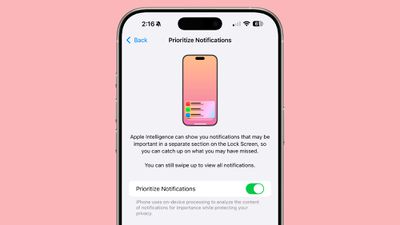
Priority Notifications display your most important messages first, highlighting them in a special section on the Lock Screen. Apple uses Apple Intelligence to decide which notifications deserve priority status, and it's typically messages notifications that need to be viewed or responded to imminently.
Upcoming deliveries are highlighted, for example, as are meetings that are happening, calendar alerts for events that are coming up that day, reminders that are due, and messages that look like they need a quick response, such as a dinner invitation.
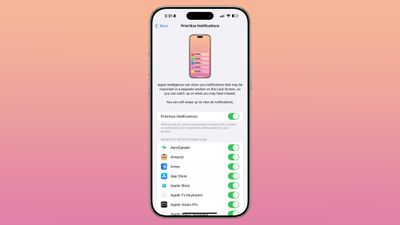
Priority Notifications can be turned on for all apps, or set up on a per-app basis in the Notifications section of the Settings app. In the beta, Priority Notifications is not on by default, and it needs to be enabled, but that could change before iOS 18.4 is released to the public.
Apple is also adding new languages to Apple Intelligence in iOS 18.4, including French, German, Italian, Portuguese (Brazil), Spanish, Japanese, Korean, and Chinese (simplified), along with localized English for Singapore and India.
Visual Intelligence Updates
For iPhone 15 Pro users, iOS 18.4 brings Visual Intelligence, a feature that was previously limited to the iPhone 16 models. Apple initially limited Visual Intelligence to iPhones with a Camera Control button, but with the iPhone 16e, Apple added an Action Button activation option, and that's what's used for the iPhone 15 Pro, too.

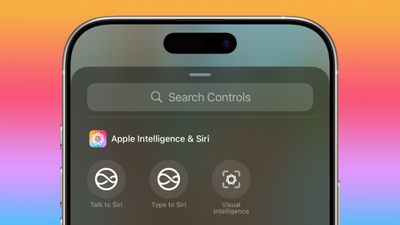
Visual Intelligence can be activated by linking it to the Action Button, but there's also a new Apple Intelligence section in Control Center that includes a Visual Intelligence button as an alternative way to launch it.
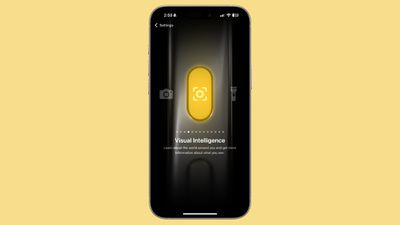
The Action Button and Control Center options for Visual Intelligence can also be used on iPhone 16 models, so if you have an iPhone 16 and don't like the Camera Control long press to activate Visual Intelligence, you can now use these alternatives.
New Emoji
There are a handful of new emoji characters that are available in iOS 18.4, and that's always a big deal for emoji fans. The new emoji characters include bags under eyes, fingerprint, leafless tree, root vegetable, harp, shovel, and splatter.

Ambient Music
iOS 18.4 has an Ambient Music toggle that can be added to Control Center. You can choose from four different sound categories, including Sleep, Chill, Productivity, and Wellbeing. Selecting one of the Ambient Music categories plays a random selection of sounds or music from that category.
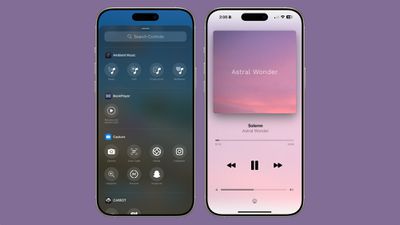
There is no dedicated Ambient Music app and you can't choose what's playing from Control Center, but if you play a category and then tap into the Dynamic Island at the top or access the Now Playing widget, you can skip songs and see the name of what's playing.
App Store Downloads
In iOS 18.4, when you download an app from the App Store, you can pause the download right from the update list. It's a small change, but one that is useful if you're in a situation where you have low signal and need to do something else while an app download is in progress.
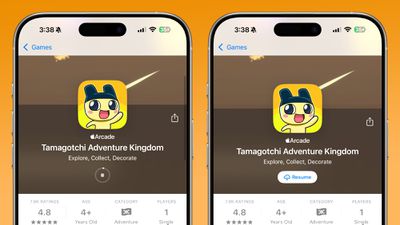
Before now, you could only stop and restart an app installation from the App Store interface.
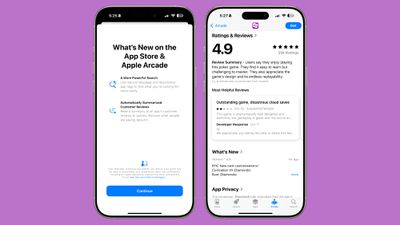
Apple also added App Store review summaries, which makes it easier to see what people think of an app at a glance.
Bonus for Vision Pro Users: Guest Mode Controls
Apple added an iPhone app for the Apple Vision Pro in iOS 18.4, and it can be used to view info about the Vision Pro, find content to watch, and download apps to the headset. Overall, it's not super exciting.
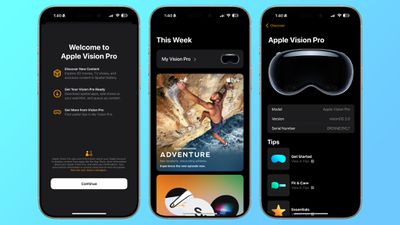
What is useful, though, is an option to control Guest Mode from your iPhone or iPad if someone is using your Vision Pro. When someone that isn't you picks up your Vision Pro and puts it on, you'll see a pop up on your iPhone. From there, you can choose what apps and experiences the person will view, and you can use AirPlay mode to guide them through their Vision Pro experience.
More Features
For a full list of all the features we've found in iOS 18.4 so far, make sure to check out our iOS 18.4 roundup.
Launch Date
We're on the fourth beta of iOS 18.4, and there are likely a couple more to go. Apple plans to release iOS 18.4 in early April alongside iPadOS 18.4 and macOS Sequoia 15.4.





















