Apple has released iOS 18.4, bringing further refinements to Apple Intelligence features, a neat new capability to iPhone 15 Pro devices, new emoji, and more.
While not quite as packed with new features as Apple's preceding iOS 18 point releases, iOS 18.4 still introduces enhancements that aim to make your iPhone smarter and more intuitive. Below, we've listed 12 new things your iPhone will be able to do after you install the new update via Settings ➝ General ➝ Software Update.
Prioritize Notifications
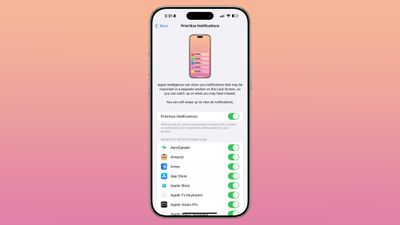
iOS 18.4 introduces a smarter way to manage notifications with the new Prioritize Notifications feature. Initially launched as an all-or-nothing setting in beta 1, the feature in the latest beta release allows you to customize this feature on a per-app basis.
Priority notifications appear in a dedicated section on your Lock Screen, ensuring you see important alerts first. Apple Intelligence automatically determines which notifications deserve priority status, but you can still access all notifications by swiping up to view Notification Center.
Discover Vision Pro Content
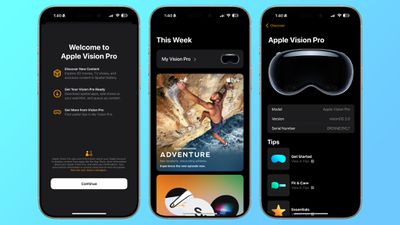
If you own an Apple Vision Pro headset, iOS 18.4 will install a dedicated Vision Pro app on your iPhone. This companion app helps you discover and download content for your headset without needing to wear it.
The app features specialized sections for Immersive Video and 3D movies, plus the ability to download apps directly to your Vision Pro. There's also a My Vision Pro section that provides a user guide and helpful tips for getting the most from your device.
Apple Intelligence via Control Center
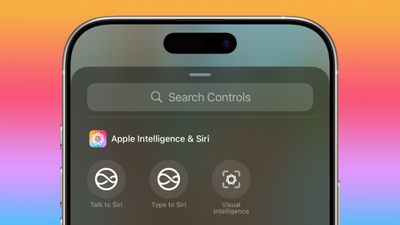
The Control Center now has a dedicated Apple Intelligence section in iOS 18.4. This new section incorporates the Type to Siri option (previously found in the now-removed Siri section) alongside new controls for activating Siri and accessing Visual Intelligence features.
Visual Intelligence via Action Button
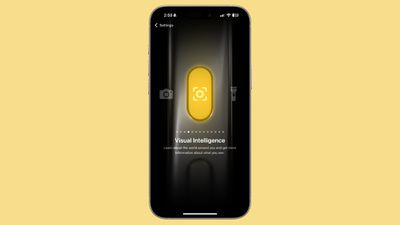
In iOS 18.4, there's a new option that lets you configure the Action button to activate Visual Intelligence. This provides an alternative to using the Camera Control button on iPhone 16 models and enables the feature on iPhone 15 Pro devices. Visual Intelligence allows you to use your iPhone camera to learn more about places and objects around you. It can also summarize text, read text out loud, translate text, search Google for items, ask ChatGPT, and more.
Pause Downloads
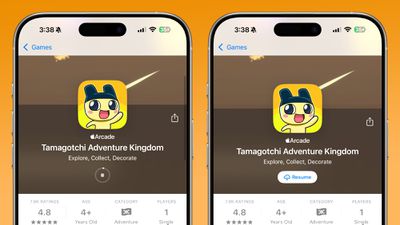
A small but useful addition in iOS 18.4 is the ability to pause app downloads directly from the App Store's update list. Previously, you could only completely stop an installation from the App Store or pause it by pressing on the app icon from your Home Screen.
The new functionality works for both fresh downloads and app updates, letting you pause and resume installations with greater flexibility.
Change App Settings via Shortcuts
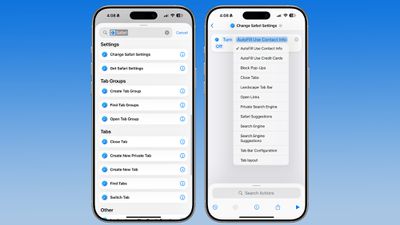
Power users will appreciate the numerous new Shortcuts actions for Apple apps in iOS 18.4. Most of these actions focus on changing app settings without manual navigation. For instance, Maps now supports actions for avoiding busy roads or tolls, adjusting volume, and managing directions on radio, while Safari gains actions for controlling AutoFill, blocking pop-ups, closing tabs, changing search engines, and modifying the tab bar configuration.
Additional Settings actions are available for Reminders, Calendar, Apple TV, Books, Notes, Voice Memos, and Weather apps.
Get News About Everything Food
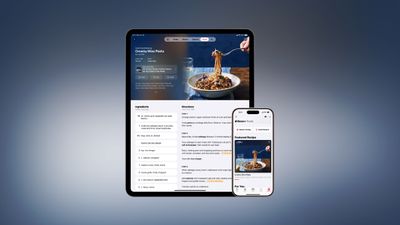
A new dedicated food hub in Apple News delivers tens of thousands of recipes, restaurant features, healthy eating tips, and kitchen essentials all in one place. Available exclusively for Apple News+ subscribers, the section brings together content from renowned culinary publications including Allrecipes, Bon Appétit, Food & Wine, Good Food, and Serious Eats.
A highlight of the new food section is the Recipe Catalog, which will be regularly updated with fresh recipes. The practical cook mode feature provides step-by-step cooking instructions, and favorite recipes can be saved for offline access.
Sketch in Image Playground
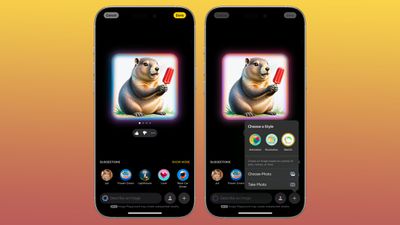
iOS 18.4 expands the creative capabilities of Image Playground with the addition of a new Sketch style. This artistic option joins the existing Animation and Illustration styles. Switching between styles is as easy as tapping the "+" button in the Image Playground app to access and swap between the different visual approaches.
In addition to the new style, Apple has refreshed the seasonal themes by replacing "Winter Holidays" with a new "Spring" theme, just in time for the changing seasons.
Play Ambient Music
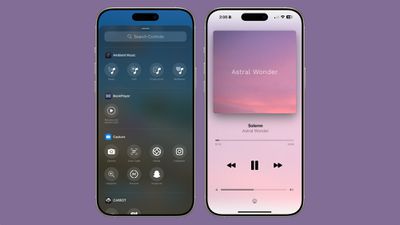
iOS 18.4 introduces a calming new feature with Ambient Music, which is accessible directly from Control Center. This addition offers four distinct sound categories: Sleep, Chill, Productivity, and Wellbeing. Each sound category can be added to Control Center separately, giving you quick access to your preferred ambient soundscapes. Simply tap a category to start playing a random selection of sounds or music from that particular theme.
Control Center offers basic playback functionality, but you can access additional controls by tapping the Dynamic Island at the top of your screen or through the Now Playing widget. These expanded controls allow you to skip tracks and see what's currently playing.
Categorize Your Mail on iPad
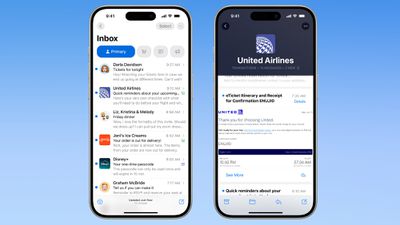
iPad users receive an intelligent Mail upgrade in iPadOS 18.4 with the introduction of email categorization. This organizational feature, which iPhone users have had since iOS 18.2, automatically sorts incoming emails into different sections for more efficient inbox management.
The system prioritizes important communications in the Primary category while organizing other messages into practical sections for product orders, newsletters, promotional deals, and social notifications. The idea is that this categorization reduces inbox clutter and ensures you see your most important messages first.
Bigger CarPlay Home Screen
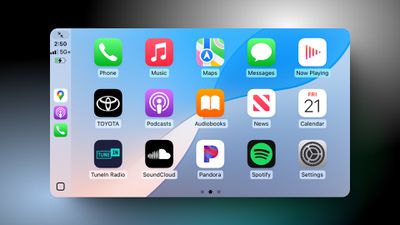
CarPlay appears to have received a welcome space upgrade in iOS 18.4, with some users reporting an expanded Home Screen that now displays three rows of app icons instead of the previous two rows. This enhancement allows drivers to view more apps at once without scrolling, making it easier and safer to access navigation, music, messaging, and other apps while on the road.
Express Yourself With New Emoji
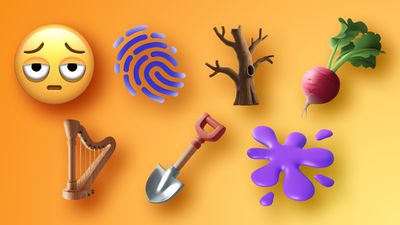
There are new emoji characters in iOS 18.4, including bags under eyes, fingerprint, leafless tree, root vegetable, harp, shovel, and splatter. The emojis are part of the Unicode 16 Standard that was released in September 2024.
Other smaller improvements in iOS 18.4 include one-tap options to delete or recover all photos in the Recently Deleted section of Photos, more Siri voices, new Podcast widgets, and a reorganized menu in the Wallet app that consolidates Orders, Settings, and Subscriptions and Payments options.