
iOS 19 Rumored to Add Stage Manager Support to USB-C iPhones - MacRumors
Skip to Content

iOS 19 Rumored to Add Stage Manager Support to USB-C iPhones

A leaker known as Majin Bu today claimed that iOS 19 will enable support for at least a limited version of Stage Manager on iPhone models with a USB-C port.
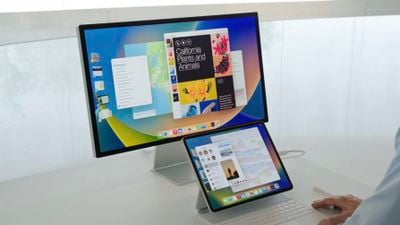
ipados 16 stage manager
In a blog post citing sources, the leaker said that when an iPhone with a USB-C port is connected to an external display, users will be able to take advantage of a Stage Manager-like interface with multiple apps open at once on the screen. However, he said that there might be more limitations compared to Stage Manager on iPads.

iPhone models with a USB-C port include all iPhone 15 models and newer.

iPhones with both Lightning and USB-C ports can already be connected to external displays, but only for basic screen mirroring.

The first developer beta of iOS 19 should be available immediately after the WWDC 2025 keynote on June 9, and the software update is expected to be released to the general public in September. It is unclear if Stage Manager support on USB-C iPhones would be available in the first beta, or enabled later in the iOS 19 software cycle.

Samsung offers a similar feature called DeX on its Galaxy smartphones.

Majin Bu has a mixed track record with Apple rumors, with some hits and some misses. They were one of the sources who accurately claimed that the device succeeding the iPhone SE would be named the iPhone 16e, but they also inaccurately claimed that the device would have a Dynamic Island instead of a notch. They also accurately leaked the redesigned Milanese Loop for the Apple Watch Ultra 2, the Desert Titanium color name for iPhone 16 Pro models, several iPhone cases, and much more.


Related Roundups: iOS 26, iPadOS 26
Related Forum: iOS 26

Popular Stories

iOS 26

iOS 26.4 Adds Two New Features to CarPlay

Tuesday March 24, 2026 1:55 pm PDT by
iOS 26.4 was released today, and it includes a couple of new features for CarPlay: an Ambient Music widget and support for voice-based chatbot apps. To update your iPhone 11 or newer to iOS 26.4, open the Settings app and tap on General → Software Update. CarPlay will automatically offer the new features so long as the iPhone connected to your vehicle is running iOS 26.4 or later....
Apple Business hero

Apple Unveils 'Apple Business' All-in-One Platform

Tuesday March 24, 2026 8:53 am PDT by
Apple today announced Apple Business, a new all-in-one platform that unifies device management, productivity tools, and customer outreach features. The service is designed to be a consolidated replacement for several of Apple's existing business-focused offerings, including Apple Business Essentials, Apple Business Manager, and Apple Business Connect. It provides organizations with a single...
AirPods Pro Firmware Feature

Apple Releases New Firmware for AirPods Pro 3, AirPods Pro 2 and AirPods 4

Tuesday March 24, 2026 12:31 pm PDT by
Apple today released new firmware for the AirPods Pro 2, AirPods Pro 3, and the AirPods 4. The firmware has a version number of 8B39, up from 8B34 on the AirPods Pro 3, 8B28 on the AirPods Pro 2, and 8B21 on the AirPods 4. There is no word on what's included in the firmware, but Apple has a support document with limited notes. Most updates are limited to bug fixes and performance...

Top Rated Comments

Reverend Benny Avatar
12 months ago

What would be the use case(s) for having multiple iPhone apps open on an external display?
Imagine docking your iPhone into a USB-C dock, getting mouse and keyboard on the big screen and being able to use your apps desktop style.
Score: 16 Votes (Like | Disagree)
Nautilus007 Avatar
12 months ago
Man, they are really doing everything they can not to cannabilize sales.
Apple could literally make it so you could connect your phone to a screen and mirror Mac OS
Score: 14 Votes (Like | Disagree)
PotentPeas Avatar
12 months ago

What would be the use case(s) for having multiple iPhone apps open on an external display?
The big idea here is less about "Stage Manager" and more about just being able to use an external display connected to the iPhone for something other than mirroring the iPhone screen.

I can see uses for this, especially if apps take advantage to provide some extra functionality in "external display" mode. (I imagine they would if they're already doing this for iPad.)

For instance, my wife doesn't use a PC or laptop very often, she just lives on her phone. She does a lot of work with photos on there and a lot of it is "keeping the family up with what's been going on with our kids". I think being able to plug into a screen and have more working space could be very helpful.

For myself, I can think of situations where I need to run to the office for a meeting and I have to detach my laptop from all of the dock setup stuff I have in my home office. If I could just grab my phone instead and be able to connect it to a usable desktop-ish work environment at the office, that would be nice.

I can envision a situation where my kids don't need anything *other* than a phone and a dock setup to do their school work.

The ideas are there. Whether it would be any good all depends on if the implementation/execution that Apple and possibly third-party devs come up with.
Score: 11 Votes (Like | Disagree)
applesith Avatar
12 months ago
I can't imagine we are far from having an iPhone serve the role of a Mac Mini when plugged into a monitor with a Bluetooth mouse and keyboard. Even if this is technically possible, there will be intentional software limitations because otherwise, this would cannibalize sales of other devices. Which is also why I believe iPad OS is so limited to mitigate its overlap with MacOS.
Score: 9 Votes (Like | Disagree)
BelgianChoklit Avatar
12 months ago
Because it's been such a stellar success on the iPad.
Score: 8 Votes (Like | Disagree)
12 months ago
Very cool! I could see docking an iPhone to an external display to do a bit of writing or whatever. I like the idea of rolling up to a place with just my phone, working for a bit on a real keyboard and mouse, and then leaving with just my phone in my pocket.
Score: 6 Votes (Like | Disagree)















