
Apple Offers Safari Design Choices in iOS 26, Learning from Past Criticism - MacRumors
Skip to Content

Apple Offers Safari Design Choices in iOS 26, Learning from Past Criticism

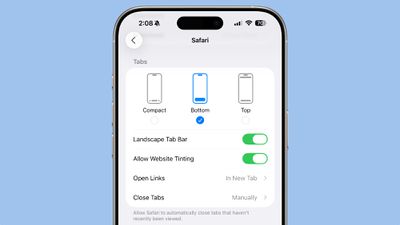
Apple introduced a new, compact design for Safari in iOS 26 that serves as the default layout, but there are two other design options available if you don't like it.
ios 26 safari options
In the Safari section of the Settings app, you can select Compact (the default), Bottom, or Top. The latter two are the options in iOS 18, so ‌iOS 26‌ uses that same layout, but with a tweaked design to match the Liquid Glass aesthetic.
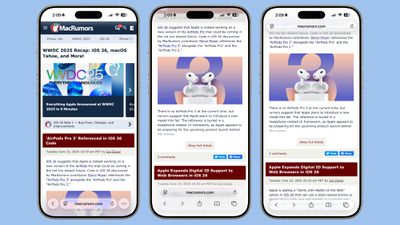
ios 26 safari design light modeThe three Safari Tab options in ‌iOS 26‌, Light Mode

Functionally, the Bottom and Top Tabs operate in the same way as the Safari Tab bars in iOS 18, so you don't need to change anything about how you use Safari. The Compact option hides the share, bookmark, and tab settings behind the three-dot button on the left of the URL bar.
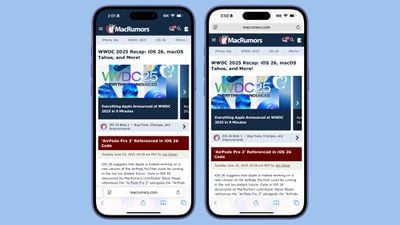
ios 18 safari designSafari in iOS 18

The Liquid Glass translucent design blends the URL bar and buttons into the background of the webpage you're looking at regardless of what layout you choose. The effect is similar in both Light and Dark mode, with the color of the bar determined by the webpage's content.
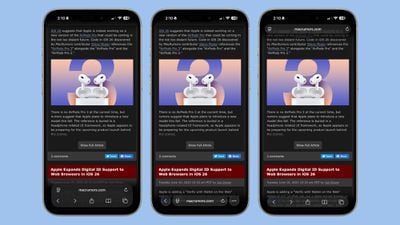
ios 26 safari design dark modeThe three Safari Tab options in ‌iOS 26‌, Dark Mode

When you scroll down with any of the Tab settings, the URL bar and buttons collapse down into a single, small bar with just the webpage address listed. The collapsible bar allows you to see more of the webpage without distractions.
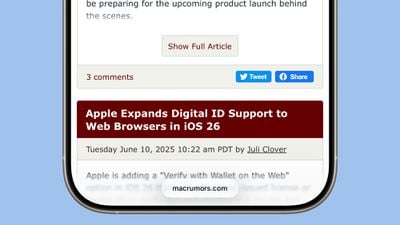
ios 26 safari menu collapsedCollapsed Tab Bar in ‌iOS 26‌

Back when iOS 15 was in beta testing, Apple changed the design of Safari and did not initially provide different layout options for the URL bar. Apple received negative feedback throughout the beta testing process, and ultimately implemented options to revert to the original design. This time around, Apple has learned its lesson, and has provided users with more choice for the Safari layout.
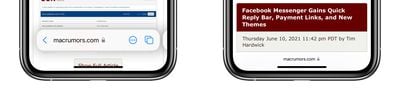
safariThe iOS 15 Safari Tab Bar

Apple has actually offered design choices for several of the ‌iOS 26‌ design updates that could be controversial. The Phone app offers a unified view, for example, but by default, it's not implemented. There are also glass-like icons that can be selected, but they're also not the default option.

Related Roundups: iOS 26, iPadOS 26
Tag: Safari
Related Forum: iOS 26

Popular Stories

iOS 26

iOS 26.4 Adds Two New Features to CarPlay

Tuesday March 24, 2026 1:55 pm PDT by
iOS 26.4 was released today, and it includes a couple of new features for CarPlay: an Ambient Music widget and support for voice-based chatbot apps. To update your iPhone 11 or newer to iOS 26.4, open the Settings app and tap on General → Software Update. CarPlay will automatically offer the new features so long as the iPhone connected to your vehicle is running iOS 26.4 or later....
Apple Business hero

Apple Unveils 'Apple Business' All-in-One Platform

Tuesday March 24, 2026 8:53 am PDT by
Apple today announced Apple Business, a new all-in-one platform that unifies device management, productivity tools, and customer outreach features. The service is designed to be a consolidated replacement for several of Apple's existing business-focused offerings, including Apple Business Essentials, Apple Business Manager, and Apple Business Connect. It provides organizations with a single...
AirPods Pro Firmware Feature

Apple Releases New Firmware for AirPods Pro 3, AirPods Pro 2 and AirPods 4

Tuesday March 24, 2026 12:31 pm PDT by
Apple today released new firmware for the AirPods Pro 2, AirPods Pro 3, and the AirPods 4. The firmware has a version number of 8B39, up from 8B34 on the AirPods Pro 3, 8B28 on the AirPods Pro 2, and 8B21 on the AirPods 4. There is no word on what's included in the firmware, but Apple has a support document with limited notes. Most updates are limited to bug fixes and performance...

Top Rated Comments

10 months ago
liquid glass looks horrible. Why does the whole page blur when near the edge, even if not covered by the floating tab?


Attachment Image
Score: 20 Votes (Like | Disagree)
10 months ago
I’m leaving this comment for all those who like the fact that we have an option. Score one for the good guys!

Now, I’ll sit back and wait for a thumbs down vote for those who don’t like the fact we have options.
Score: 19 Votes (Like | Disagree)
10 months ago
I hated the tabs on bottom layout when it first came out and avoided using it for years.

I eventually decided to give it a try again on a trial basis — use it for a week, and if I still hated it, revert. I never went back to tabs on top after that.
Score: 18 Votes (Like | Disagree)
klasma Avatar
10 months ago
I dislike floating elements though. It's unfortunate that all three options have them.
Score: 13 Votes (Like | Disagree)
kurtfoster Avatar
10 months ago
I for one, prefer the address bar at the top. That’s how it’s always been for me, and it’s what I’m used to. Also, I’m too old to change. Hopefully that will continue to be a choice.
Score: 11 Votes (Like | Disagree)
10 months ago
This design has terrible UX. The entire web is not going to reformat to use safe area insets. If this makes it to the broad public this Fall, people are going to flip their gourd.
Score: 10 Votes (Like | Disagree)

















