
Here's What You Can Do With the iOS 26 Apple Intelligence Shortcuts App - MacRumors
Skip to Content

Here's What You Can Do With the iOS 26 Apple Intelligence Shortcuts App

Apple overhauled the Shortcuts app in iOS 26, iPadOS 26, and macOS Tahoe, and there are now Apple Intelligence options that users can take advantage of. The app supports ‌Apple Intelligence‌ models for things like summarizing PDFs, generating recipes, answering questions, and more.
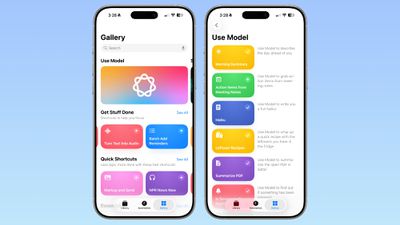
ios 26 shortcuts app examples
There are several pre-programmed Shortcuts in the Gallery that you can select in ‌iOS 26‌. Here's what Apple offers, along with the descriptions:

  • Morning Summary - Use Model to describe the day ahead of you.
  • Action Items From Meeting Notes - Use Model to grab action items from meeting notes.
  • Haiku - Use Model to write a you a fun haiku.
  • Leftover Recipes - Use Model to whip up a quick recipe with leftovers you have in the fridge.
  • Summarize PDF - Use Model to summarize the open PDF in Safari.
  • Is Severance Season 3 Out? - Use Model to find out if something has been released.
  • ASCII Art - Use Model to draw you some ASCII art.
  • Document Review - Use Mode to help you compare and contrast documents.
  • Reminders Roulette - Use Model to punt an unimportant reminder to tomorrow.
  • Get Started With Language Models - A tutorial for Use Model with examples.

As the last pre-made Shortcut suggests, you can create your own shortcuts that incorporate Apple's AI model, and Apple's offerings serve as examples.

When you go to create a Shortcut, there's a new ‌Apple Intelligence‌ section. You can opt to use an on-device model, a cloud model that takes advantage of Private Cloud Compute, or ChatGPT. There are some pre-determined options, so you can do things like open Visual Intelligence or generate an image with Image Playground.
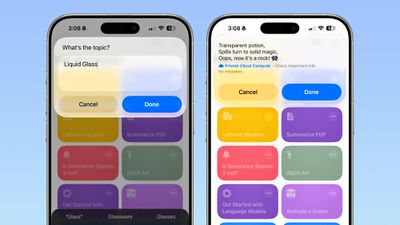
ios 26 shortcuts app haiku
There are several Writing Tools features for adjusting the tone of text, proofreading, creating a list from text, summarizing text, or rewriting text.

When you tap on Cloud, On-Device Model, or ChatGPT, there's an open-ended prompt where you can write in what you want to do. You need to work within the confines of the model that Apple provides, pairing it with other functionality in Shortcuts. You can pull in data from the Weather app, your Calendar, and Reminders, then ask the model to prepare a summary, for example. AI models can be incorporated into any Shortcut.
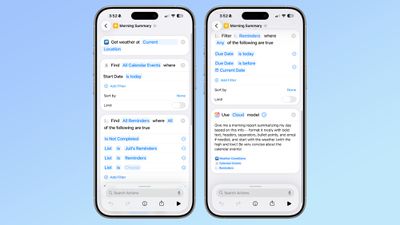
ios 26 shortcuts app ai
‌iOS 26‌, ‌iPadOS 26‌, and ‌macOS Tahoe‌ are in the early stages of beta testing, so the work on Shortcuts has just started, and Apple will be refining the app over the course of the beta testing period.


Related Roundups: iOS 26, iPadOS 26
Related Forum: iOS 26

Popular Stories

iOS 26

iOS 26.4 Adds Two New Features to CarPlay

Tuesday March 24, 2026 1:55 pm PDT by
iOS 26.4 was released today, and it includes a couple of new features for CarPlay: an Ambient Music widget and support for voice-based chatbot apps. To update your iPhone 11 or newer to iOS 26.4, open the Settings app and tap on General → Software Update. CarPlay will automatically offer the new features so long as the iPhone connected to your vehicle is running iOS 26.4 or later....
Apple Business hero

Apple Unveils 'Apple Business' All-in-One Platform

Tuesday March 24, 2026 8:53 am PDT by
Apple today announced Apple Business, a new all-in-one platform that unifies device management, productivity tools, and customer outreach features. The service is designed to be a consolidated replacement for several of Apple's existing business-focused offerings, including Apple Business Essentials, Apple Business Manager, and Apple Business Connect. It provides organizations with a single...
AirPods Pro Firmware Feature

Apple Releases New Firmware for AirPods Pro 3, AirPods Pro 2 and AirPods 4

Tuesday March 24, 2026 12:31 pm PDT by
Apple today released new firmware for the AirPods Pro 2, AirPods Pro 3, and the AirPods 4. The firmware has a version number of 8B39, up from 8B34 on the AirPods Pro 3, 8B28 on the AirPods Pro 2, and 8B21 on the AirPods 4. There is no word on what's included in the firmware, but Apple has a support document with limited notes. Most updates are limited to bug fixes and performance...

Top Rated Comments

211 Avatar
10 months ago
I still don’t understand Shortcuts. Can I just tell it what I want now and it will create it?
Score: 6 Votes (Like | Disagree)
gaximus Avatar
10 months ago
I love shortcuts, and use them for everything. But most of these new things, Siri should just be able to handle. I shouldn’t have to create a shortcut to find out if a move has been released, Siri should just know if I ask.
Score: 5 Votes (Like | Disagree)
LordArchie Avatar
10 months ago
Loving this.. waiting for some really cool shortcuts. Great list to start from
Score: 3 Votes (Like | Disagree)
tomtad Avatar
10 months ago
What's model?

Also isn't this essentially saved prompts for a chatbot? All of these I should be able to do by just asking Siri.
Score: 1 Votes (Like | Disagree)
10 months ago
This is making the shortcuts app even better. Waiting to try out the various possibilities soon.
Score: 1 Votes (Like | Disagree)
adrianlondon Avatar
10 months ago

I still don’t understand Shortcuts. Can I just tell it what I want now and it will create it?
No. It seems, from the screenshot above, you use existing shortcut actions to feed into an AI prompt.

I'm not sure what it offers that I'm not currently doing in iOS 18. I'm assuming a difference is that it can be done on device.

If you're interested to play in iOS 18, here's a shortcut that grabs weather info and asks Gemini to read it out to you.
https://routinehub.co/shortcut/17674/ (requires https://routinehub.co/shortcut/18664/)
Score: 1 Votes (Like | Disagree)














