iOS 26 Adds New Zoom Setting to CarPlay - MacRumors
Skip to Content

iOS 26 Adds New Zoom Setting to CarPlay

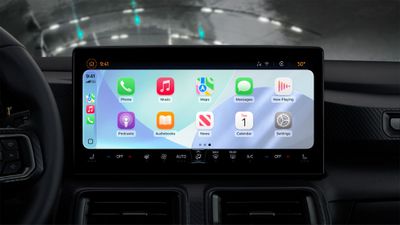
iOS 26 adds a new Smart Display Zoom setting to CarPlay.
CarPlay Liquid Glass Light
When the setting is enabled, CarPlay will be automatically resized to better fit the shape and size of your vehicle's dashboard screen, if possible.

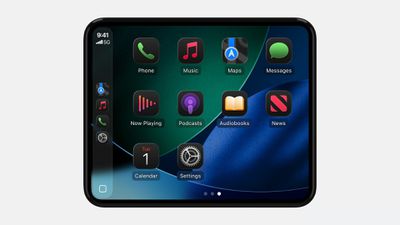
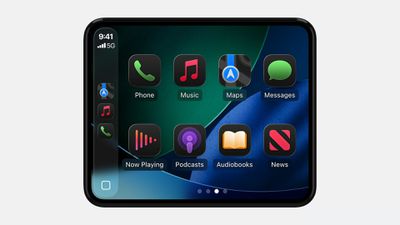
The images below show what CarPlay looks like before and after the Smart Display Zoom setting is enabled. With the setting turned on, all of the user interface elements become smaller, allowing for an extra row of app icons to fit on the screen.
CarPlay Smart Display Zoom BeforeBefore
CarPlay Smart Display Zoom AfterAfter

Apple highlighted the setting in a WWDC 2025 video for developers this week.

"Vehicle screens come in many shapes and sizes," said Olivia Hess, a CarPlay software engineer. "In iOS 26, some screen configurations allow drivers to adjust their display scale with Smart Display Zoom configurable within Settings in CarPlay. When Smart Display Zoom is enabled, your CarPlay app will be automatically resized to the new display scale."

To see this new CarPlay setting, you will need to be using an iPhone running iOS 26, which is currently in developer beta. A public beta will be available next month, and the update should be released in September for the iPhone 11 and newer.

CarPlay is gaining many other new features with iOS 26, including a Liquid Glass design, Live Activities on the Dashboard screen, a new widgets screen, Tapbacks and pinned conversations in the Messages app, multi-touch support in mapping apps, the ability to play videos from an iPhone via AirPlay while the vehicle is parked, and more.


Related Roundups: CarPlay, iOS 26, iPadOS 26, WWDC 2026

Popular Stories

iOS 26

iOS 26.4 Adds Two New Features to CarPlay

Tuesday March 24, 2026 1:55 pm PDT by
iOS 26.4 was released today, and it includes a couple of new features for CarPlay: an Ambient Music widget and support for voice-based chatbot apps. To update your iPhone 11 or newer to iOS 26.4, open the Settings app and tap on General → Software Update. CarPlay will automatically offer the new features so long as the iPhone connected to your vehicle is running iOS 26.4 or later....
Apple Business hero

Apple Unveils 'Apple Business' All-in-One Platform

Tuesday March 24, 2026 8:53 am PDT by
Apple today announced Apple Business, a new all-in-one platform that unifies device management, productivity tools, and customer outreach features. The service is designed to be a consolidated replacement for several of Apple's existing business-focused offerings, including Apple Business Essentials, Apple Business Manager, and Apple Business Connect. It provides organizations with a single...
AirPods Pro Firmware Feature

Apple Releases New Firmware for AirPods Pro 3, AirPods Pro 2 and AirPods 4

Tuesday March 24, 2026 12:31 pm PDT by
Apple today released new firmware for the AirPods Pro 2, AirPods Pro 3, and the AirPods 4. The firmware has a version number of 8B39, up from 8B34 on the AirPods Pro 3, 8B28 on the AirPods Pro 2, and 8B21 on the AirPods 4. There is no word on what's included in the firmware, but Apple has a support document with limited notes. Most updates are limited to bug fixes and performance...

Top Rated Comments

ScreenSavers Avatar
10 months ago
The sidebar is so frustrating. I really wish they would let us choose which apps are pinned there and how many of them.
Score: 6 Votes (Like | Disagree)
sw1tcher Avatar
10 months ago
The images below show what CarPlay looks like before and after the Smart Display Zoom setting is enabled. With the setting turned on, all of the user interface elements become smaller, allowing for an extra row of app icons to fit on the screen.
Making the app icons smaller means this is a Smart Display Zoom Out setting.
Score: 6 Votes (Like | Disagree)
Nermal Avatar
10 months ago

pretty sure that's the opposite of zoom
Zooming in and zooming out are both zooming.
Score: 4 Votes (Like | Disagree)
10 months ago

You really want a windshield full of fingerprints?? 😝
Imagine the trademarked Apple cleaning rag ('https://www.apple.com/au/shop/product/MW693FE/A/polishing-cloth') sales opportunities!? 😄 The Apple Polishing Cloth will have a new lease of life!
Score: 3 Votes (Like | Disagree)
turbineseaplane Avatar
10 months ago

It sounds crazy but having an optional choice for people who want more icons is inherently better.
Agreed. No qualms with more options and especially with CarPlay, which could use SO many more ways to change and customize it.
Score: 3 Votes (Like | Disagree)
EugW Avatar
10 months ago
I am very much looking forward to the updated CarPlay, but I won't be installing iOS 26 until maybe dev beta 4 / pubic beta 2 or so. I have iPadOS 26 dev beta 1 on my iPad Pro M4 and not surprisingly, it's not really suitable for everyday mainstream use.


Perhaps in Carplay 3 we can use the windscreen as a touch screen.
FWIW, current CarPlay turn-by-turn navigation in Apple Maps shows up on my car's headup display.
Score: 3 Votes (Like | Disagree)