Apple's Passwords App Gains Version History Feature
Apple's Passwords app is getting a handy new feature in iOS 26 and macOS Tahoe that should eliminate a particularly frustrating password management scenario.
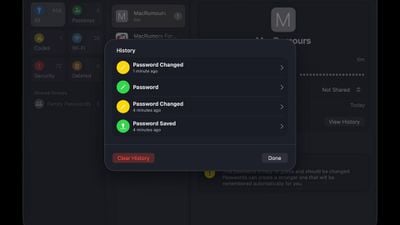
The Passwords app now saves complete version history for stored logins that have been changed, which could be a lifesaver if you find yourself in a situation where a password gets accidentally overwritten.
Users will find a new "View History" button when opening any login that has multiple saved versions. The history display shows each different password iteration, creation timestamps, and an option to clear the stored versions.
Apple launched the standalone Passwords app in iOS 18, iPadOS 18, and macOS Sequoia after years of burying password management tools within the Settings app, and the version history addition is a nice refinement in iOS 26, iPadOS 26, and MacOS Tahoe.
The update should prove particularly valuable for users managing frequently-changing credentials or situations where you update a password on a website and something causes the new credentials to not register properly.
Popular Stories
iOS 26.4 was released today, and it includes a couple of new features for CarPlay: an Ambient Music widget and support for voice-based chatbot apps.
To update your iPhone 11 or newer to iOS 26.4, open the Settings app and tap on General → Software Update. CarPlay will automatically offer the new features so long as the iPhone connected to your vehicle is running iOS 26.4 or later....
Apple today announced Apple Business, a new all-in-one platform that unifies device management, productivity tools, and customer outreach features.
The service is designed to be a consolidated replacement for several of Apple's existing business-focused offerings, including Apple Business Essentials, Apple Business Manager, and Apple Business Connect. It provides organizations with a single...
Apple today released new firmware for the AirPods Pro 2, AirPods Pro 3, and the AirPods 4. The firmware has a version number of 8B39, up from 8B34 on the AirPods Pro 3, 8B28 on the AirPods Pro 2, and 8B21 on the AirPods 4.
There is no word on what's included in the firmware, but Apple has a support document with limited notes. Most updates are limited to bug fixes and performance...
























