
iOS 26 Adding Two New Wi-Fi Features, Allows AirDrop and AirPlay Alternatives - MacRumors
Skip to Content

iOS 26 Adding Two New Wi-Fi Features, Allows AirDrop and AirPlay Alternatives

iOS 26 is gaining two new Wi-Fi features, including Captive Assist and Wi-Fi Aware.

Wi Fi WiFi General Feature
MacRumors contributor Aaron Perris discovered a reference to Captive Assist within the code for the first iOS 26 developer beta, but Apple has yet to enable the feature. It should be available by the time the software update is released later this year.

In his Power On newsletter last month, Bloomberg's Mark Gurman said that Apple was working on a feature that would sync captive Wi-Fi network sign-in information across the iPhone, iPad, and Mac. This means that if you are asked to fill out a web form on one Apple device before connecting to a public Wi-Fi network at a hotel, airport, or coffee shop, that information would automatically be shared with your other Apple devices.

Ultimately, this Captive Assist feature will make connecting to public Wi-Fi networks more convenient across iOS 26, iPadOS 26, and macOS Tahoe.

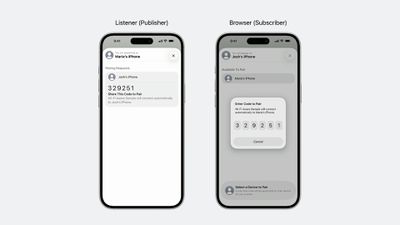
Next, iOS 26 and iPadOS 26 add support for Wi-Fi Aware, which is essentially the industry-standard equivalent of the Apple Wireless Direct Link technology behind AirDrop and AirPlay. Apple is making a Wi-Fi Aware framework available to developers, allowing for App Store apps to offer peer-to-peer connections between Wi-Fi devices, without an internet connection or access point. Wi-Fi Aware will allow for third-party apps to offer new built-in features for high-speed file transfers, media streaming, screen sharing, and more.
iOS 26 Wi Fi Aware
Apple was required to support Wi-Fi Aware on the iPhone and iPad in the EU, under the terms of the Digital Markets Act. In fact, the European Commission specifically stated that iOS and iPadOS must allow for AirDrop and AirPlay alternatives by the end of next year. As noted by 9to5Mac, the Wi-Fi Aware framework seems to satisfy those requirements. Apple has actually gone a step further by making the Wi-Fi Aware framework available worldwide.

Apple says the following devices support the Wi-Fi Aware framework:

  • iPhone 12 and later
  • iPad (10th generation) and later
  • iPad mini (6th generation) and later
  • iPad Air (4th generation) and later
  • iPad Pro 11-inch (3rd generation) and later
  • iPad Pro 12.9-inch (5th generation) and later

Related Roundups: iOS 26, iPadOS 26
Related Forum: iOS 26

Popular Stories

iOS 26

iOS 26.4 Adds Two New Features to CarPlay

Tuesday March 24, 2026 1:55 pm PDT by
iOS 26.4 was released today, and it includes a couple of new features for CarPlay: an Ambient Music widget and support for voice-based chatbot apps. To update your iPhone 11 or newer to iOS 26.4, open the Settings app and tap on General → Software Update. CarPlay will automatically offer the new features so long as the iPhone connected to your vehicle is running iOS 26.4 or later....
Apple Business hero

Apple Unveils 'Apple Business' All-in-One Platform

Tuesday March 24, 2026 8:53 am PDT by
Apple today announced Apple Business, a new all-in-one platform that unifies device management, productivity tools, and customer outreach features. The service is designed to be a consolidated replacement for several of Apple's existing business-focused offerings, including Apple Business Essentials, Apple Business Manager, and Apple Business Connect. It provides organizations with a single...
AirPods Pro Firmware Feature

Apple Releases New Firmware for AirPods Pro 3, AirPods Pro 2 and AirPods 4

Tuesday March 24, 2026 12:31 pm PDT by
Apple today released new firmware for the AirPods Pro 2, AirPods Pro 3, and the AirPods 4. The firmware has a version number of 8B39, up from 8B34 on the AirPods Pro 3, 8B28 on the AirPods Pro 2, and 8B21 on the AirPods 4. There is no word on what's included in the firmware, but Apple has a support document with limited notes. Most updates are limited to bug fixes and performance...

Top Rated Comments

10 months ago
Great stuff.

And I’m glad Apple needs to open up Airplay and AirDrop. Interoperability is great.
Score: 17 Votes (Like | Disagree)
10 months ago
Just waiting for someone to say that this is terrible and apple should pull out of the EU!

Apple gets to keep control of their own technologies and be free to innovate, but implement similar technologies for devs to use.

A win for all. Or am I missing something?
Score: 8 Votes (Like | Disagree)
10 months ago

For me, as somebody who does not update iOS, iPadOS, or MacOS, the interoperability has been incredibly good. OS X El Capitan, a 2015 release, works perfectly with iOS 18, iPadOS 18, iPadOS 15, iOS 12, iOS 14, iOS 10. Literally every software combo I have has performed flawlessly, I’m grateful to Apple for that.

Hopefully they don’t destroy the current protocol. I don’t care about improvements if that means that my entire group of devices will be mutually incompatible in the future. The cornerstone of AirDrop for me is OS version interoperability. I lose that, and it’s useless, considering I don’t update anything.
That seems like a very secure setup.
Score: 7 Votes (Like | Disagree)
piccolamela Avatar
10 months ago
a user friendly choice of Apple to make Wi-Fi Aware available worldwide.
Score: 7 Votes (Like | Disagree)
crisss1205 Avatar
10 months ago

Captive Assist within the code for the first iOS 26 developer beta ('https://www.geekwebguides.com/how-to/get-ios-26-developer-beta-iphone/'), but Apple has yet to enable the feature
It already is active.


This means that if you are asked to fill out a web form on one Apple device before connecting to a public Wi-Fi network at a hotel, airport, or coffee shop, that information would automatically be shared with your other Apple devices.
Not exactly. It works similar to autofill. When you enter in details on the captive portal login page such as a password or access code, the device will remember it and on other devices you will get an "Autofill from XXX Device" option when on the same page.


As you see, I now get the "Autofill from iPhone 17 Air" option after signing in on my phone.

Attachment Image
Score: 6 Votes (Like | Disagree)
10 months ago
iOS should have all the functionality that iPadOS 26 has right now. I should be able to move windows and such like on the iPhone.
Score: 6 Votes (Like | Disagree)
















