
iOS 26 Allows You to Restore Any iPhone Without a Mac or PC - MacRumors
Skip to Content

iOS 26 Allows You to Restore Any iPhone Without a Mac or PC

iOS 26 adds a new Recovery Assistant feature to all compatible iPhones, and it can help return the device to a working state, with no Mac or PC required.
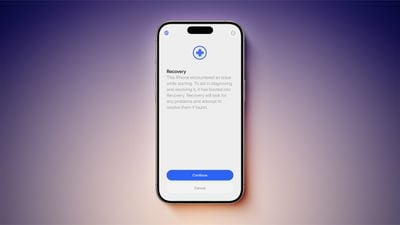
iOS 26 Recovery Assistant Feature Clean
Recovery Assistant was introduced in the first iOS 26 beta, but Apple only mentioned the feature in its release notes for the second iOS 26 beta today.

"Recovery Assistant is a new way to recover your device if it doesn't start up normally," says Apple. "It can look for problems and attempt to resolve them if found."

Apple says an iPhone running iOS 26 will boot into a Recovery mode if the device has "encountered an issue while starting."

Here is what Recovery mode says on the iPhone's screen: "This iPhone encountered an issue while starting. To aid in diagnosing and resolving it, it has booted into Recovery. Recovery will look for any problems and attempt to resolve them if found."

According to a Reddit post, Recovery Assistant can help you return an iPhone to a working state with help from another Apple device, such as an iPad. This process can be initiated through the menu in the top-right corner of the Recovery mode on the affected iPhone. On the other Apple device, you can follow the on-screen steps to download and install a newer iOS version on the iPhone that is in Recovery mode, to help revive it.

This seems to expand on a recovery feature that debuted on iPhone 16 models last year.

Related Roundups: iOS 26, iPadOS 26
Related Forum: iOS 26

Popular Stories

iOS 26

iOS 26.4 Adds Two New Features to CarPlay

Tuesday March 24, 2026 1:55 pm PDT by
iOS 26.4 was released today, and it includes a couple of new features for CarPlay: an Ambient Music widget and support for voice-based chatbot apps. To update your iPhone 11 or newer to iOS 26.4, open the Settings app and tap on General → Software Update. CarPlay will automatically offer the new features so long as the iPhone connected to your vehicle is running iOS 26.4 or later....
Apple Business hero

Apple Unveils 'Apple Business' All-in-One Platform

Tuesday March 24, 2026 8:53 am PDT by
Apple today announced Apple Business, a new all-in-one platform that unifies device management, productivity tools, and customer outreach features. The service is designed to be a consolidated replacement for several of Apple's existing business-focused offerings, including Apple Business Essentials, Apple Business Manager, and Apple Business Connect. It provides organizations with a single...
AirPods Pro Firmware Feature

Apple Releases New Firmware for AirPods Pro 3, AirPods Pro 2 and AirPods 4

Tuesday March 24, 2026 12:31 pm PDT by
Apple today released new firmware for the AirPods Pro 2, AirPods Pro 3, and the AirPods 4. The firmware has a version number of 8B39, up from 8B34 on the AirPods Pro 3, 8B28 on the AirPods Pro 2, and 8B21 on the AirPods 4. There is no word on what's included in the firmware, but Apple has a support document with limited notes. Most updates are limited to bug fixes and performance...

Top Rated Comments

10 months ago
this is absolutely huge!
there have been code references to this since iOS 13.3 over five years ago.
The fact that you’ve still needed access to a Mac or PC to restore an iPhone or iPad in 2025, 18 years since the original iPhone released and 13 years since it’s been PC free for set up and software updates has never made sense and has been one of the most dated parts of the iPhone. this is one of the best features introduced this year.
Score: 19 Votes (Like | Disagree)
klasma Avatar
10 months ago

I've never seen an iPhone "not start normally".
Maybe they are expecting it to happen more frequently with iOS 26.
Score: 9 Votes (Like | Disagree)
10 months ago

I've never seen an iPhone "not start normally". Is this a beta only thing?
I never have either. But that doesn't mean it has never happened before. I would assume they built this because it can happen.
Score: 8 Votes (Like | Disagree)
winxmac Avatar
10 months ago
Reminds me of Recovery/Troubleshooter in Windows 8.x and newer
Score: 8 Votes (Like | Disagree)
10 months ago
Not to worry, everyone, because the Apple Support SOP has been updated!

1. Reboot your device.
2. Force restart your device.
3. Reset Network Settings.
4. Check for Recovery Assistant. If Recovery Assistant doesn't appear, your phone is operating as expected and no further troubleshooting will be provided. Remember to keep your device up to date. Thank you for contacting Apple Support. Have a nice day.
Score: 7 Votes (Like | Disagree)
Devyn89 Avatar
10 months ago
I wonder if this would work if you’re trying to downgrade from a beta version to a release version of the software. That’s the only reason I still have a Mac haha.
Score: 7 Votes (Like | Disagree)
















