
iPhone Feature for Tracking Lost Bags With AirTag Expands to JetBlue - MacRumors
Skip to Content

iPhone Feature for Tracking Lost Bags With AirTag Expands to JetBlue

JetBlue today announced that it now supports the iPhone feature that makes it easier to share the location of AirTag-equipped baggage at airports.
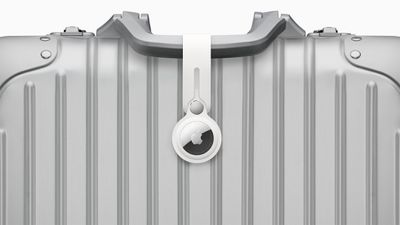
AirTag on Baggage
iOS 18.2 added a new feature to the Find My app that allows you to temporarily share the location of an AirTag-equipped item with others, including employees at participating airlines. This way, if you have put AirTags inside your bags, the airline can better help you find them in the event they are lost or delayed at the airport.

Here is how JetBlue explains the process:

Customers who place an Apple AirTag or Find My network accessory in their bag can now choose to securely share its location with JetBlue's Baggage Service team, helping the airline reunite customers with their belongings more quickly.

To share an item's location, customers can generate a Share Item Location link in the Find My app on their iPhone, iPad, or Mac. This link can be provided to JetBlue by scanning a QR code in the baggage claim area or by working with a crewmember at the airport's Baggage Service Office. JetBlue crewmembers will use the temporary link to help locate and retrieve bags found within JetBlue stations or other contracted facilities.

Other airlines that already offer the feature include American Airlines, Delta, United, Air Canada, Virgin Atlantic, Lufthansa, and more.
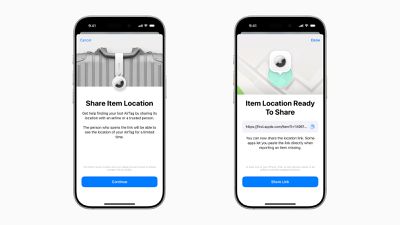
iOS 18 2 Share Item Location
iPhone, iPad, and Mac users running iOS 18.2, iPadOS 18.2, and macOS Sequoia 15.2 or later can generate a "Share Item Location" link in the Find My app. Anyone they share the link with can then view a web page with a location of the item on a map. The page will automatically update with the item's latest known location.

Apple said it worked directly with airlines to put systems in place to "privately and securely" accept the "Share Item Location" links. Access to each link is "limited to a small number of people," and airport employees are required to "authenticate" to view the link by signing into their Apple Account or partner email address.
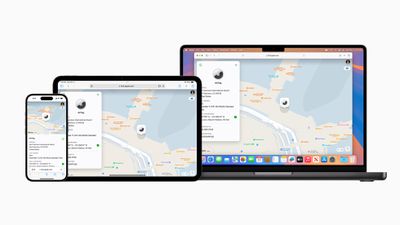
Apple Share Item Location iPhone iPad Mac
The item's location stops being shared "as soon as a user is reunited with their item," or automatically expires after seven days.


Related Roundup: AirTag
Buyer's Guide: AirTag (Buy Now)

Popular Stories

iOS 26

iOS 26.4 Adds Two New Features to CarPlay

Tuesday March 24, 2026 1:55 pm PDT by
iOS 26.4 was released today, and it includes a couple of new features for CarPlay: an Ambient Music widget and support for voice-based chatbot apps. To update your iPhone 11 or newer to iOS 26.4, open the Settings app and tap on General → Software Update. CarPlay will automatically offer the new features so long as the iPhone connected to your vehicle is running iOS 26.4 or later....
Apple Business hero

Apple Unveils 'Apple Business' All-in-One Platform

Tuesday March 24, 2026 8:53 am PDT by
Apple today announced Apple Business, a new all-in-one platform that unifies device management, productivity tools, and customer outreach features. The service is designed to be a consolidated replacement for several of Apple's existing business-focused offerings, including Apple Business Essentials, Apple Business Manager, and Apple Business Connect. It provides organizations with a single...
AirPods Pro Firmware Feature

Apple Releases New Firmware for AirPods Pro 3, AirPods Pro 2 and AirPods 4

Tuesday March 24, 2026 12:31 pm PDT by
Apple today released new firmware for the AirPods Pro 2, AirPods Pro 3, and the AirPods 4. The firmware has a version number of 8B39, up from 8B34 on the AirPods Pro 3, 8B28 on the AirPods Pro 2, and 8B21 on the AirPods 4. There is no word on what's included in the firmware, but Apple has a support document with limited notes. Most updates are limited to bug fixes and performance...

Top Rated Comments

10 months ago
Good to see more airlines supporting this. Will be very useful if the checked in baggage ever gets lost. But it might be better to keep the AirTag inside the bag instead of just being strapped outside.
Score: 1 Votes (Like | Disagree)
vegetassj4 Avatar
10 months ago
Thanks JetBlue, now how long will I have to wait to actually get my bag back?


Attachment Image
Score: 1 Votes (Like | Disagree)
snak-atak Avatar
10 months ago
Wondering how many people place their AirTag on the outside of their bag as a luggage tag? Wouldn’t it be safer tucked inside their bag? Or does that make it harder to track?
Score: 1 Votes (Like | Disagree)














