
Apple's Invites App Gets More Backgrounds - MacRumors
Skip to Content

Apple's Invites App Gets More Backgrounds

Apple today updated its Invites app, adding a new event background options for customizing the look of event invitations that are sent out. Apple says that the added background options are ideal for planning a pool day, drinks with friends, or a watch party for the big game.

General Apple Invites Feature
There are several new backgrounds in the "Photographic" section, including clouds, a lime slice in soda water, lemon slices in punch, a frosty beer, watermelon slices, a pool inner tube, a disco ball, orchid flowers, bamboo shoots, a zoomed in shot of a chrysanthemum, a colorful set of pickleballs, tennis balls, footballs, soccer balls, basketballs, golf balls, a beach with clear water, a green bokeh background, brocade fabric, grass, colorful flowers, rainbow sparkles, a multi-colored light pattern, and champagne glasses.
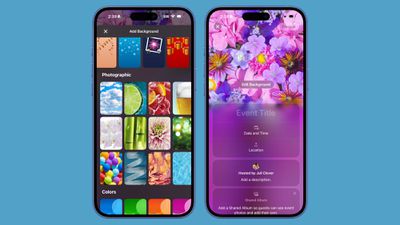
apple invites app backgrounds
Apple launched the Invites app back in February, and this is the second update the app has received. In May, Apple added the option to include links in event invitations.

Invites is an event planning app that supports creating custom invitations with unique background images, fonts, and relevant information like directions and the weather. It also has easy-to-use event managing and RSVP tools.

While Invites is free, it is an iCloud+ service, so an ‌iCloud‌+ subscription is required to create an event. ‌iCloud‌+ plans are priced starting at $0.99 per month, and they include additional ‌iCloud‌ storage and features like Private Relay.

Though an ‌iCloud‌+ subscription is needed for creating an event, anyone can RSVP to an invitation, including those without iPhones.

The Invites app can be downloaded from the App Store. [Direct Link]

Popular Stories

iOS 26

iOS 26.4 Adds Two New Features to CarPlay

Tuesday March 24, 2026 1:55 pm PDT by
iOS 26.4 was released today, and it includes a couple of new features for CarPlay: an Ambient Music widget and support for voice-based chatbot apps. To update your iPhone 11 or newer to iOS 26.4, open the Settings app and tap on General → Software Update. CarPlay will automatically offer the new features so long as the iPhone connected to your vehicle is running iOS 26.4 or later....
Apple Business hero

Apple Unveils 'Apple Business' All-in-One Platform

Tuesday March 24, 2026 8:53 am PDT by
Apple today announced Apple Business, a new all-in-one platform that unifies device management, productivity tools, and customer outreach features. The service is designed to be a consolidated replacement for several of Apple's existing business-focused offerings, including Apple Business Essentials, Apple Business Manager, and Apple Business Connect. It provides organizations with a single...
AirPods Pro Firmware Feature

Apple Releases New Firmware for AirPods Pro 3, AirPods Pro 2 and AirPods 4

Tuesday March 24, 2026 12:31 pm PDT by
Apple today released new firmware for the AirPods Pro 2, AirPods Pro 3, and the AirPods 4. The firmware has a version number of 8B39, up from 8B34 on the AirPods Pro 3, 8B28 on the AirPods Pro 2, and 8B21 on the AirPods 4. There is no word on what's included in the firmware, but Apple has a support document with limited notes. Most updates are limited to bug fixes and performance...

Top Rated Comments

vegetassj4 Avatar
10 months ago
FOR IMMEDIATE RELEASE

[HEADING=2]Apple Revolutionizes the Digital Calendar… Again[/HEADING]
Invites App Now Features Even More Backgrounds, Because That's What You Asked For

CUPERTINO, California — June 24, 2025 — Apple® today proudly announced a groundbreaking update to its beloved Invites™ app: more backgrounds. Yes, you read that correctly. While the world grapples with AI, climate change, and the ethical implications of sentient robots, we at Apple have been laser-focused on what really matters — letting you pick between Pastel Bubbles and Gentle Mountains when sending your dentist a calendar invite.

“We’re thrilled to bring our users what they’ve clearly been demanding in every forum, blog, and obscure corner of the internet,” said Linda Cheng, VP of Background Innovation. “More. Backgrounds. We’ve pushed the boundaries of what’s possible in flat JPEG aesthetics.”

The update includes an awe-inspiring seven new static backgrounds, each meticulously curated by an elite team of Apple designers working in dimly lit rooms with reclaimed wood desks. Themes include:


* Corporate Confetti – For when you’re pretending to enjoy work events.
* Serene Fog – For that 9AM therapy appointment vibe.
* Vibrant Gradient v12 – Like the old gradient, but slightly more smug.

Apple’s design philosophy has always been about minimalism, restraint, and adding 3–5 things people didn’t ask for. These new backgrounds perfectly embody that vision.

Availability
The new Invites backgrounds will roll out gradually, starting today — because if there’s one thing better than new features, it’s delayed gratification.

For more information, visit apple.com/invites-backgrounds-but-not-really ('http://apple.com/invites-backgrounds-but-not-really').

About Apple
Apple is a company that makes phones, computers, and occasionally remembers that people use calendars. With over two trillion dollars in market cap and unlimited potential to change the world, we chose to change wallpapers instead.
Score: 10 Votes (Like | Disagree)
VPrime Avatar
10 months ago

I tried to use this tool to organize a major birthday celebration recently. I ended up not using it because for invitees to reply, they have to have or register for an account. The steps to getting people to reply creates a LOT of friction that is resolved via simple email invitations in which a person just replies YES, NO. The Invites app is terribly complicated. I think Apple should throw out this app and go back to the drawing board.
This was my experience as well. I set it up, invited people. And no one used it because they had to signup/log in. Most didn't understand what was happening, and the others just didn't want to log in/sign up for this weird thing.

Other services work much more seamlessly.
Score: 8 Votes (Like | Disagree)
10 months ago
I tried to use this tool to organize a major birthday celebration recently. I ended up not using it because for invitees to reply, they have to have or register for an account. The steps to getting people to reply creates a LOT of friction that is resolved via simple email invitations in which a person just replies YES, NO. The Invites app is terribly complicated. I think Apple should throw out this app and go back to the drawing board.
Score: 7 Votes (Like | Disagree)
ijordano Avatar
10 months ago
Why isn't this just built into the calendar app
Score: 7 Votes (Like | Disagree)
orbital~debris Avatar
10 months ago
I'm glad Apple made this app. It's a fun implementation and has a fresh interface for something that could otherwise be a little mundane.
Love the icon, too, and it's a nice addition to the iCloud+ feature set.
Score: 7 Votes (Like | Disagree)
dustin_ Avatar
10 months ago
tried this app out once & then promptly forgot its existence
Score: 7 Votes (Like | Disagree)
















