
iOS 26 Brings New Functionality to HomePod - MacRumors
Skip to Content

iOS 26 Brings New Functionality to HomePod

With the launch of iOS 26 and HomePod Software 26, Apple is adding support for Crossfade, an Apple Music feature that improves transitions between songs.
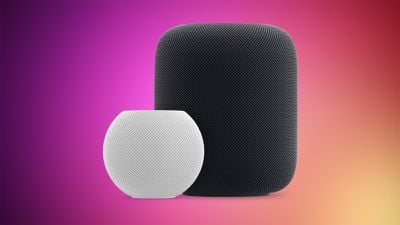
HomePod 2 and Mini feature 2
Beta testers who have the second ‌HomePod‌ Software 26 and ‌iOS 26‌ betas now have an option to enable Crossfade. The toggle is a little bit hidden, but it can be found by opening up the Home app, going to Settings, tapping on a person's name, and choosing ‌Apple Music‌.

Crossfade timing can be set anywhere from one second to 12 seconds, so users can adjust the fade in and fade out period for song transitions. When Crossfade is toggled on, the volume of the song that's ending will lower gradually, while the volume of the song that's coming on will increase. It is designed to prevent silence gaps between songs.
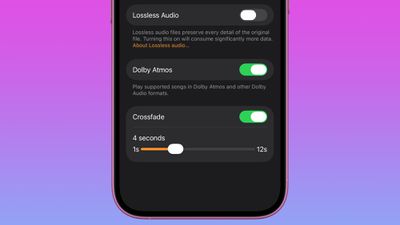
ios 26 homepod crossfade
Crossfade is an ‌Apple Music‌ feature, so an ‌Apple Music‌ subscription is required to use it. It has been an option on the iPhone, iPad, and Mac for some time now, but Apple didn't bring it to the ‌HomePod‌ until now.

‌Apple Music‌ in ‌iOS 26‌ and iPadOS 26 has a new AutoMix feature that replaces Crossfade. AutoMix goes beyond simple crossfading, and it uses time stretching and beat matching for a DJ-like song transition experience.

The ‌HomePod‌ 26 software also includes a new feature that allows you to select a Wi-Fi network to connect to, something that wasn't an option before.

(Thanks, Hidde!)

Related Roundups: HomePod, HomePod mini

Popular Stories

iOS 26

iOS 26.4 Adds Two New Features to CarPlay

Tuesday March 24, 2026 1:55 pm PDT by
iOS 26.4 was released today, and it includes a couple of new features for CarPlay: an Ambient Music widget and support for voice-based chatbot apps. To update your iPhone 11 or newer to iOS 26.4, open the Settings app and tap on General → Software Update. CarPlay will automatically offer the new features so long as the iPhone connected to your vehicle is running iOS 26.4 or later....
Apple Business hero

Apple Unveils 'Apple Business' All-in-One Platform

Tuesday March 24, 2026 8:53 am PDT by
Apple today announced Apple Business, a new all-in-one platform that unifies device management, productivity tools, and customer outreach features. The service is designed to be a consolidated replacement for several of Apple's existing business-focused offerings, including Apple Business Essentials, Apple Business Manager, and Apple Business Connect. It provides organizations with a single...
AirPods Pro Firmware Feature

Apple Releases New Firmware for AirPods Pro 3, AirPods Pro 2 and AirPods 4

Tuesday March 24, 2026 12:31 pm PDT by
Apple today released new firmware for the AirPods Pro 2, AirPods Pro 3, and the AirPods 4. The firmware has a version number of 8B39, up from 8B34 on the AirPods Pro 3, 8B28 on the AirPods Pro 2, and 8B21 on the AirPods 4. There is no word on what's included in the firmware, but Apple has a support document with limited notes. Most updates are limited to bug fixes and performance...

Top Rated Comments

vegetassj4 Avatar
10 months ago
FOR IMMEDIATE RELEASE
Apple Introduces Genmoji on HomePod with iOS 26

Now your speaker can send emoji. Because that was the missing piece in your life.

CUPERTINO, CALIFORNIA — June 25, 2025 — In a move that’s “revolutionary”, Apple today announced game changing new functionality: Genmoji are now available on HomePod with the release of iOS 26.

Yes, the speaker that’s been magically playing your music and mishearing your requests since 2018 is now capable of responding with AI-generated emojis. Because clearly, what users wanted was not better Siri comprehension, multi-user memory, or local podcast support—it was anthropomorphic emojis giving them side-eye.

“Built from the ground up for Apple Intelligence, Genmoji on HomePod represents a huge leap forward in ambient personality projection,” said Kelly Smirkson, VP of Feature Justification. “Now when you ask Siri about the weather, she can shrug with a sarcastic cartoon cloud or a web emoji instead of the typical 'here's what I found on the web'.”

New Features in iOS 26 for HomePod include:


* Emotionally Overexpressive Siri: No longer limited to just voice, Siri now responds to queries with abstract Genmoji. Ask how your stocks are doing, and HomePod may respond with a todamoon rocket, sweating piggy bank or a burning dumpster.
* Silent Judgment, Visually Rendered: You’ll know HomePod is listening—and quietly mocking—when it flashes a Genmoji of an exhausted rabbit in response to your third Taylor Swift request of the day.
* Voice-to-Emoji Translation: Tell your HomePod you’re “fine,” and it’ll reply with a melting smiley that says, “No you’re not, but sure.”

Critics have described the feature as “the least helpful update since U2 appeared in my library,” and “a high-effort way to feel low-key insulted by a $299 speaker.”

When pressed for clarity on the feature’s purpose, Apple responded, “Vibes.”

Compatibility: Genmoji on HomePod requires iOS 26 and a tolerance for minor absurdity. Works on HomePod (2nd gen) and HomePod mini. Not supported on AirPods Pro—yet. But don’t worry. We’re working on it.

At Apple, we’ve always believed in pushing the boundaries of what technology can do.

[HEADING=2][/HEADING]
Score: 15 Votes (Like | Disagree)
10 months ago
Hope they bring back the feature "doesn't mishear you half the time" and get rid of the feature "hang for 15 seconds and then say it ran into a problem." Our HomePod mini has gotten steadily less usable with every update.
Score: 8 Votes (Like | Disagree)
thiscatisfat Avatar
10 months ago
Can innovate anymore my ass!
Score: 8 Votes (Like | Disagree)
ChittagongBoy Avatar
10 months ago
Still waiting for the MANUAL EQ on the Music APP.
Score: 7 Votes (Like | Disagree)
thejadedmonkey Avatar
10 months ago
I remember when Apple brought this novel feature to the i... Pod. Like 2 decades ago. What's Apple been doing since then?
Score: 5 Votes (Like | Disagree)
10 months ago
Are we talking OG Homepod or only gen 2?
Score: 4 Votes (Like | Disagree)
















