AT&T Launches Account Lock to Combat SIM Swapping Scams

AT&T today said that customers can activate Wireless Account Lock, a new feature that will prevent unauthorized changes to a wireless account. With Account Lock turned on, account changes like billing updates and wireless number transfers are disabled.
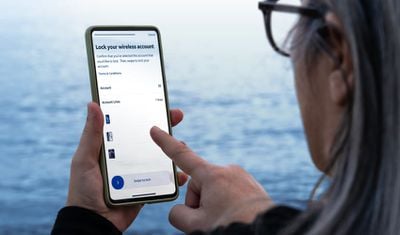
att wireless account lock
Account Lock will protect AT&T users from SIM swapping, a technique that scammers employ to gain control of a smartphone user's phone number, and by extension, two-factor verification codes sent to that number. With SIM swapping, an attacker calls the carrier's support staff, pretends to be the smartphone user, and asks for a number transfer.

Postpaid AT&T customers can activate Wireless Account Lock from the myAT&T app. Locked features will not be accessible until the Wireless Account Lock is disabled in the app, requiring physical control for access. Here's what Account Lock prevents:

  • Upgrading a device
  • Changing a SIM card or eSIM
  • Initiating a phone number transfer
  • Adding a new line
  • Changing billing information
  • Changing authorized users
  • Changing phone numbers

There are also account locking features for enterprise customers and prepaid AT&T users.

AT&T says that it will never call or text subscribers to ask them to turn off the Wireless Account Lock feature.

Popular Stories

wwdc sans text feature

Apple Rumored to Announce New Product on February 19

Thursday February 5, 2026 12:22 pm PST by
Apple plans to announce the iPhone 17e on Thursday, February 19, according to Macwelt, the German equivalent of Macworld. The report, citing industry sources, is available in English on Macworld. Apple announced the iPhone 16e on Wednesday, February 19 last year, so the iPhone 17e would be unveiled exactly one year later if this rumor is accurate. It is quite uncommon for Apple to unveil...
Apple Logo Zoomed

Tim Cook Teases Plans for Apple's Upcoming 50th Anniversary

Thursday February 5, 2026 12:54 pm PST by
Apple turns 50 this year, and its CEO Tim Cook has promised to celebrate the milestone. The big day falls on April 1, 2026. "I've been unusually reflective lately about Apple because we have been working on what do we do to mark this moment," Cook told employees today, according to Bloomberg's Mark Gurman. "When you really stop and pause and think about the last 50 years, it makes your heart ...
Finder Siri Feature

Why Apple's iOS 26.4 Siri Upgrade Will Be Bigger Than Originally Promised

Friday February 6, 2026 3:06 pm PST by
In the iOS 26.4 update that's coming this spring, Apple will introduce a new version of Siri that's going to overhaul how we interact with the personal assistant and what it's able to do. The iOS 26.4 version of Siri won't work like ChatGPT or Claude, but it will rely on large language models (LLMs) and has been updated from the ground up. Upgraded Architecture The next-generation...
maxresdefault

Apple Shows Off a Key Reason to Upgrade to the iPhone 17

Saturday February 7, 2026 9:26 am PST by
Apple today shared an ad that shows how the upgraded Center Stage front camera on the latest iPhones improves the process of taking a group selfie. "Watch how the new front facing camera on iPhone 17 Pro takes group selfies that automatically expand and rotate as more people come into frame," says Apple. While the ad is focused on the iPhone 17 Pro and iPhone 17 Pro Max, the regular iPhone...
iOS 26

iOS 26.3 and iOS 26.4 Will Add These New Features to Your iPhone

Tuesday February 3, 2026 7:47 am PST by
While the iOS 26.3 Release Candidate is now available ahead of a public release, the first iOS 26.4 beta is likely still at least a week away. Following beta testing, iOS 26.4 will likely be released to the general public in March or April. Below, we have recapped known or rumored iOS 26.3 and iOS 26.4 features so far. iOS 26.3 iPhone to Android Transfer Tool iOS 26.3 makes it easier...

Top Rated Comments

Black_Mage Avatar
8 months ago
1) Great idea

2) Why the hell did it take so long for a carrier to figure this out?
Score: 19 Votes (Like | Disagree)
Plutonius Avatar
8 months ago
Good idea. The scammers are getting out of control.
Score: 15 Votes (Like | Disagree)
surfzen21 Avatar
8 months ago
I just ported one of my numbers out of AT&T 2 days ago.

I can confirm that even after I requested and received my port out pin and entered all the relevant info into the port in for my new service, AT&T denied the port until I confirmed that I requested it.

I received a message on the phone with the number I was trying to port out and I needed to confirm it.

I appreciate this added level of security.

Its my understanding from people in the industry that sim stealing is becoming more and more frequent. This is especially problematic when more and more people do their banking and investment management from their phones and use their number as a security check.
Score: 9 Votes (Like | Disagree)
fatTribble Avatar
8 months ago

Has anyone been able to find this in the app? I don’t see the option anywhere
[HEADING=2]Turn Wireless Account Lock on or off[/HEADING]
You can only turn Wireless Account Lock on or off using the myAT&T app. The app needs to be installed on a device that is active on your Wireless account. Download the myAT&T app now ('https://www.att.com/features/myatt-app/')

[LIST=1]
* Open the myAT&T app. Sign in, if asked.
* Select Services (second tab at the bottom).
* Choose Mobile Security, then scroll to and select Wireless Account Lock.
* Scroll to and select Continue.
* Choose the account that you want to lock or unlock.
* Swipe to lock or unlock the account.

Good to know: Any time a user turns Wireless Account Lock on or off, we’ll send an email to the primary account holder and a text message to each active wireless number on the account.


https://www.att.com/support/article/wireless/000102016/
Score: 9 Votes (Like | Disagree)
R4z3r Avatar
8 months ago

1) Great idea

2) Why the hell did it take so long for a carrier to figure this out?
Other carriers have figured this kind of thing out. Verizon for example offers services like Number Lock and SIM protection to do this kind of thing — https://www.verizon.com/about/privacy/account-security/how-does-verizon-protect-my-account

It’s not that carriers haven’t figured this out, it’s that most customers aren’t regularly going into their wireless accounts looking for security features nor are carriers doing a good job of advertising this stuff
Score: 7 Votes (Like | Disagree)
archvile Avatar
8 months ago

It says it was announced today. Seems likely they will notify customers about the new feature.
I’ve had this feature on my account for at least 6 months, if not longer. Maybe I was lucky but I thought they rolled this out a while ago.
Score: 5 Votes (Like | Disagree)


















