
iOS 26 Public Beta: Check Out What's New on Your iPhone Lock Screen

With the iOS 26 public beta now out, you may have chosen to give the new software update a try ahead of its general release in the fall. If that's the case, Apple has made some changes and feature additions to the iPhone Lock Screen that you may want to check out.
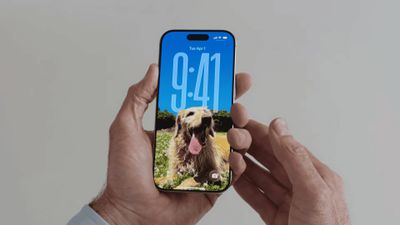
new iphone lockscreen ios 26
To download the iOS 26 public beta to your iPhone, go to Settings ➝ General ➝ Software Update, then tap Beta Updates and choose iOS 26 Public Beta from the checklist. Tap Back, and wait for the update screen to appear, then hit Update Now.

Things can always change before the software makes its way to the general iPhone-owning public, but here are five new things iOS 26 can do on the Lock Screen as of the current developer beta.

Widgets Top or Bottom
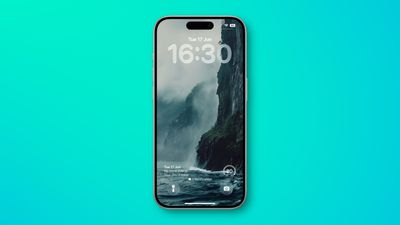
ios 26 bottom widgets lock screen
In iOS 18, the row of widgets on your Lock Screen is literally locked in place right below the clock. In iOS 26, however, Customize mode lets you drag them down to the bottom of the screen, so that they hover just above the two quick actions (assuming you have any). The new optional positioning makes tapping a widget during one-handed use a lot easier. Note: to customize your Lock Screen, long press on it, then tap Customize.

Make the Time Bigger
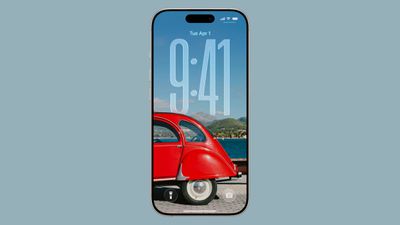
ios 26 lock screen time
In iOS 26, Apple has made it so that the clock on the Lock Screen can be expanded to fill more of the display, making it easier to read. This can be done in Customize mode thanks to a new drag handle on the bottom-right corner of the selection frame around the time.

You can make the digits take up half of the screen, though if you have any widgets, they will slide down to the bottom of the display. In addition, if you have a depth effect applied to a photo and pinch to crop, the time will automatically adjust to accommodate the subject. Bear in mind that the ability to expand the time seems to depend on the selected photo – if there's no space above the photo's subject, the drag handle won't appear.

Quicker Photo Access
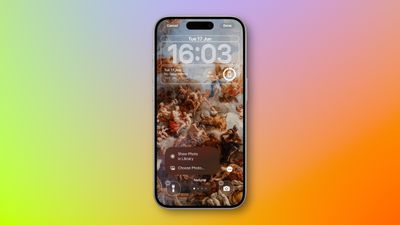
show photo in library lock screen
The Lock Screen in iOS 26 has a different Photos selection button in Customize mode that appears as a miniature version of the currently displayed photo. If you tap it, you now have an option to Show Photo in Library, making it easier to find the picture, or you can take the existing route and tap Choose Photo to pick another image.

Spatial Scenes

spatial scenes 1
The iPhone 15 Pro and newer models can take Spatial Photos, and while the 3D photos have a realistic depth to them, they're best viewed on Apple's Vision Pro. In iOS 26, however, the Photos app has inherited the Vision Pro's ability to convert 2D images into a 3D Spatial Scene. Not all photos work with the spatial feature, but if you create a new Lock Screen wallpaper, iOS will automatically serve up compatible photos with the feature already applied and ready to be viewed.

The feature is hard to appreciate with a still image, but the results are impressive as the image animates when you move your device. Spatial Scenes use machine learning rather than Apple Intelligence, which means the feature is available on iPhone 12 and newer devices.

Music Album Animations
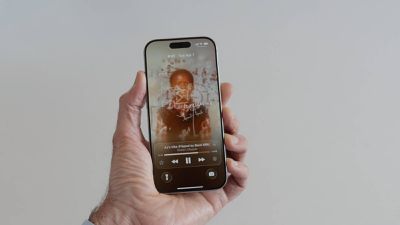
liquid glass music lock screen
iOS 26 introduces full-screen animated album art on the iPhone Lock Screen for select Apple Music tracks. By tapping the album art in the Lock Screen music player, the artwork expands and animates, creating a more immersive listening experience. While animated album art has been available within the Apple Music app for some time, this marks its first appearance on the Lock Screen. Not all songs support it yet, but the number is steadily increasing. Apple is also opening the Animated Album Art feature to third‑party developers, so expect it to work with apps like Spotify and YouTube Music soon.


Popular Stories

Apple Logo Zoomed

Tim Cook Teases Plans for Apple's Upcoming 50th Anniversary

Thursday February 5, 2026 12:54 pm PST by
Apple turns 50 this year, and its CEO Tim Cook has promised to celebrate the milestone. The big day falls on April 1, 2026. "I've been unusually reflective lately about Apple because we have been working on what do we do to mark this moment," Cook told employees today, according to Bloomberg's Mark Gurman. "When you really stop and pause and think about the last 50 years, it makes your heart ...
wwdc sans text feature

Apple Rumored to Announce New Product on February 19

Thursday February 5, 2026 12:22 pm PST by
Apple plans to announce the iPhone 17e on Thursday, February 19, according to Macwelt, the German equivalent of Macworld. The report, citing industry sources, is available in English on Macworld. Apple announced the iPhone 16e on Wednesday, February 19 last year, so the iPhone 17e would be unveiled exactly one year later if this rumor is accurate. It is quite uncommon for Apple to unveil...
Finder Siri Feature

Why Apple's iOS 26.4 Siri Upgrade Will Be Bigger Than Originally Promised

Friday February 6, 2026 3:06 pm PST by
In the iOS 26.4 update that's coming this spring, Apple will introduce a new version of Siri that's going to overhaul how we interact with the personal assistant and what it's able to do. The iOS 26.4 version of Siri won't work like ChatGPT or Claude, but it will rely on large language models (LLMs) and has been updated from the ground up. Upgraded Architecture The next-generation...
iOS 26

iOS 26.3 and iOS 26.4 Will Add These New Features to Your iPhone

Tuesday February 3, 2026 7:47 am PST by
While the iOS 26.3 Release Candidate is now available ahead of a public release, the first iOS 26.4 beta is likely still at least a week away. Following beta testing, iOS 26.4 will likely be released to the general public in March or April. Below, we have recapped known or rumored iOS 26.3 and iOS 26.4 features so far. iOS 26.3 iPhone to Android Transfer Tool iOS 26.3 makes it easier...
iphone 17 pro dark blue 1

iPhone 18 Pro Max Rumored to Deliver Next-Level Battery Life

Friday February 6, 2026 5:14 am PST by
The iPhone 18 Pro Max will feature a bigger battery for continued best-in-class battery life, according to a known Weibo leaker. Citing supply chain information, the Weibo user known as "Digital Chat Station" said that the iPhone 18 Pro Max will have a battery capacity of 5,100 to 5,200 mAh. Combined with the efficiency improvements of the A20 Pro chip, made with TSMC's 2nm process, the...

Top Rated Comments

Ctrlos Avatar
7 months ago
Whilst I'm not a fan of OS26 in general I will give credit to the lock screen team for knocking it out of the park again. The scaling clock that shrinks as you get notifications with the layered wallpaper is very, very clever and looks great.
Score: 6 Votes (Like | Disagree)
Cesar Battistini Avatar
7 months ago
The music Lock Screen iPad is insanely good.
Score: 2 Votes (Like | Disagree)
carswell Avatar
7 months ago
YMMV but I don't find that elongated time display easier to read. The opposite actually.
Score: 1 Votes (Like | Disagree)
svish Avatar
7 months ago
Good to see the various changes. Not yet installed the beta but want to try out Spatial scenes.
Score: 1 Votes (Like | Disagree)
dustin_ Avatar
7 months ago
really happy w lockscreen updates this year. well done.
Score: 1 Votes (Like | Disagree)
martin2345uk Avatar
7 months ago
Spatial photos is not working on the iPad 10th generation; at least not a single photo gives the option on mine!
Score: 1 Votes (Like | Disagree)















