Macintosh HD Gets a New Look in Latest macOS Tahoe Beta
Apple has been updating some classic Mac icons during the macOS Tahoe beta, upsetting some longtime Mac users who prefer the original look. In beta 5, Apple changed the design of the built-in Mac storage icon, which you'll notice if you have it on your desktop.
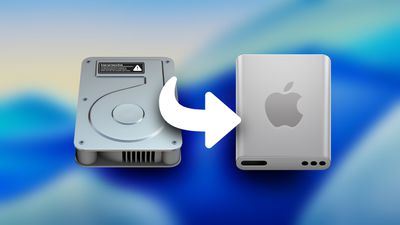
The existing icon still resembled a hard disk drive, but the new icon looks like a modern solid state drive. Apple's Macs stopped using hard disk drives starting more than a decade ago. The low-cost 21.5-inch iMac was the last Mac that had a hard drive component, as it used Apple's SSD + HDD Fusion Drive. All current Macs use SSDs.
If you don't want to see the new icon, you can hide Macintosh HD from view entirely. To do so, open up the Finder app's settings and click the check mark next to "Hard disks."
Apple also updated Disk Utility and the Finder icon in earlier betas. With the Finder icon, Apple initially reversed the color scheme with the light shade on the left and the dark on the right, but the uproar was so significant that Apple had to return it to the classic color arrangement.
Popular Stories
iOS 26.4 was released today, and it includes a couple of new features for CarPlay: an Ambient Music widget and support for voice-based chatbot apps.
To update your iPhone 11 or newer to iOS 26.4, open the Settings app and tap on General → Software Update. CarPlay will automatically offer the new features so long as the iPhone connected to your vehicle is running iOS 26.4 or later....
Apple today announced Apple Business, a new all-in-one platform that unifies device management, productivity tools, and customer outreach features.
The service is designed to be a consolidated replacement for several of Apple's existing business-focused offerings, including Apple Business Essentials, Apple Business Manager, and Apple Business Connect. It provides organizations with a single...
Apple today released new firmware for the AirPods Pro 2, AirPods Pro 3, and the AirPods 4. The firmware has a version number of 8B39, up from 8B34 on the AirPods Pro 3, 8B28 on the AirPods Pro 2, and 8B21 on the AirPods 4.
There is no word on what's included in the firmware, but Apple has a support document with limited notes. Most updates are limited to bug fixes and performance...
























