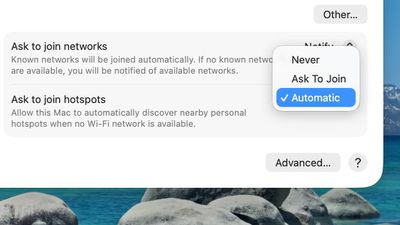
macOS Tahoe 26 includes support for automatically joining your iPhone's Personal Hotspot when no Wi-Fi network is available, so you no longer need to manually connect.
To set up automatic joining in macOS Tahoe, you can click on the Wi-Fi button in the menu bar or Control Center to open up Wi-Fi Settings. From there, scroll down to the bottom where it says "Ask to join hotspots" and click to select the Automatic option.
With Auto-Join Hotspot turned on, when your Mac doesn't have Wi-Fi available and is near an iPhone or iPad providing a Personal Hotspot, it will automatically attempt to join it.
Auto-Join works with Family Sharing, so you can set up your Mac to automatically connect to a family member's Personal Hotspot, or allow their Mac to automatically connect to yours.
iOS 26.4 was released today, and it includes a couple of new features for CarPlay: an Ambient Music widget and support for voice-based chatbot apps.
To update your iPhone 11 or newer to iOS 26.4, open the Settings app and tap on General → Software Update. CarPlay will automatically offer the new features so long as the iPhone connected to your vehicle is running iOS 26.4 or later....
Apple today announced Apple Business, a new all-in-one platform that unifies device management, productivity tools, and customer outreach features.
The service is designed to be a consolidated replacement for several of Apple's existing business-focused offerings, including Apple Business Essentials, Apple Business Manager, and Apple Business Connect. It provides organizations with a single...
Tuesday March 24, 2026 12:31 pm PDT by Juli Clover
Apple today released new firmware for the AirPods Pro 2, AirPods Pro 3, and the AirPods 4. The firmware has a version number of 8B39, up from 8B34 on the AirPods Pro 3, 8B28 on the AirPods Pro 2, and 8B21 on the AirPods 4.
There is no word on what's included in the firmware, but Apple has a support document with limited notes. Most updates are limited to bug fixes and performance...
Since my cell carrier has a strong signal, blazing fast speeds, and cheap prices, I no longer have a WiFi at home and exclusively use my hotspot.
It has been quite annoying to have to turn it on on the phone so frequently, so this is a much asked feature from me (via feedback app) (and no doubt many in my situation).
One question that I haven’t tested yet is that frequently I see my neighbor’s iPhone hotspot.
Does auto join any hotspot or only those it has been authenticated to like during manual join?
I think it must be the latter but ask out of an abundance of caution as I’m not keen (spoof hotspot for MIM attack?) on just attaching to any hotspot in the neighborhood, train or plane.
Since my cell carrier has a strong signal, blazing fast speeds, and cheap prices, I no longer have a WiFi at home and exclusively use my hotspot.
It has been quite annoying to have to turn it on on the phone so frequently, so this is a much asked feature from me (via feedback app) (and no doubt many in my situation).
One question that I haven’t tested yet is that frequently I see my neighbor’s iPhone hotspot.
Does auto join any hotspot or only those it has been authenticated to like during manual join?
I think it must be the latter but ask out of an abundance of caution as I’m not keen (spoof hotspot for MIM attack?) on just attaching to any hotspot in the neighborhood, train or plane.
I did the same and haven’t had a Wi-Fi router for a few years so this is welcome as I feel your pain in manually connecting.
You can forget networks so can set your neighbours phone to ignore. Also your Mac would need to know their hotspot password anyway which I assume you don’t have?
All kinds of useless stuff and you still can't resize the finder window and let it stay like that after a reboot. Simple, useful, and something that should be "allowed". But no, Apple knows best. Still can't do a basic click-through. Have to go and activate the window then you can start clicking. Still the "End" button on the keyboard won't take a blinking cursor to the end of a line. It scrolls down a full page as if that's even related when you're in the middle of typing anyway. Apple loves adding useless features to their os systems. Beyond crazy.