
iOS 26.1 Beta 4 Lets Users Control Liquid Glass Transparency with New Toggle - MacRumors
Skip to Content

iOS 26.1 Beta 4 Lets Users Control Liquid Glass Transparency with New Toggle

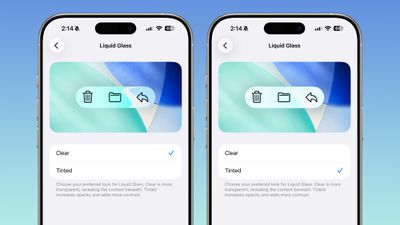
With the fourth betas of iOS 26.1, iPadOS 26.1, and macOS 26.1, Apple has introduced a new setting that's designed to allow users to customize the look of Liquid Glass.
ios 26 1 liquid glass opaque
The toggle lets users select from a clear look for Liquid Glass, or a tinted look. Clear is the current Liquid Glass design, which is more transparent and shows the background underneath buttons, bars, and menus, while tinted increases the opacity of Liquid Glass and adds more contrast.

The new setting can be found on iOS and iPadOS by going to Settings > Display and Brightness, or System Settings > Appearance on the Mac.

Apple says that the new toggle was added because during the beta testing period over the summer, user feedback suggested that some people would prefer to have a more opaque option for Liquid Glass. The added setting provides additional customization in iOS 26.1, iPadOS 26.1, and macOS Tahoe 26.1.

Increasing opacity and adding contrast applies to Liquid Glass throughout the operating system, including in apps and Lock Screen notifications.

There are multiple other new features in iOS 26.1, including a new slide to stop feature for alarms and timers, new Apple Intelligence languages, a redesigned Apple TV app icon, changes to the Settings app, and more, with a full list of features available in our iOS 26.1 feature guide.


Related Roundups: iOS 26, iPadOS 26
Related Forum: iOS 26

Popular Stories

iOS 26

iOS 26.4 Adds Two New Features to CarPlay

Tuesday March 24, 2026 1:55 pm PDT by
iOS 26.4 was released today, and it includes a couple of new features for CarPlay: an Ambient Music widget and support for voice-based chatbot apps. To update your iPhone 11 or newer to iOS 26.4, open the Settings app and tap on General → Software Update. CarPlay will automatically offer the new features so long as the iPhone connected to your vehicle is running iOS 26.4 or later....
Apple Business hero

Apple Unveils 'Apple Business' All-in-One Platform

Tuesday March 24, 2026 8:53 am PDT by
Apple today announced Apple Business, a new all-in-one platform that unifies device management, productivity tools, and customer outreach features. The service is designed to be a consolidated replacement for several of Apple's existing business-focused offerings, including Apple Business Essentials, Apple Business Manager, and Apple Business Connect. It provides organizations with a single...
AirPods Pro Firmware Feature

Apple Releases New Firmware for AirPods Pro 3, AirPods Pro 2 and AirPods 4

Tuesday March 24, 2026 12:31 pm PDT by
Apple today released new firmware for the AirPods Pro 2, AirPods Pro 3, and the AirPods 4. The firmware has a version number of 8B39, up from 8B34 on the AirPods Pro 3, 8B28 on the AirPods Pro 2, and 8B21 on the AirPods 4. There is no word on what's included in the firmware, but Apple has a support document with limited notes. Most updates are limited to bug fixes and performance...

Top Rated Comments

Innovati0n Avatar
22 weeks ago
Can't wait to see people somehow complain about even this.

Great addition!
Score: 39 Votes (Like | Disagree)
dannyyankou Avatar
22 weeks ago
Finally! I'm turning it all the way up lol
Score: 37 Votes (Like | Disagree)
22 weeks ago
What's with the comments about turning it up? It's a toggle, not a slider.
Score: 29 Votes (Like | Disagree)
mango316 Avatar
22 weeks ago
Wowww!! Apple actually listened to people request!! How shocking!!! 😱
Score: 22 Votes (Like | Disagree)
greg624 Avatar
22 weeks ago

Totally not necessary. Apple just needs to make a choice and stick to it.
You’re upset that Apple’s giving their users choice?


Attachment Image
Score: 19 Votes (Like | Disagree)
22 weeks ago

Totally not necessary. Apple just needs to make a choice and stick to it.
The fact they added it already means their analytics show a lot of people don’t like the default Liquid Glass.
Score: 16 Votes (Like | Disagree)















