
Apple Again Tests Background Security Updates in iOS 26.3 and macOS Tahoe 26.3

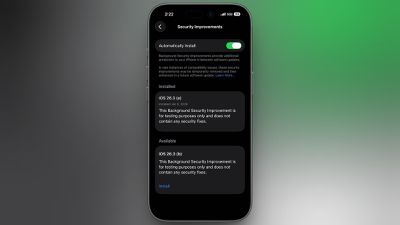
Apple is once again testing its new Background Security Improvement feature that first rolled out in iOS 26.1, iPadOS 26.1, and macOS Tahoe 26.1. Following a previous test earlier this week, developers and public beta testers who are running iOS 26.3, iPadOS 26.3, or ‌macOS Tahoe‌ 26.3 can now install a second Background Security Improvement update for testing purposes.
background security improvements 2
Apple says Background Security Improvements provide additional security protections between software updates for Safari, WebKit, and other system libraries.

Background Security Improvements can be installed by going to the Privacy and Security section of the Settings app, scrolling down to Background Security Improvements, and selecting the "Install" option. If "Automatically Install" is toggled on, Background Security Improvements will be automatically installed when they come out with no need to manually install them.

Apple says that users who opt not to install the Background Security Improvements will receive the updates in a standard software update.

Apple previously had a Rapid Security Response update feature for delivering security improvements, but it wasn't used often after it was introduced in iOS 16, and was ultimately phased out in favor of Background Security Improvements. At one point in 2023, there was a Rapid Security Response bug that prevented some websites from displaying properly.

Apple warns that Background Security Updates can result in "rare instances of compatibility issues." Should that occur, the updates may be temporarily removed and enhanced in a subsequent software update.


Popular Stories

Apple Logo Zoomed

Tim Cook Teases Plans for Apple's Upcoming 50th Anniversary

Thursday February 5, 2026 12:54 pm PST by
Apple turns 50 this year, and its CEO Tim Cook has promised to celebrate the milestone. The big day falls on April 1, 2026. "I've been unusually reflective lately about Apple because we have been working on what do we do to mark this moment," Cook told employees today, according to Bloomberg's Mark Gurman. "When you really stop and pause and think about the last 50 years, it makes your heart ...
Finder Siri Feature

Why Apple's iOS 26.4 Siri Upgrade Will Be Bigger Than Originally Promised

Friday February 6, 2026 3:06 pm PST by
In the iOS 26.4 update that's coming this spring, Apple will introduce a new version of Siri that's going to overhaul how we interact with the personal assistant and what it's able to do. The iOS 26.4 version of Siri won't work like ChatGPT or Claude, but it will rely on large language models (LLMs) and has been updated from the ground up. Upgraded Architecture The next-generation...
wwdc sans text feature

Apple Rumored to Announce New Product on February 19

Thursday February 5, 2026 12:22 pm PST by
Apple plans to announce the iPhone 17e on Thursday, February 19, according to Macwelt, the German equivalent of Macworld. The report, citing industry sources, is available in English on Macworld. Apple announced the iPhone 16e on Wednesday, February 19 last year, so the iPhone 17e would be unveiled exactly one year later if this rumor is accurate. It is quite uncommon for Apple to unveil...
iOS 26

iOS 26.3 and iOS 26.4 Will Add These New Features to Your iPhone

Tuesday February 3, 2026 7:47 am PST by
While the iOS 26.3 Release Candidate is now available ahead of a public release, the first iOS 26.4 beta is likely still at least a week away. Following beta testing, iOS 26.4 will likely be released to the general public in March or April. Below, we have recapped known or rumored iOS 26.3 and iOS 26.4 features so far. iOS 26.3 iPhone to Android Transfer Tool iOS 26.3 makes it easier...
iphone 17 pro dark blue 1

iPhone 18 Pro Max Rumored to Deliver Next-Level Battery Life

Friday February 6, 2026 5:14 am PST by
The iPhone 18 Pro Max will feature a bigger battery for continued best-in-class battery life, according to a known Weibo leaker. Citing supply chain information, the Weibo user known as "Digital Chat Station" said that the iPhone 18 Pro Max will have a battery capacity of 5,100 to 5,200 mAh. Combined with the efficiency improvements of the A20 Pro chip, made with TSMC's 2nm process, the...

Top Rated Comments

Lounge vibes 05 Avatar
4 weeks ago

I'm sorry, but based on Apple's poor software quality I do NOT ever want a security update to happen in the background or without my specific authorization.

So… turn it off?
Also, they can be removed after they are installed just so you are aware.
Score: 14 Votes (Like | Disagree)
nt5672 Avatar
4 weeks ago
I'm sorry, but based on Apple's poor software quality I do NOT ever want a security update to happen in the background or without my specific authorization.

My income is based on my Apple devices working, not being bricked when I need them most.
Score: 11 Votes (Like | Disagree)
Lounge vibes 05 Avatar
4 weeks ago

But Apple is just prepping for a time when there will not be any choice. They have a constant history of removing options.

So "turn it off" works for now, but what about later?
First of all, this feature has been an iOS for four years now and you’ve always been able to turn it off, even though Apple hasn’t really used it. And they specifically state you can remove the security updates in case of compatibility issues, and you will get the security update in the future software revision.
But also… Why are you worrying about some hypothetical that might maybe possibly but also might possibly not probably won’t happen someday?
For now, they are removable, and you can turn the feature off.
If that policy changes, cross that bridge when you get to it, literally absolutely no point in fixating on it today.
It’s like the complaints in 2010 that Apple was going to make macOS “AppStore only” and your finder and terminal and all of your cool computer things are going away. It’s been 16 years and you can still download apps to your Mac from the Internet and fly through Finder and use the terminal to your heart’s content. You can even do those things at the same time..
Score: 11 Votes (Like | Disagree)
nt5672 Avatar
4 weeks ago

So… turn it off?
Also, they can be removed after they are installed just so you are aware.
But Apple is just prepping for a time when there will not be any choice. They have a constant history of removing options.

So "turn it off" works for now, but what about later?
Score: 9 Votes (Like | Disagree)
Lounge vibes 05 Avatar
4 weeks ago

Make no mistake, they really wanted to do this.

But I think they realized it would have been the end of the Mac.
And your source is?
Or is this another “just trust me bro” straw man.
Score: 6 Votes (Like | Disagree)
RSmith2023 Avatar
4 weeks ago

First of all, this feature has been an iOS for four years now and you’ve always been able to turn it off, even though Apple hasn’t really used it. And they specifically state you can remove the security updates in case of compatibility issues, and you will get the security update in the future software revision.
But also… Why are you worrying about some hypothetical that might maybe possibly but also might possibly not probably won’t happen someday?
For now, they are removable, and you can turn the feature off.
If that policy changes, cross that bridge when you get to it, literally absolutely no point in fixating on it today.
It’s like the complaints in 2010 that Apple was going to make macOS “AppStore only” and your finder and terminal and all of your cool computer things are going away. It’s been 16 years and you can still download apps to your Mac from the Internet and fly through Finder and use the terminal to your heart’s content. You can even do those things at the same time..
Some people just don’t feel right in the morning unless they wake up complaining about hypothetical things.
Score: 6 Votes (Like | Disagree)















