
New AirTag's Improved Precision Finding Requires These iPhone Models - MacRumors
Skip to Content

New AirTag's Improved Precision Finding Requires These iPhone Models

The new AirTag that Apple unveiled today features a second-generation Ultra Wideband chip, enabling the Precision Finding feature to work up to 50% farther away from an item compared to the previous AirTag, according to Apple. However, you need a compatible iPhone model in order to take advantage of this improvement.
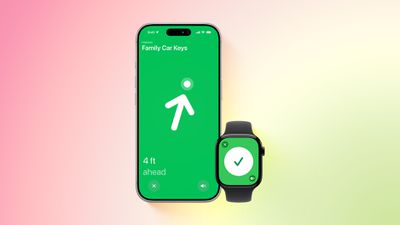
AirTag Find My Precision Finding Feature
The improved Precision Finding requires one of these iPhone models:

  • iPhone 15
  • iPhone 15 Plus
  • iPhone 15 Pro
  • iPhone 15 Pro Max
  • iPhone 16
  • iPhone 16 Plus
  • iPhone 16 Pro
  • iPhone 16 Pro Max
  • iPhone 17
  • iPhone 17 Pro
  • iPhone 17 Pro Max
  • iPhone Air

Precision Finding at longer distances is limited to the iPhone models listed above because both the AirTag and the iPhone need Apple's second-generation Ultra Wideband chip, which was introduced starting with the iPhone 15 series.

Note that the lower-end iPhone 16e does not have a second-generation Ultra Wideband chip.

Precision Finding at the previous distances is still supported on the iPhone 11 and newer.

Precision Finding can lead you to the exact location of an item with an AirTag attached to it, by showing you a directional arrow and your distance away from the item on your iPhone's screen. Starting with watchOS 26.2.1, you can also use Precision Finding on an Apple Watch Series 9 and later or Apple Watch Ultra 2 and later to find an AirTag 2.

Precision Finding on the Apple Watch does not work with the original AirTag.

The new AirTag also has an upgraded Bluetooth chip for improved overall range outside of Precision Finding mode, with an iPhone 11 or newer.

The new AirTag is available to order on Apple.com and in the Apple Store app starting today, and it will be available at Apple Store locations later this week. In the U.S., pricing remains set at $29 for one AirTag and at $99 for four.


Related Roundup: AirTag
Buyer's Guide: AirTag (Buy Now)

Popular Stories

iOS 26

iOS 26.4 Adds Two New Features to CarPlay

Tuesday March 24, 2026 1:55 pm PDT by
iOS 26.4 was released today, and it includes a couple of new features for CarPlay: an Ambient Music widget and support for voice-based chatbot apps. To update your iPhone 11 or newer to iOS 26.4, open the Settings app and tap on General → Software Update. CarPlay will automatically offer the new features so long as the iPhone connected to your vehicle is running iOS 26.4 or later....
Apple Business hero

Apple Unveils 'Apple Business' All-in-One Platform

Tuesday March 24, 2026 8:53 am PDT by
Apple today announced Apple Business, a new all-in-one platform that unifies device management, productivity tools, and customer outreach features. The service is designed to be a consolidated replacement for several of Apple's existing business-focused offerings, including Apple Business Essentials, Apple Business Manager, and Apple Business Connect. It provides organizations with a single...
AirPods Pro Firmware Feature

Apple Releases New Firmware for AirPods Pro 3, AirPods Pro 2 and AirPods 4

Tuesday March 24, 2026 12:31 pm PDT by
Apple today released new firmware for the AirPods Pro 2, AirPods Pro 3, and the AirPods 4. The firmware has a version number of 8B39, up from 8B34 on the AirPods Pro 3, 8B28 on the AirPods Pro 2, and 8B21 on the AirPods 4. There is no word on what's included in the firmware, but Apple has a support document with limited notes. Most updates are limited to bug fixes and performance...

Top Rated Comments

8 weeks ago
AirTag is a game changer for luggage, especially if you travel internationally. Don’t leave home without it
Score: 7 Votes (Like | Disagree)
8 weeks ago

Hmm, used the AirTag in my saddle bag on my road bike, but never actually used it. After I got a flat I saw the AirTag was corroded, and tossed it away. Never used the other 3 in the multipack.

You guys use it though?
Indeed, we make use of them—affixed to our keys, fastened upon my pup’s collar, and discreetly tucked into luggage, purses, and backpacks. Only what is strictly necessary.

Are they employed often? Hardly. Yet when circumstance demands it, the assurance they provide is most welcome.

I remain undecided as to acquiring the newer AirTags; however, for my pup & luggage during travel, I would be inclined to invest in the updated models. One can only hope Apple may one day grace us with a thinner, wallet-style design—an innovation both elegant and practical.
Score: 4 Votes (Like | Disagree)
8 weeks ago
Hmm, used the AirTag in my saddle bag on my road bike, but never actually used it. After I got a flat I saw the AirTag was corroded, and tossed it away. Never used the other 3 in the multipack.

You guys use it though?
Score: 4 Votes (Like | Disagree)
8 weeks ago
what version of Bluetooth does the new AirTag use? 5.3? 6.x?
Score: 4 Votes (Like | Disagree)
8 weeks ago

FINALLY!! I've been waiting forever!!
MacRumors can start the gen 3 rumors now :p
Score: 3 Votes (Like | Disagree)
tonywalker23 Avatar
8 weeks ago

Hmm, used the AirTag in my saddle bag on my road bike, but never actually used it. After I got a flat I saw the AirTag was corroded, and tossed it away. Never used the other 3 in the multipack.

You guys use it though?
my keys. my wife’s keys. my daughter’s keys. my backpack. my son’s backpack. two son’s wallets. that’s all shared in the family find my. and then on their own devices the two boys have the the older AirPods with a case that has an AirTag slot on it.

however, nothing compares to the living room apple tv remote. it has a big piece of cardboard taped to it with a piece of elastic string hanging off of the cardboard. it is the most lost item we have I think. even with the find my for the remote, that doesn’t help get your hand behind or inside the couch. since I taped the big piece of cardboard to it, we haven’t lost it.
Score: 3 Votes (Like | Disagree)















