Apple Now Sending Critical Security Alerts to iPhones Running iOS 17 and Earlier - MacRumors
Skip to Content

Apple Now Sending Critical Security Alerts to iPhones Running iOS 17 and Earlier

Apple has begun pushing Lock Screen notifications to iPhones and iPads running older versions of iOS and iPadOS, warning users of active web-based attacks.
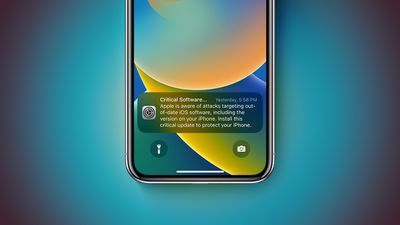
lock screen notifications for iPhones running out of date versions of iOS feature 3
The alerts, which appear as a "Critical Software" notification from the Settings app, warn that Apple "is aware of attacks targeting out-of-date iOS software, including the version on your iPhone," and urge users to install a critical update to protect their device. The notifications are being seen on devices running a range of older iOS versions, including iOS 17.0, far beyond the iOS 13 and iOS 14 devices that Apple specifically flagged in its support documentation.

In the documentation, Apple highlighted recent reports about hacking tools that are effective against older versions of iOS. Hackers are using iOS exploit kits known as "Coruna" and "DarkSword," which can take advantage of vulnerabilities in iOS 13 through to iOS 17.2.1. Clicking a malicious link or visiting a compromised website on an unpatched device could result in data being stolen.

"If your iPhone doesn't have the latest software, update iOS to protect your data," Apple says. Users can update by going to Settings, General, and Software Update.

Apple released iOS 15.8.7 and iOS 16.7.15, along with corresponding iPadOS versions, on March 11 to address security vulnerabilities associated with the Coruna exploit kit. Devices running the latest updated versions of iOS 15 through iOS 26 are already protected, while devices on iOS 13 or iOS 14 must update to iOS 15 to receive these protections.

Apple has patched the vulnerabilities as they have come to light over the last several months, so users who have already upgraded to the newest version of iOS available for their iPhone are protected from the malicious websites and links that are circulating right now. Apple Safe Browsing in Safari is enabled by default and blocks the malicious URL domains identified in the attacks.

Users who are unable to update should consider enabling Lockdown Mode, if available, to protect against malicious web content. Lockdown Mode is available on iOS 16 and later.


Related Forums: iOS 17, iPadOS 17, iOS 15, iOS 16

Popular Stories

iOS 26

iOS 26.4 Adds Two New Features to CarPlay

Tuesday March 24, 2026 1:55 pm PDT by
iOS 26.4 was released today, and it includes a couple of new features for CarPlay: an Ambient Music widget and support for voice-based chatbot apps. To update your iPhone 11 or newer to iOS 26.4, open the Settings app and tap on General → Software Update. CarPlay will automatically offer the new features so long as the iPhone connected to your vehicle is running iOS 26.4 or later....
Apple Business hero

Apple Unveils 'Apple Business' All-in-One Platform

Tuesday March 24, 2026 8:53 am PDT by
Apple today announced Apple Business, a new all-in-one platform that unifies device management, productivity tools, and customer outreach features. The service is designed to be a consolidated replacement for several of Apple's existing business-focused offerings, including Apple Business Essentials, Apple Business Manager, and Apple Business Connect. It provides organizations with a single...
AirPods Pro Firmware Feature

Apple Releases New Firmware for AirPods Pro 3, AirPods Pro 2 and AirPods 4

Tuesday March 24, 2026 12:31 pm PDT by
Apple today released new firmware for the AirPods Pro 2, AirPods Pro 3, and the AirPods 4. The firmware has a version number of 8B39, up from 8B34 on the AirPods Pro 3, 8B28 on the AirPods Pro 2, and 8B21 on the AirPods 4. There is no word on what's included in the firmware, but Apple has a support document with limited notes. Most updates are limited to bug fixes and performance...

Top Rated Comments

AusMness Avatar
1 hour ago at 07:41 am

Hopefully not, otherwise I'll go ahead and hit purchase on that Pixel that been sitting in my Amazon cart for a while.

Unless there is a genuine reason, and there currently isn't, then that would be Apple just being obnoxious.
If it means you finally decide to uphold basic security standards, then sure, get the Pixel
Score: 3 Votes (Like | Disagree)
nymphe Avatar
1 hour ago at 07:39 am

People out there still rocking iphone X and below? Wild
why? my father is still using 6s plus...
Score: 3 Votes (Like | Disagree)
1 hour ago at 07:36 am
But I still can't update my iPhone 15 to the latest version of iOS 18? Still stuck on 18.7.3 if I don't want to go to 26.
Score: 3 Votes (Like | Disagree)
WarmWinterHat Avatar
1 hour ago at 07:32 am

Glad to see this. Hopefully this starts appearing on iOS 18 (on devices that support 26) as well
Hopefully not, otherwise I'll go ahead and hit purchase on that Pixel that been sitting in my Amazon cart for a while.

Unless there is a genuine reason, and there currently isn't, then that would be Apple just being obnoxious.
Score: 2 Votes (Like | Disagree)
JosephAW Avatar
1 hour ago at 07:31 am
These vulnerabilities were one of the reasons I finally bit the bullet and went from iOS 18 to iOS 26.
Unfortunately it’s not a one-sided problem, Apple is also contributing by not providing updates for devices that can run newer versions of iOS.
This would be like Apple saying we are no longer patching Sequoia for devices that can run Tahoe, absurd, they’re providing updates for Sequoia even though devices can run a newer version of macOS. o_O
Score: 2 Votes (Like | Disagree)
WarmWinterHat Avatar
1 hour ago at 07:27 am

is this popping up for people on iOS 18 as well that are on devices capable of iOS 26? That would be interesting.

If so, some people might find iOS 26 upgrade a bit of a mixed bag who purposefully held off.
Don't think so since it says iOS 17 and below.

Well, it hasn't for me, anyway.
Score: 2 Votes (Like | Disagree)