
16GB vs. 32GB MacBook Pro: How Much RAM is Enough? - MacRumors
Skip to Content

16GB vs. 32GB MacBook Pro: How Much RAM is Enough?

Apple's high-end 14-inch and 16-inch MacBook Pro models from 2021 offer the M1 Pro chip with 16GB of RAM as standard, but you can upgrade to 32GB of RAM for $400.
m1 pro chip
When choosing your ‌M1 Pro‌ ‌MacBook Pro‌ configuration, should you upgrade to the 32GB memory option, and does it justify its cost? Our guide helps to answer the question of how to decide which of these two memory options for the high-end ‌MacBook Pro‌ is best for you.

Unified Memory Architecture

Macs and PCs have traditionally needed to use multiple chips for the CPU, RAM, I/O, and more. With Apple silicon chips, these technologies are combined into a single System on Chip (SoC), delivering a new level of integration for improved performance and power efficiency.
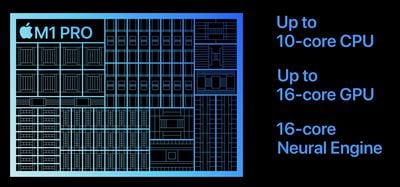
m1 pro chip
Like the M1 and M2 chips, the ‌M1 Pro‌ features a unified memory architecture. This brings together high-bandwidth, low-latency memory into a single pool within a custom package. This allows all of the technologies in the SoC to access the same data without copying it between multiple pools of memory, which significantly improves performance and efficiency.

The ‌MacBook Pro‌'s substantially different memory hardware is the basis for its improved memory performance, but the ‌M1 Pro‌ ‌MacBook Pro‌ is also bolstered by 200GB/s unified memory and a faster, 7.4GB/s SSD, which means that the memory is much quicker and the system can swap with the SSD faster. Overall, this means that the new ‌MacBook Pro‌'s memory performance is massively improved compared to previous ‌MacBook Pro‌ models, as well as most PCs.

Decisions about getting either 16GB or 32GB of memory should therefore be rooted in the understanding that the ‌MacBook Pro‌'s memory is not conventional RAM, but rather a much faster unified memory architecture.

macOS Optimization

macOS intelligently optimizes memory usage in the background, filling up much of the available RAM for better performance. This means that high memory usage does not necessarily indicate that you need additional memory.
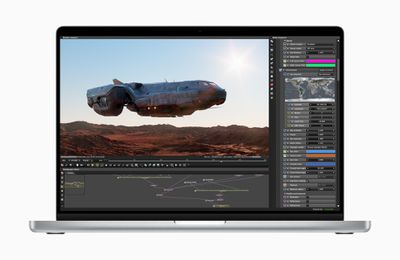
macbook pro workload
Using the faster SSD in the high-end ‌MacBook Pro‌, the system can also swap data on the memory with the SSD if it needs to do so. As evidenced by the performance of previous Apple silicon Macs, macOS is able to optimize the unified memory pool extremely well. As a result, the extent and effectiveness of macOS optimization should be factored into decisions about paying for the $400 32GB memory upgrade.

Real-World Tests

The YouTube channel Max Tech recently compared the 16GB and 32GB ‌MacBook Pro‌ models when performing a number of intense tasks to give an indication of how the two memory configurations weigh up.
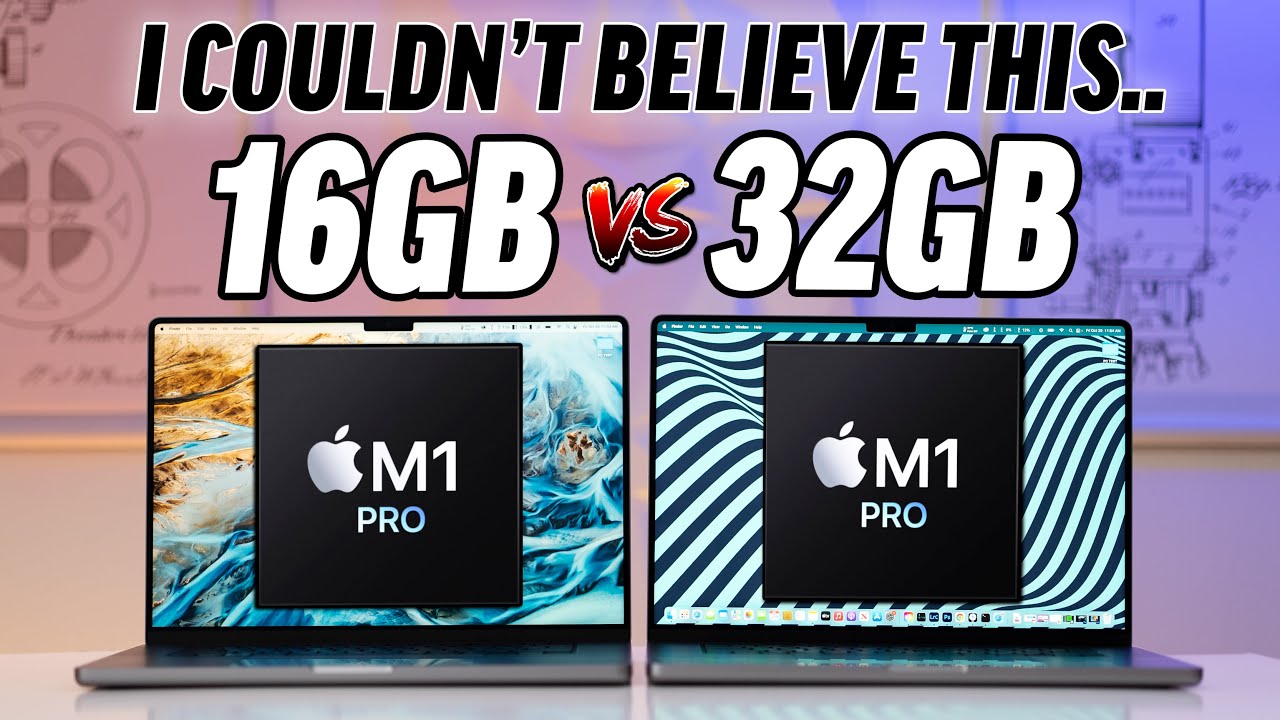
In Lightroom Classic, Max Tech found that the 32GB ‌MacBook Pro‌ performed exports just two seconds faster than the 16GB model. With multiple memory-hungry applications open in the background, the gap between the machines only increased by one second.
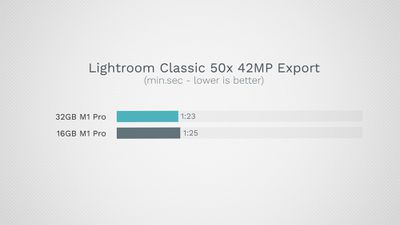
m1 pro lightroom classic benchmark
When exporting 4K ProRes RAW video, the 16GB ‌MacBook Pro‌ was just six seconds slower than the 32GB version. When exporting 8K ProRes RAW video, this gap was reduced to just a single second.
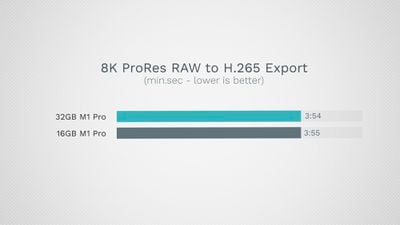
m1 pro 8k prores raw benchmark
In Xcode, the 16GB model compiled a project in 137 seconds, compared to the 32GB model's 115 seconds. When performing photo editing, video editing, audio editing, coding, and heavy browsing, the 32GB model did not substantially outperform the 16GB model.
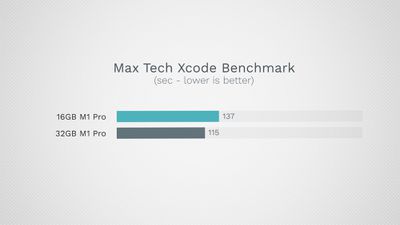
m1 pro xcode benchmark
Max Tech did not notice any tangible slowdowns on the 16GB model, even when simultaneously running large and resource-heavy Logic Pro X and Final Cut Pro X projects. The narrowness of the difference between the two models was shown in practice when the 16GB model did not noticeably need to reload browser tabs more often than the 32GB model, despite a large number of intense tasks being active in the background.

We did our own memory test, comparing the base 14-inch ‌MacBook Pro‌, which has 16GB RAM, with the high-end 16-inch ‌MacBook Pro‌ equipped with 32GB RAM. This was a real-world memory test, so we loaded up a series of apps that one might use in a video editing workflow, like Final Cut Pro, Lightroom, Chrome, Safari, Music, and a few others, and there were zero performance hiccups with either machine, with the 16GB ‌MacBook Pro‌ performing as well as the higher-end model.

Final Thoughts

Unless you are configuring your ‌MacBook Pro‌ with the ‌M1 Max‌ chip, which starts with 32GB of memory, you likely do not need the $400 add-on. In real-world tests, the 32GB ‌MacBook Pro‌ is not significantly outperforming the 16GB model, even during intense workflows.

Memory is often the limiting factor for older workstations, leading some observers to claim that upgrading to more memory is a worthwhile long-term investment. It should be remembered that other parts of the machine will inevitably age over time, so it is up to you if you feel the $400 upgrade is worthwhile for potential future-proofing. Alternatively, this money could be saved to spend on a future machine instead.
macbook pro box apple
Apple's unified memory architecture and excellent memory management in macOS appear to be getting much more out of its memory compared to machines that do not have an Apple silicon SoC. The high-end 14 and 16-inch ‌MacBook Pro‌ models benefit from much faster SSD and memory, enabling them to swap memory even faster. This is the basis for the excellent memory performance of the 16GB model and why it should suffice for most users.

Moreover, it is important to understand that intense tasks often also heavily rely on the CPU or GPU. This means that memory is not always the choke-point for performance lag. You may max out other hardware before you begin to push the limits of the unified memory, resulting in slowdowns regardless of the amount of memory you have.

Generally, if you need 32GB of memory, you will know that you need it for extremely intense workflows such as running virtual machines or heavy video editing with multiple 4K or 8K streams. That being said, most customers with workflows of sufficient intensity to warrant 32GB of RAM will opt for the ‌M1 Max‌ chip over the ‌M1 Pro‌.

Related Roundup: MacBook Pro
Buyer's Guide: MacBook Pro (Caution)
Related Forum: MacBook Pro

Popular Stories

M5 MacBook Pro

RIP, MacBook Ultra

Monday October 19, 2026 9:37 am PDT by
Apple today sent out invites for an experience in Los Angeles on Wednesday, October 28, and the "Pro and tell" tagline on the invitation likely means that the rumored MacBook models with touch-enabled OLED displays will stick with MacBook Pro branding instead of the once-rumored "MacBook Ultra" name. The long-rumored "iPhone Ultra" ended up being named iPhone Duo, so speculation that Apple...
MacBook Pro Ultra Feature 1

Apple to Launch Touchscreen OLED MacBook Pro and OLED iPad mini on October 27

Thursday October 8, 2026 1:31 pm PDT by
Apple will introduce new OLED touchscreen MacBook Pro models and an OLED iPad mini "on or around" Tuesday, October 27, reports Bloomberg. The launch will also include an M6 14-inch MacBook Pro and an M6 iMac. The October 27 follows Apple's October 13 debut of a new smart home hub, a revamped Apple TV 4K, and a refreshed HomePod mini. Earlier this month, MacRumors reported that Apple would do ...
Black Apple Event Logo

Apple Now Inviting Media to October 28 'Launch Experience'

Thursday October 15, 2026 4:13 am PDT by
Apple has begun inviting selected members of the media to a product launch experience in Los Angeles on Wednesday, October 28, according to Bloomberg's Mark Gurman. In a post on X, Gurman described the gathering as an "all-day product launch experience" for touchscreen MacBooks, a new iPad mini, and Macs equipped with M6 chips. Gurman previously reported that Apple would introduce the...

Top Rated Comments

pilgrim2812 Avatar
48 months ago
Most people buy computers for the here and now. When I bought my MacBook Pro in 2013, I blew it out to 16GB RAM and 1TB of SSD which was a ridiculous overkill at the time. 10 years later my MacBook Pro is much more modest by today's standards, but its still very relevant and can still keep up with whatever I need to do. When you spec a new Mac, keep longevity in the back of your mind.


Score: 3 Votes (Like | Disagree)
45 months ago
I'm writing this as a warning for anyone debating this.
I have a Macbook M1 Pro with 16Gb of Ram, and it runs great... until it runs out of ram. then it's a slow piece of hot garbage.

I run Google Chrome, I have tons of tabs, this on its own will run extremely well for about 1 day, (2 max) and then it runs out of memory. when this happens, it starts swapping memory to disk, and even with this stupid fast SSD, the computer turns into a Windows XP laptop.
a reboot fixes the issue. But who wants to do that? Certainly not me.
Because of this, I've actually gone back to my 7 year old Hackint0sh with 128GB of DDR3 (dual xeon)
it's not as fast, but it doesn't slow down.


To go back to the slow performance, with my heavy use of Chrome Tabs, if I open up Photoshop and Lightroom, you're guaranteed to start swapping to disk right away, even after a fresh Reboot.


This is a real problem, just google "MacBook m1 memory leak" - I believe that this problem has been miscategorize as a memory leak in the m1's early days. read the stories... they're all the same. the computer is super fast, until all of a sudden it isn't and the only way to fix it is my rebooting. (even if you close the app, it stays in memory, it doesn't release it right away)

16GB is not enough. I don't even know what is enough, I know that 128GB is great for me... but that's really not affordable. 32GB should do the trick... but I hope Apple ups its game here and make 32GB the new minimum.
Score: 2 Votes (Like | Disagree)
45 months ago
I've noticed something similar, but with Safari not handing back memory when tabs are closed. There is also another helper process that seems to suffer from a memory leak (I can't remember which off the top of my head), as I've seen it grow to multi GB. I've iterated from an 8GB M1 Mac mini to a 16GB Mac mini, then a 32GB Mac Studio, followed by a 64GB Mac Studio!

At that point, more memory doesn't seem likely to help as the process gobbling memory appears to slow everything down, even before you run out of memory and the only way out is a reboot.

PS Like you, I've not had this issue on Intel Macbooks, which I've happy run with 8GB to 16GB of RAM.
Score: 1 Votes (Like | Disagree)
Abstract Avatar
49 months ago
I had to check the date of the article to make sure that it wasn’t 2021. 🥶
Score: 1 Votes (Like | Disagree)
Latest Stories
Giant iPhone Duo Displays Coming to Four Apple Stores
38 minutes ago
Apple Pulls Keynote, Pages and Numbers From App Store
1 hour ago
Apple Updates More Apps With iPhone Duo Support
2 hours ago
Apple Will Label Apps 'Made for iPhone Duo' in App Store
5 hours ago
Amazon Takes $49 Off iPad With Prices Starting at $399.99
5 hours ago
F1 on Apple TV Now Available in Dolby Atmos
6 hours ago
Apple Reveals More Than 50 Apps That Will Be Updated for iPhone Duo
6 hours ago
Apple Blocks Certificates That Could Help Attackers Fake Websites
8 hours ago
Giant iPhone Duo Installations Spotted at Apple Fifth Avenue
8 hours ago
iPhone Duo 2 Prototypes Include Under-Display Face ID
9 hours ago
Tesla App Gains iPad and iPhone Duo Support
13 hours ago
Apple Reportedly Boosts iPhone Duo Orders by 44%
13 hours ago
Fortnite Returning to Australian App Store After Court Ruling
14 hours ago
Apple Ordered to Open iPhone to Rival App Stores in Australia
14 hours ago
Apple Suppliers Face Hurdles Cutting Circuit Board Emissions
14 hours ago
Things Updated for iPhone Duo With Adaptive Layout
15 hours ago
Simplicity and Siri AI Are HomeView's Killer Features, Apple Says
15 hours ago
iPhone Duo Reviewers Really Miss Face ID
20 hours ago
Does the iPhone Duo Run Hot? Here's What Reviews Found
21 hours ago
Apple Music's New Look is Now Live on Apple's Website
22 hours ago
Anthropic Launches Claude Duet, a Proactive AI Agent
23 hours ago
What 32,000 Folds Did to the iPhone Duo's Hinge
23 hours ago
iPhone Duo's Hidden FaceTime Camera Takes 'Trash' Photos
1 day ago
iPhone Duo Has 'Edge Light' Feature That Debuted on Macs Last Year
1 day ago
Apple Support App Updated for iPhone Duo's Larger Display
1 day ago
Amazon Sweetens the Deal on Entry-Level 16-Inch MacBook Pro With $570 Off
1 day ago
iPhone Duo Tips Over on MagSafe Stands When Unfolded
1 day ago
Apple Music's New Look Officially Announced
1 day ago
iPhone Duo Supports Apple Pencil Starting With iOS 27.2
1 day ago
iPhone Duo Accessories Roundup: Cases and Screen Protectors From OtterBox, ZAGG, and More
1 day ago











































