
Following the release of macOS Catalina version 10.15.7, an increasing number of users have experienced an issue with a system process named "accountsd" showing very high CPU usage in Activity Monitor, causing their Mac to slow down.

One user in the Apple Support Communities shared a screenshot of "accountsd" with CPU usage above 400%, rendering their 2018 MacBook Pro "useless."
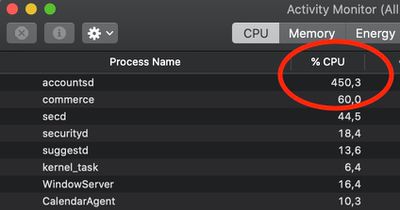
accountsd activity monitor
While this issue has popped up occasionally over the years, there has been a noticeable uptick in complaints across the Apple Support Communities, MacRumors Forums, Twitter, Reddit, Stack Exchange, and elsewhere since the release of macOS Catalina version 10.15.7, with users attempting to troubleshoot the issue.

What is accountsd?

Accountsd is a daemon, part of the Accounts framework. Apple's developer documentation says this framework helps users access and manage their external accounts from within apps, without requiring them to enter login credentials.

The Accounts framework provides access to user accounts stored in the Accounts database, which is managed by the system. An account stores the login credentials of a particular service, such as Twitter, and you use those credentials to authenticate with the service. When you integrate the Accounts framework into your app, you don't need to store account logins yourself. Instead, the user grants your app access to use their account login credentials, bypassing the need to type their username and password. If no account for a particular service exists in the user's Accounts database, you can let them create and save an account from within your app.

How to fix accountsd CPU usage?

Affected users have offered a wide range of potential solutions, but your mileage may vary.

Some users have managed to solve the issue by signing out of their Apple ID account under System Preferences > Apple ID > Overview > Sign Out, restarting their Mac, and then signing back in to the account, but this has not worked for everyone.

Some users have solved the issue by resetting their Mac's SMC and/or NVRAM.

One user on Stack Exchange believes the issue relates to a bug with file indexing on the Mac. Their solution involves resetting the indexing by navigating to System Preferences > Spotlight > Privacy and adding (+) your storage drive ("Macintosh HD" by default) to the "Prevent Spotlight from searching these locations" list. Then, remove (-) the drive from the list, and the Mac will begin reindexing. The indexing process can temporarily slow down your Mac, so these steps are recommended to be completed overnight.

As for more advanced troubleshooting, some users have had success with navigating to "~/Library/Accounts" and renaming the file "Accounts4.sqlite" to "Accounts4.sqlite.testbackup" or using more complex Terminal commands, but proceed with caution, as these solutions could impact your iCloud accounts or syncing.

Apple has yet to acknowledge this issue. Should a software update be released with a fix, we will update this article accordingly.


Related Forum: macOS Catalina

Top Rated Comments

trip1ex Avatar
70 months ago
buying a new mac always solves the problem and is the official solution straight from Apple HQ
Score: 21 Votes (Like | Disagree)
navaira Avatar
70 months ago
There is a bug in Catalina?

Unheard of.
Score: 16 Votes (Like | Disagree)
Internet Enzyme Avatar
70 months ago
This type of crap is so pervasive in macOS. . . Some stupid process like “photolibraryd” or something will just toss a plurality of your CPU into a bottomless pit
Score: 15 Votes (Like | Disagree)
aloshka Avatar
70 months ago
I think this has been happening for the last 2-3 years (including Mojave) for me anyway. If apple is aware of it, it’s not priority and probably will not be fixed.
Score: 14 Votes (Like | Disagree)
WannaGoMac Avatar
70 months ago
Yet another reason to stick with Mojave...
Score: 10 Votes (Like | Disagree)
Dr. James Avatar
70 months ago
Yep, happened to me with a 2015 Macbook Pro. The whole OS was useless. To fix it, I signed out of iCloud and then signed in. No restart required.
Score: 9 Votes (Like | Disagree)

Popular Stories

Apple Logo Zoomed

Tim Cook Teases Plans for Apple's Upcoming 50th Anniversary

Thursday February 5, 2026 12:54 pm PST by
Apple turns 50 this year, and its CEO Tim Cook has promised to celebrate the milestone. The big day falls on April 1, 2026. "I've been unusually reflective lately about Apple because we have been working on what do we do to mark this moment," Cook told employees today, according to Bloomberg's Mark Gurman. "When you really stop and pause and think about the last 50 years, it makes your heart ...
wwdc sans text feature

Apple Rumored to Announce New Product on February 19

Thursday February 5, 2026 12:22 pm PST by
Apple plans to announce the iPhone 17e on Thursday, February 19, according to Macwelt, the German equivalent of Macworld. The report, citing industry sources, is available in English on Macworld. Apple announced the iPhone 16e on Wednesday, February 19 last year, so the iPhone 17e would be unveiled exactly one year later if this rumor is accurate. It is quite uncommon for Apple to unveil...
Finder Siri Feature

Why Apple's iOS 26.4 Siri Upgrade Will Be Bigger Than Originally Promised

Friday February 6, 2026 3:06 pm PST by
In the iOS 26.4 update that's coming this spring, Apple will introduce a new version of Siri that's going to overhaul how we interact with the personal assistant and what it's able to do. The iOS 26.4 version of Siri won't work like ChatGPT or Claude, but it will rely on large language models (LLMs) and has been updated from the ground up. Upgraded Architecture The next-generation...
iOS 26

iOS 26.3 and iOS 26.4 Will Add These New Features to Your iPhone

Tuesday February 3, 2026 7:47 am PST by
While the iOS 26.3 Release Candidate is now available ahead of a public release, the first iOS 26.4 beta is likely still at least a week away. Following beta testing, iOS 26.4 will likely be released to the general public in March or April. Below, we have recapped known or rumored iOS 26.3 and iOS 26.4 features so far. iOS 26.3 iPhone to Android Transfer Tool iOS 26.3 makes it easier...
iphone 17 pro dark blue 1

iPhone 18 Pro Max Rumored to Deliver Next-Level Battery Life

Friday February 6, 2026 5:14 am PST by
The iPhone 18 Pro Max will feature a bigger battery for continued best-in-class battery life, according to a known Weibo leaker. Citing supply chain information, the Weibo user known as "Digital Chat Station" said that the iPhone 18 Pro Max will have a battery capacity of 5,100 to 5,200 mAh. Combined with the efficiency improvements of the A20 Pro chip, made with TSMC's 2nm process, the...















