
Had It With the Dropbox App? Here Are Five Alternative Dropbox Clients

The Dropbox app has a troubled reputation among Mac users. The client is often called out for using significant system resources, even when it's not doing anything in the background. And when it does lurch into action, syncing with Dropbox's servers can sometimes be painfully slow, for no obvious reason.
General Dropbox Feature
Added to this is the fact that almost a year after the first Macs with the M1 chip became available, Dropbox still doesn't natively support Apple silicon, and won't until sometime in 2022. That means ‌M1‌ Mac owners must use Dropbox with Rosetta, and reports suggest the client hemorrhages MacBook battery life and uses a disproportionate amount of memory on Apple silicon Macs.

If you've had your share of frustrations with the Dropbox app, you can always switch to another rival cloud storage service like iCloud, or you can try one of the following alternative Mac clients to sync with your existing Dropbox account.

1. Maestral (Free)
maestral
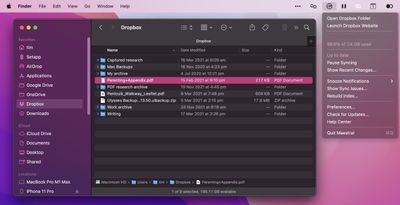
Maestral is a popular open-source Dropbox client for Mac that's free to use and has a significantly smaller resource footprint than the Dropbox app (40MB versus 420MB). The lightweight client happily syncs files and folders in the background, and won't bring your Mac to a standstill in the process. It also natively supports Apple silicon. The caveats are that it doesn't support Dropbox Paper, shared folder settings, or the transfer of only those parts of a file which have changed ("binary diff").

2. CloudMounter ($29.99 a year)
cloudmounter
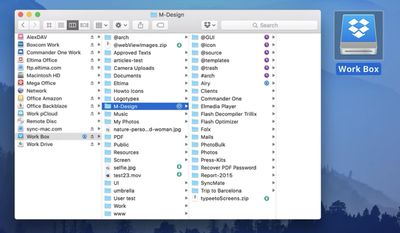
CloudMounter connects cloud storage accounts like Dropbox and Google Drive to your Mac's Finder, allowing you to treat them like regular, local drives. You can search, drag, drop, and access your files, and it doesn't automatically synchronize them to your local drive, which is great if you need access to files on Dropbox's servers but are low on storage space. It encrypts your files to ensure their safety, and you can also share any file or folder by copying its Dropbox link to the clipboard via a contextual menu option.

3. Mountain Duck 3 ($39)
mountainduck macos
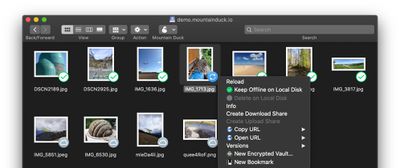
Like CloudMounter, Mountain Duck integrates with Finder to turn it into a fully-functional SFTP client, allowing you to access your Dropbox (or other cloud storage service) account as if it was a local drive. You can choose to keep individual files offline on your local disk, and it displays which files are in sync with little icons. Client-side encryption is included, and it also has a contextual menu to keep sync and URL copying options at your fingertips.

4. Transmit 5 ($45)
transmit panic mac
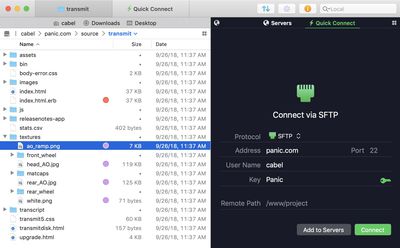
Long-running file transfer app Transmit used to be referred to as an FTP client, but these days it can also connect to 11 different cloud services, Dropbox being one of them, which is why we've included it here. While it's not a straight up Dropbox client replacement (it doesn't sync files in the background) its dual-pane interface is faster than Finder, which makes it good if you upload and download files regularly. It also has useful features like File Sync, which can mirror remote and local files in one click.

5. Strongsync ($49.95)
strongsyncair
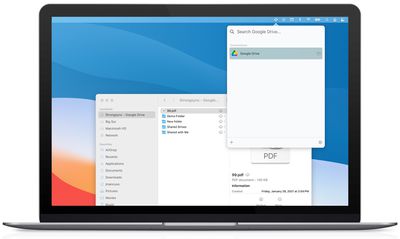
Strongsync is another client that lets you mount cloud storage accounts on your Mac as if they were local disks. Files get downloaded transparently when another app requests them or when you request them in Finder. Amongst other clouds, it supports Dropbox and Dropbox for Business. There's no kernel extension or reboots needed, it offers full library search, and its SwiftUI 2 interface natively supports both Apple silicon and Intel Macs.

Know of any other Mac clients that support Dropbox integration and have proved useful to you? Let us know in the comments.


Tag: Dropbox

Popular Stories

Apple Logo Zoomed

Tim Cook Teases Plans for Apple's Upcoming 50th Anniversary

Thursday February 5, 2026 12:54 pm PST by
Apple turns 50 this year, and its CEO Tim Cook has promised to celebrate the milestone. The big day falls on April 1, 2026. "I've been unusually reflective lately about Apple because we have been working on what do we do to mark this moment," Cook told employees today, according to Bloomberg's Mark Gurman. "When you really stop and pause and think about the last 50 years, it makes your heart ...
iOS 26

iOS 26.3 and iOS 26.4 Will Add These New Features to Your iPhone

Tuesday February 3, 2026 7:47 am PST by
While the iOS 26.3 Release Candidate is now available ahead of a public release, the first iOS 26.4 beta is likely still at least a week away. Following beta testing, iOS 26.4 will likely be released to the general public in March or April. Below, we have recapped known or rumored iOS 26.3 and iOS 26.4 features so far. iOS 26.3 iPhone to Android Transfer Tool iOS 26.3 makes it easier...
imac video apple feature

Apple Makes Its Second-Biggest Acquisition Ever

Tuesday February 3, 2026 12:45 pm PST by
Apple recently acquired Israeli startup Q.ai for close to $2 billion, according to Financial Times sources. That would make this Apple's second-biggest acquisition ever, after it paid $3 billion for the popular headphone maker Beats in 2014. This is also the largest known Apple acquisition since the company purchased Intel's smartphone modem business and patents for $1 billion in 2019....
wwdc sans text feature

Apple Rumored to Announce New Product on February 19

Thursday February 5, 2026 12:22 pm PST by
Apple plans to announce the iPhone 17e on Thursday, February 19, according to Macwelt, the German equivalent of Macworld. The report, citing industry sources, is available in English on Macworld. Apple announced the iPhone 16e on Wednesday, February 19 last year, so the iPhone 17e would be unveiled exactly one year later if this rumor is accurate. It is quite uncommon for Apple to unveil...
Finder Siri Feature

Why Apple's iOS 26.4 Siri Upgrade Will Be Bigger Than Originally Promised

Friday February 6, 2026 3:06 pm PST by
In the iOS 26.4 update that's coming this spring, Apple will introduce a new version of Siri that's going to overhaul how we interact with the personal assistant and what it's able to do. The iOS 26.4 version of Siri won't work like ChatGPT or Claude, but it will rely on large language models (LLMs) and has been updated from the ground up. Upgraded Architecture The next-generation...

Top Rated Comments

doolar Avatar
55 months ago
I moved to iCloud after about a decade on Dropbox. Couldn’t be happier!
Score: 20 Votes (Like | Disagree)
rfog Avatar
55 months ago
I have about 600 GB in Dropbox, near 400.000 files. A couple of days ago I tested some of those:


* Maestral: Used 100% one CPU, selected only two folders to sync, only one was synchronised.
* CloudMounter: a mess with file dates, plus a lot of sync issues when uploading heavy files.
* Strongsync: Evaluated, never got a full sync.
* Mountain Duck behave similar as Maestral. I don't remember what did wrong, but failed to do some operations losing the file changes.

I think Dropbox is bad, but other those third party tools are worse when you want real hard job done. Any cloud can manage 10.000 files. Problems happens when you have it tens of thousands, even iCloud Drive.
Score: 18 Votes (Like | Disagree)
michelb76 Avatar
55 months ago
People comparing dropbox to onedrive to icloud are probably not using any dropbox features. It syncs faster than others, advanced sharing is super-easy, even with people outside of your family/company and backup/restore/versioning is unparalleled. If you don't need those features, then yes, you can switch to whatever is cheap. The client sucks (it will of course be apple silicon native at some point), but so does onedrive, google drive, and icloud isn't that much better because it is too dumb and you have zero control.
Score: 10 Votes (Like | Disagree)
GaymerAdam Avatar
55 months ago
Often confused why people would pay for Dropbox. You get 5 x 1TB accounts and the full MS Office suite with Office 365 for £3.33 a month with a retail card, or you can pay £7.99 a month for 2TB on Dropbox.
Score: 9 Votes (Like | Disagree)
Marlor Avatar
55 months ago
Why not just set up a self-hosted NextCloud instance like a normal person?
Score: 7 Votes (Like | Disagree)
PC_tech Avatar
55 months ago

The client I use after finishing my dropbox yearly is called iCloud.

Same price. Better integration. No ******** company that doesn't care about it's customers "M1 Mac is not a thing"
Apple doesn’t care about you either ?
Score: 7 Votes (Like | Disagree)















