
Here's How Interactive Widgets Work in macOS Sonoma

In macOS Sonoma, Apple has changed the widgets landscape. No longer do widgets have to be hidden offscreen and largely forgotten in the Notifications Center panel. Now they live right on your desktop – and they're interactive, too.
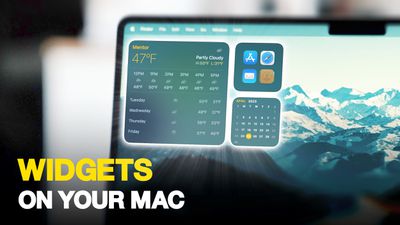
Widgets on Your Mac Thumb 3
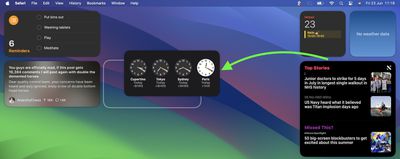
It's worth noting from the off that widgets can still be parked in Notification Center, but now they can also be dragged out onto the desktop. The first widget can be placed anywhere, then Apple provides placement guidance for subsequent widgets by displaying a widget-shaped outline, indicating where they can be snapped into position in relation to the others.
Screenshot 2023 06 23 at 11
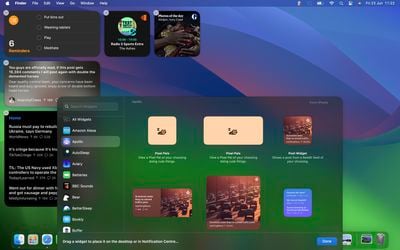
Alternatively, if you right-click on an empty space on the desktop, the menu that appears includes a new "Edit Widgets..." option. Selecting this brings up a widget gallery, which – thanks to a new Continuity feature between Apple devices – also includes widgets from your iPhone in all available sizes. So even if you don't have the corresponding Mac app, you can still use the iOS widget right on your desktop. Simply drag it from the gallery into an available space.
widgets macos
If you're running the macOS Sonoma beta, trying out iPhone widgets is a good way to get used to their interactivity until third-party developers have a chance to bake this into their Mac widgets. As it stands, only Apple's own widgets offer (sometimes buggy) interactions.

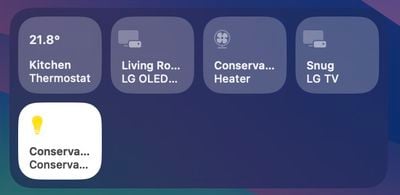
In the Home app widget, for example, you can control specific accessories by clicking the individual buttons to turn them on and off.
home widget
If you right-click a widget, any available customization options appear in the contextual menu. Widgets are available in Small, Medium, and Large sizes, and all include an option to "Remove Widget" if you want to get rid of it.
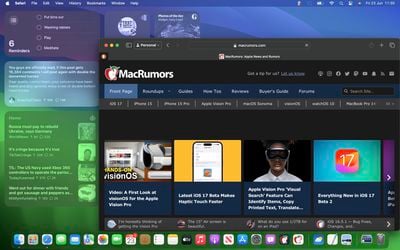
widgets fade
When not in use, widgets fade into the background by taking on the color of your wallpaper, so you can concentrate on the active app or window. There's also an option in System Settings to change the widget style to from full color to Monochrome, for a more uniform look.

Widgets have evolved in macOS Sonoma. By bringing them in from the dark and out into the open workspace of your desktop, users are actively encouraged to work alongside them. What are your thoughts on Apple's new take on Mac widgets? Are you more likely to use them in their new guise? Let us know in the comments.


Related Forum: macOS Sonoma

Popular Stories

Apple Logo Zoomed

Tim Cook Teases Plans for Apple's Upcoming 50th Anniversary

Thursday February 5, 2026 12:54 pm PST by
Apple turns 50 this year, and its CEO Tim Cook has promised to celebrate the milestone. The big day falls on April 1, 2026. "I've been unusually reflective lately about Apple because we have been working on what do we do to mark this moment," Cook told employees today, according to Bloomberg's Mark Gurman. "When you really stop and pause and think about the last 50 years, it makes your heart ...
wwdc sans text feature

Apple Rumored to Announce New Product on February 19

Thursday February 5, 2026 12:22 pm PST by
Apple plans to announce the iPhone 17e on Thursday, February 19, according to Macwelt, the German equivalent of Macworld. The report, citing industry sources, is available in English on Macworld. Apple announced the iPhone 16e on Wednesday, February 19 last year, so the iPhone 17e would be unveiled exactly one year later if this rumor is accurate. It is quite uncommon for Apple to unveil...
Finder Siri Feature

Why Apple's iOS 26.4 Siri Upgrade Will Be Bigger Than Originally Promised

Friday February 6, 2026 3:06 pm PST by
In the iOS 26.4 update that's coming this spring, Apple will introduce a new version of Siri that's going to overhaul how we interact with the personal assistant and what it's able to do. The iOS 26.4 version of Siri won't work like ChatGPT or Claude, but it will rely on large language models (LLMs) and has been updated from the ground up. Upgraded Architecture The next-generation...
iOS 26

iOS 26.3 and iOS 26.4 Will Add These New Features to Your iPhone

Tuesday February 3, 2026 7:47 am PST by
While the iOS 26.3 Release Candidate is now available ahead of a public release, the first iOS 26.4 beta is likely still at least a week away. Following beta testing, iOS 26.4 will likely be released to the general public in March or April. Below, we have recapped known or rumored iOS 26.3 and iOS 26.4 features so far. iOS 26.3 iPhone to Android Transfer Tool iOS 26.3 makes it easier...
iphone 17 pro dark blue 1

iPhone 18 Pro Max Rumored to Deliver Next-Level Battery Life

Friday February 6, 2026 5:14 am PST by
The iPhone 18 Pro Max will feature a bigger battery for continued best-in-class battery life, according to a known Weibo leaker. Citing supply chain information, the Weibo user known as "Digital Chat Station" said that the iPhone 18 Pro Max will have a battery capacity of 5,100 to 5,200 mAh. Combined with the efficiency improvements of the A20 Pro chip, made with TSMC's 2nm process, the...

Top Rated Comments

therunningman Avatar
34 months ago

I'm surprised it has taken Apple this long to bring back widget functionality on the Mac desktop.
Absolutely!


Attachment Image
Score: 36 Votes (Like | Disagree)
ratbastard Avatar
34 months ago
Sounds a lot like an updated version of Dashboard.
Score: 31 Votes (Like | Disagree)
contacos Avatar
34 months ago

I'm surprised it has taken Apple this long to implement widget functionality on the Mac desktop.

I'm surprised it has taken Apple this long to bring back widget functionality on the Mac desktop.
Score: 24 Votes (Like | Disagree)
gwhizkids Avatar
34 months ago

Stop cluttering my desktop.
Active Desktop went nowhere, I highly doubt this will go anywhere either.
Easy response: just don’t add any widgets. Problem solved.

Not sure why you would deny this to all the rest of us who actually like this feature though.
Score: 22 Votes (Like | Disagree)
TheYayAreaLiving ?️ Avatar
34 months ago
Seems like you can fill your entire desktop with Widgets on Sonoma!

Check it out! ?


Attachment Image
Score: 14 Votes (Like | Disagree)
adrianlondon Avatar
34 months ago
What's good about these (and yes, they're available on Intel macs - it's what I have) is that they're widgets from my phone's apps.

They keep themselves updated by magic (I have Bluetooth turned off on my phone and laptop). OK, it's via iCloud of course.

For example, I have desktop widgets now from iOS apps Readdle Calendars and Pedometer. They keep in sync with the phone.

Hint: Turn on the monochrome mode for widgets in Settings. They look great. You can duplicate them (in colour) in the Notification Centre thing if you wish.


Attachment Image
Score: 13 Votes (Like | Disagree)















