
Here's How Interactive Widgets Work in macOS Sonoma - MacRumors
Skip to Content

Here's How Interactive Widgets Work in macOS Sonoma

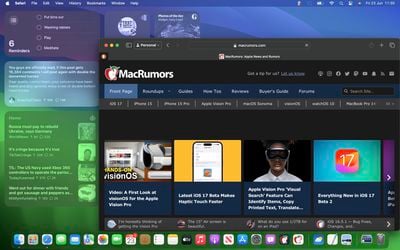
In macOS Sonoma, Apple has changed the widgets landscape. No longer do widgets have to be hidden offscreen and largely forgotten in the Notifications Center panel. Now they live right on your desktop – and they're interactive, too.
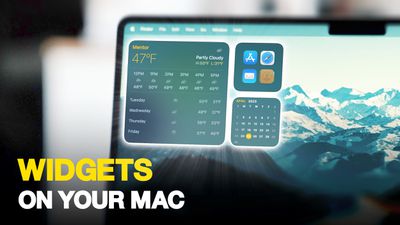
Widgets on Your Mac Thumb 3
It's worth noting from the off that widgets can still be parked in Notification Center, but now they can also be dragged out onto the desktop. The first widget can be placed anywhere, then Apple provides placement guidance for subsequent widgets by displaying a widget-shaped outline, indicating where they can be snapped into position in relation to the others.
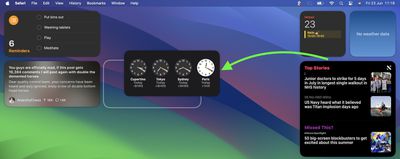
Screenshot 2023 06 23 at 11
Alternatively, if you right-click on an empty space on the desktop, the menu that appears includes a new "Edit Widgets..." option. Selecting this brings up a widget gallery, which – thanks to a new Continuity feature between Apple devices – also includes widgets from your iPhone in all available sizes. So even if you don't have the corresponding Mac app, you can still use the iOS widget right on your desktop. Simply drag it from the gallery into an available space.
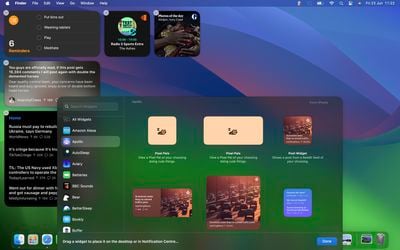
widgets macos
If you're running the macOS Sonoma beta, trying out iPhone widgets is a good way to get used to their interactivity until third-party developers have a chance to bake this into their Mac widgets. As it stands, only Apple's own widgets offer (sometimes buggy) interactions.

In the Home app widget, for example, you can control specific accessories by clicking the individual buttons to turn them on and off.
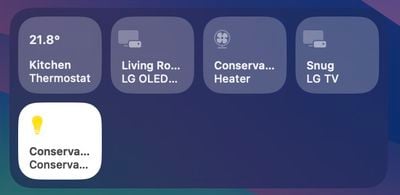
home widget
If you right-click a widget, any available customization options appear in the contextual menu. Widgets are available in Small, Medium, and Large sizes, and all include an option to "Remove Widget" if you want to get rid of it.
widgets fade
When not in use, widgets fade into the background by taking on the color of your wallpaper, so you can concentrate on the active app or window. There's also an option in System Settings to change the widget style to from full color to Monochrome, for a more uniform look.

Widgets have evolved in macOS Sonoma. By bringing them in from the dark and out into the open workspace of your desktop, users are actively encouraged to work alongside them. What are your thoughts on Apple's new take on Mac widgets? Are you more likely to use them in their new guise? Let us know in the comments.


Related Forum: macOS Sonoma

Popular Stories

M5 MacBook Pro

RIP, MacBook Ultra

Monday October 19, 2026 9:37 am PDT by
Apple today sent out invites for an experience in Los Angeles on Wednesday, October 28, and the "Pro and tell" tagline on the invitation likely means that the rumored MacBook models with touch-enabled OLED displays will stick with MacBook Pro branding instead of the once-rumored "MacBook Ultra" name. The long-rumored "iPhone Ultra" ended up being named iPhone Duo, so speculation that Apple...
iPhone Duo Trio

Here's What Apple's Apps Look Like on the iPhone Duo

Tuesday October 20, 2026 11:12 am PDT by
With just three days to go until the iPhone Duo is released, Apple is getting ready for the launch. Behind the scenes, the App Store now has screenshots of Apple's built-in apps running on the Duo. We've seen some apps in marketing materials, but images of the ones we haven't seen give us an idea of what it will be like using the iPhone Duo day to day. Many apps are shown in landscape...
apple pro tell logo

Apple Announcing New Products Next Week: 'Pro and Tell'

Monday October 19, 2026 9:05 am PDT by
Apple's Greg Joswiak today hinted at new product announcements coming next week, sharing a social media post that says "Can't wait to pro and tell next week." Rumors suggest Apple is planning to debut the new MacBook Pro with an OLED touchscreen display, an M6 entry-level MacBook Pro, an M6 iMac, an iPad mini with an OLED display. Can't wait to pro and tell next week....

Top Rated Comments

therunningman Avatar
44 months ago

I'm surprised it has taken Apple this long to bring back widget functionality on the Mac desktop.
Absolutely!


Attachment Image
Score: 36 Votes (Like | Disagree)

ratbastard Avatar
44 months ago
Sounds a lot like an updated version of Dashboard.
Score: 31 Votes (Like | Disagree)
contacos Avatar
44 months ago

I'm surprised it has taken Apple this long to implement widget functionality on the Mac desktop.

I'm surprised it has taken Apple this long to bring back widget functionality on the Mac desktop.
Score: 24 Votes (Like | Disagree)
gwhizkids Avatar
44 months ago

Stop cluttering my desktop.
Active Desktop went nowhere, I highly doubt this will go anywhere either.
Easy response: just don’t add any widgets. Problem solved.

Not sure why you would deny this to all the rest of us who actually like this feature though.
Score: 22 Votes (Like | Disagree)
TheYayAreaLiving 🎗️ Avatar
44 months ago
Seems like you can fill your entire desktop with Widgets on Sonoma!

Check it out! 👇


Attachment Image
Score: 14 Votes (Like | Disagree)
adrianlondon Avatar
44 months ago
What's good about these (and yes, they're available on Intel macs - it's what I have) is that they're widgets from my phone's apps.

They keep themselves updated by magic (I have Bluetooth turned off on my phone and laptop). OK, it's via iCloud of course.

For example, I have desktop widgets now from iOS apps Readdle Calendars and Pedometer. They keep in sync with the phone.

Hint: Turn on the monochrome mode for widgets in Settings. They look great. You can duplicate them (in colour) in the Notification Centre thing if you wish.


Attachment Image
Score: 13 Votes (Like | Disagree)
Latest Stories
Giant iPhone Duo Displays Coming to Four Apple Stores
56 minutes ago
Apple Pulls Keynote, Pages and Numbers From App Store
2 hours ago
Apple Updates More Apps With iPhone Duo Support
2 hours ago
Apple Will Label Apps 'Made for iPhone Duo' in App Store
5 hours ago
Amazon Takes $49 Off iPad With Prices Starting at $399.99
6 hours ago
F1 on Apple TV Now Available in Dolby Atmos
6 hours ago
Apple Reveals More Than 50 Apps That Will Be Updated for iPhone Duo
7 hours ago
Apple Blocks Certificates That Could Help Attackers Fake Websites
8 hours ago
Giant iPhone Duo Installations Spotted at Apple Fifth Avenue
9 hours ago
iPhone Duo 2 Prototypes Include Under-Display Face ID
9 hours ago
Tesla App Gains iPad and iPhone Duo Support
13 hours ago
Apple Reportedly Boosts iPhone Duo Orders by 44%
13 hours ago
Fortnite Returning to Australian App Store After Court Ruling
14 hours ago
Apple Ordered to Open iPhone to Rival App Stores in Australia
14 hours ago
Apple Suppliers Face Hurdles Cutting Circuit Board Emissions
15 hours ago
Things Updated for iPhone Duo With Adaptive Layout
15 hours ago
Simplicity and Siri AI Are HomeView's Killer Features, Apple Says
15 hours ago
iPhone Duo Reviewers Really Miss Face ID
20 hours ago
Does the iPhone Duo Run Hot? Here's What Reviews Found
22 hours ago
Apple Music's New Look is Now Live on Apple's Website
22 hours ago
Anthropic Launches Claude Duet, a Proactive AI Agent
23 hours ago
What 32,000 Folds Did to the iPhone Duo's Hinge
1 day ago
iPhone Duo's Hidden FaceTime Camera Takes 'Trash' Photos
1 day ago
iPhone Duo Has 'Edge Light' Feature That Debuted on Macs Last Year
1 day ago
Apple Support App Updated for iPhone Duo's Larger Display
1 day ago
Amazon Sweetens the Deal on Entry-Level 16-Inch MacBook Pro With $570 Off
1 day ago
iPhone Duo Tips Over on MagSafe Stands When Unfolded
1 day ago
Apple Music's New Look Officially Announced
1 day ago
iPhone Duo Supports Apple Pencil Starting With iOS 27.2
1 day ago
iPhone Duo Accessories Roundup: Cases and Screen Protectors From OtterBox, ZAGG, and More
1 day ago










































