
iOS 14.3 Features: Everything New in iOS 14.3 - GeekWebGuides
Skip to Content

iOS 14.3 Features: Everything New in iOS 14.3

Apple today released iOS 14.3 and iPadOS 14.3 to the public, introducing some notable new features. We've highlighted the biggest changes so you can get a quick overview of what to expect after installing it.


Apple Fitness+

Priced at $9.99 per month and included in the highest-tier Apple One bundle, Apple Fitness+ is Apple's latest service that's designed to work with the Apple Watch. It offers guided workouts provided by Apple-hired trainers, with the Apple Watch used to track progress through the workout.
Apple Fitness Plus Feature
Video workouts are watched on Apple TV, iPad, or iPhone, with Apple Watch metrics provided right on the screen. Workout types include High Intensity Interval Training, Indoor Cycling, Yoga, Core, Strength, Dance, Rowing, Treadmill Walking, Treadmill Running, and Mindful Cooldown, with Apple offering workout suggestions and recommendations.

Read more about it in our Apple Fitness+ guide.

AirPods Max

The update adds support for Apple's newest product, the AirPods Max over-ear headphones. Apple says the update enables high fidelity audio for rich sound, Adaptive EQ for adjusting sound in real time to the personal fit of the ear cushions, Active Noise Cancellation for blocking environmental noise, Transparency mode to hear the environment around you, and Spatial audio with dynamic head tracking for a theater-like experience.
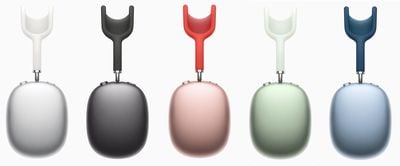
airpods max colors

ProRaw Support

iOS 14.3 brings the new ProRAW format to the iPhone 12 and iPhone 12 Pro Max. ProRAW is designed for those who prefer to shoot in RAW but also want to take advantage of the Apple image pipeline data like noise reduction and multiframe exposure adjustments.
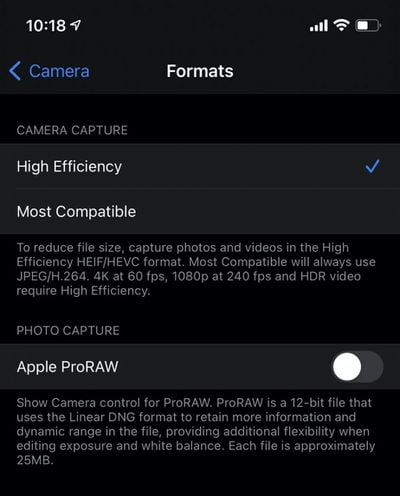
apple proraw
ProRaw can be enabled in the Camera section of the Settings app for those who have installed the iOS 14.3 beta on a new ‌iPhone 12 Pro‌ or Pro Max. When activated, there's a RAW toggle in the upper right side of the camera app that can be tapped to turn it off or on.

ProRaw photos are approximately 25MB in size, so the feature may need to be used sparingly if iPhone storage space is an issue. ProRAW photos can be edited in the Photos app.

Other Camera Additions

There's now an option to record video at 25 frames per second, plus there's a new option to mirror the front-facing camera for still photos on ‌iPhone‌ 6s, ‌iPhone‌ 6s Plus, iPhone SE, ‌iPhone‌ 7, ‌iPhone‌ 7 Plus, ‌iPhone‌ 8, ‌iPhone‌ 8 Plus, and ‌iPhone‌ X. This feature was already enabled on newer devices.

Siri Sounds

Siri in iOS 14 is able to replicate all manner of sounds, from animals to alarms, musical instruments, and more. You can ask ‌‌Siri‌‌ questions like "what does a humpback whale sound like?" or "what does a lion sound like?" to have ‌‌Siri‌‌ play the sound of a whale or a lion.

Apple added hundreds of different sounds, and on iPhone and ‌iPad‌, ‌‌Siri‌‌ will also display a picture of the animal or device and then link to more information from Wikipedia after playing the sound.

Home Screen Shortcuts

iOS 14.3 makes it easier and quicker to launch apps with custom icons from the Home Screen. When opening an app that has a custom icon created using Shortcuts, it is no longer routed through the Shortcuts app and is instead able to open much more quickly. There's still a banner that pops up, but it's a more streamlined experience than before.
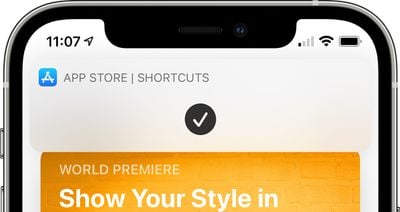
shortcuts home screen banner

Ecosia Search Engine

Ecosia is a search engine that lets users fund the planting of trees when searches are conducted. iOS 14.3 allows Ecosia to be set as the default browser as an alternative to Google, Yahoo, Bing, and DuckDuckGo.

TV App

Apple is adding a new ‌Apple TV‌+ tab that's designed to make it easier to discover ‌Apple TV‌+ original content and to make it less confusing for customers who have trouble discerning what's available through an ‌Apple TV‌+ subscription and what's not.

There's also an enhanced search feature for browsing by category like genre, and when typing in a search, Apple will provide recent searches and suggestions. Apple also now shows top search results with relevant matches across movies, tv shows, cast, channels, and sports.

Cardio Fitness

There's a new Cardio Fitness feature for Apple Watch, which also shows up in the Activity app on the iPhone. Cardio Fitness measures VO2 Max, which is the maximum amount of oxygen that your body is able to consume during exercise.

Measurements are done over time, with the iPhone and Apple Watch able to send notifications to let you know about VO2 Max fluctuations. VO2 Max is a metric that can help you chart your overall fitness level and fitness gains. Cardio Fitness can be accessed through a new trend that's been added to the Activity app, and it can be set up in the Health app on iPhone. Cardio fitness levels are available for users age 20 and above, and are estimated by age.

Cardio Fitness information will vary based on age and sex, and will be categorized into one of four ranges: high, above average, below average, or low. Notifications will let you know if your cardio fitness is at a low level, providing motivation to move more. Apple Watch has previously been able to measure VO2Max, but the new feature includes support for lower ranges that have needed clinical testing in the past.

App Clips

iOS 14.3 includes support for launching App Clips by scanning Apple-designed App Clip Codes using the Camera or the shortcut in the Control Center.

Health App

The Health app has a new section on pregnancy that works with pregnancy tracking devices and provides information on pregnancy. Apple says there are options to indicate pregnancy, lactation, or contraceptive use in Cycle Tracking in the Health app to better manage period and fertile window predictions.
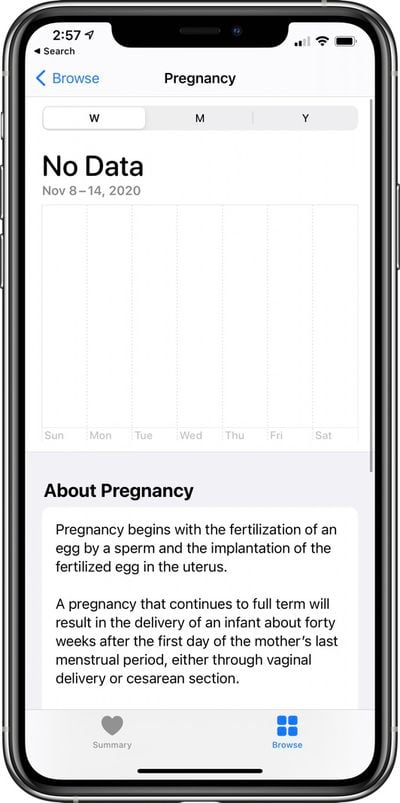
apple health app pregnancy

Find My

Code in iOS 14.3 also indicates Apple is laying the groundwork to add support for third-party item trackers to the Find My app. Third-party item trackers and Bluetooth-enabled items will be able to be tracked using the ‌‌Find My‌‌ app, and it seems the first items with this capability could perhaps be launching soon.
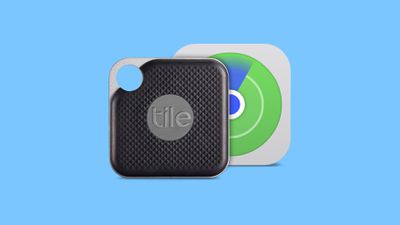
FindMyTileFeature

Weather

Air quality health recommendations are now provided at specific air quality levels in the U.S., UK, Germany, India, and Mexico, with air quality data provided by Breezometer. Air quality data is also now available in China.

Bug Fixes

iOS 14.3 fixes a bug that could case some MMS messages to not be received, along with an issue that could prevent contact groups from failing to display members when writing a message.

Some videos were not appearing correctly when shared from the ‌Photos‌ app, and app folders could fail to open, both of which are fixed. Apple addressed a big that could cause opening apps from Spotlight to not work, and the Bluetooth option to fail to appear in Settings.

There's also a fix for a bug that could cause the MagSafe Duo Charger to fail to wirelessly charge an iPhone at less than the maximum power, with full release notes available in our iOS 14.3 release article.


Related Forum: iOS 14

Popular Stories

M5 MacBook Pro

RIP, MacBook Ultra

Monday October 19, 2026 9:37 am PDT by
Apple today sent out invites for an experience in Los Angeles on Wednesday, October 28, and the "Pro and tell" tagline on the invitation likely means that the rumored MacBook models with touch-enabled OLED displays will stick with MacBook Pro branding instead of the once-rumored "MacBook Ultra" name. The long-rumored "iPhone Ultra" ended up being named iPhone Duo, so speculation that Apple...
iPhone Duo Trio

Here's What Apple's Apps Look Like on the iPhone Duo

Tuesday October 20, 2026 11:12 am PDT by
With just three days to go until the iPhone Duo is released, Apple is getting ready for the launch. Behind the scenes, the App Store now has screenshots of Apple's built-in apps running on the Duo. We've seen some apps in marketing materials, but images of the ones we haven't seen give us an idea of what it will be like using the iPhone Duo day to day. Many apps are shown in landscape...
apple pro tell logo

Apple Announcing New Products Next Week: 'Pro and Tell'

Monday October 19, 2026 9:05 am PDT by
Apple's Greg Joswiak today hinted at new product announcements coming next week, sharing a social media post that says "Can't wait to pro and tell next week." Rumors suggest Apple is planning to debut the new MacBook Pro with an OLED touchscreen display, an M6 entry-level MacBook Pro, an M6 iMac, an iPad mini with an OLED display. Can't wait to pro and tell next week....

Top Rated Comments

76 months ago

Why 25 frames per second? I’ve never heard of that being a common frame rate.
You must have never left the US of A.

Hint. The yellow ones are on 25fps:

Attachment Image
Score: 36 Votes (Like | Disagree)

76 months ago
Me: Siri play the sound of a Lion.

Siri:


Attachment Image
Score: 15 Votes (Like | Disagree)
76 months ago

From my understanding, you shouldn’t use ProRAW unless you want to edit every single photo you take with it on. Another site said the default images are flat looking and requiring editing where as normal photos are largely good in terms of color.
That’s literally what it supposed to do. So it works as advertised.
If you’re actually planning on editing your photos down to the pixel, then you don’t want them already saturated and enhanced with machine learning or anything like that. You literally want exactly what is captured, no extra things.
Score: 10 Votes (Like | Disagree)
Westside guy Avatar
76 months ago
Thank goodness the Health app is finally explaining what pregnancy is! 😁
Score: 7 Votes (Like | Disagree)
groove-agent Avatar
76 months ago
Apple really needs to work on their product naming conventions. Apple TV + is confusing due to the similarly named hardware. Same as the AirPods max. They’re not “pods”. They should have been named Airphones Pro.
Score: 6 Votes (Like | Disagree)
76 months ago

Not how RAW works on my Canon DSLR but sure.
That’s how RAW works on ALL cameras. It’s raw, unedited data. That’s the point. So you can edit the file how you see fit.

if you’re saying your camera has saturated/contrasty images, you’re not shooting raw or the camera is doing some kind of processing
Score: 6 Votes (Like | Disagree)
Latest Stories
Apple Pulls Keynote, Pages and Numbers From App Store
42 minutes ago
Apple Updates More Apps With iPhone Duo Support
1 hour ago
Apple Will Label Apps 'Made for iPhone Duo' in App Store
4 hours ago
Amazon Takes $49 Off iPad With Prices Starting at $399.99
5 hours ago
F1 on Apple TV Now Available in Dolby Atmos
5 hours ago
Apple Reveals More Than 50 Apps That Will Be Updated for iPhone Duo
6 hours ago
Apple Blocks Certificates That Could Help Attackers Fake Websites
7 hours ago
Giant iPhone Duo Installations Spotted at Apple Fifth Avenue
8 hours ago
iPhone Duo 2 Prototypes Include Under-Display Face ID
8 hours ago
Tesla App Gains iPad and iPhone Duo Support
12 hours ago
Apple Reportedly Boosts iPhone Duo Orders by 44%
12 hours ago
Fortnite Returning to Australian App Store After Court Ruling
13 hours ago
Apple Ordered to Open iPhone to Rival App Stores in Australia
13 hours ago
Apple Suppliers Face Hurdles Cutting Circuit Board Emissions
13 hours ago
Things Updated for iPhone Duo With Adaptive Layout
14 hours ago
Simplicity and Siri AI Are HomeView's Killer Features, Apple Says
14 hours ago
iPhone Duo Reviewers Really Miss Face ID
19 hours ago
Does the iPhone Duo Run Hot? Here's What Reviews Found
21 hours ago
Apple Music's New Look is Now Live on Apple's Website
21 hours ago
Anthropic Launches Claude Duet, a Proactive AI Agent
22 hours ago
What 32,000 Folds Did to the iPhone Duo's Hinge
23 hours ago
iPhone Duo's Hidden FaceTime Camera Takes 'Trash' Photos
1 day ago
iPhone Duo Has 'Edge Light' Feature That Debuted on Macs Last Year
1 day ago
Apple Support App Updated for iPhone Duo's Larger Display
1 day ago
Amazon Sweetens the Deal on Entry-Level 16-Inch MacBook Pro With $570 Off
1 day ago
iPhone Duo Tips Over on MagSafe Stands When Unfolded
1 day ago
Apple Music's New Look Officially Announced
1 day ago
iPhone Duo Supports Apple Pencil Starting With iOS 27.2
1 day ago
iPhone Duo Accessories Roundup: Cases and Screen Protectors From OtterBox, ZAGG, and More
1 day ago
Apple Stores Will Have 'Limited' Availability of iPhone Duo for Walk-In Customers
1 day ago










































