

Apple designed iOS 14 with several new features that improve how the AirPods and the AirPods Pro work with iPhones and iPads, including spatial audio, better device switching, battery notifications, and Headphone Accommodations for those who need help with sounds and frequencies.
This guide covers all of the new features that Apple added for the AirPods in iOS 14.
Spatial Audio (AirPods Pro Only)
When Apple announced spatial audio during the Worldwide Developers Conference, it was a feature that was a major surprise and one that sounded like something out of a science fiction movie. Spatial audio makes audio sound like it's coming right from your device rather than coming from headphones, providing a unique listening experience.
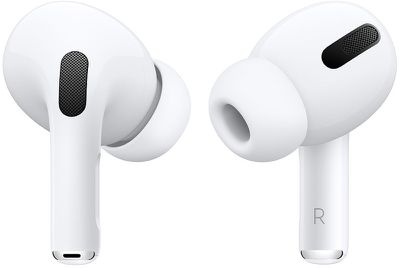
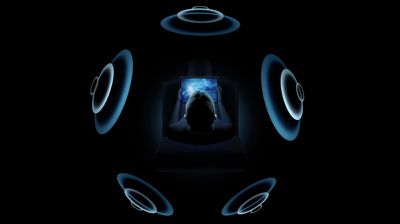
With spatial audio, Apple uses dynamic head tracking and iPhone positioning to bring a movie theater surround sound experience to the AirPods Pro. Using directional audio filters and subtle adjustments to the frequencies that each ear receives, spatial audio is able to put sounds anywhere in space for a more immersive audio experience when watching TV shows and movies.
Spatial audio is able to take advantage of the gyroscope and accelerometer in the AirPods Pro and iPhone to track head movement and device location, comparing motion data and remapping the sound field on the fly so it stays anchored to the iPhone even as your head moves around.
Spatial audio was enabled through a firmware update that was released in September, and using the feature requires the firmware update along with the iOS or iPadOS 14 update. On iPhone, spatial audio works with the iPhone 7 and later.
On iPad, spatial audio works with the iPad Pro 12.9‑inch (3rd generation) and later, the iPad Pro 11‑inch, the iPad Air (3rd generation), the iPad (6th generation) and later, and the iPad mini (5th generation).
Automatic Device Switching
AirPods and AirPods Pro already feature quick and easy device switching for devices where you're signed in with your iCloud account, but iOS 14, iPadOS 14, tvOS 14, watchOS 7, and macOS Big Sur make device switching even easier.
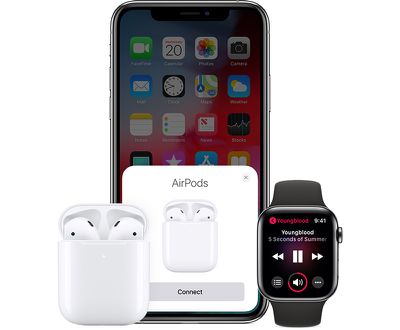
With the updates installed, AirPods and AirPods Pro automatically switch between your devices that are paired to the same iCloud account. So if you're listening to music on your iPhone but switch over to watching a video on your Mac, your AirPods will seamlessly connect to the Mac.
Right now, you can swap quickly, but on most devices it requires accessing the Bluetooth settings for your secondary device if the AirPods are already paired to a primary device.
Automatic device switching requires an iCloud account and it works on iPhone, iPad, iPod touch, Mac, and Apple Watch with the latest software versions installed. Automatic switching works with the AirPods Pro and the second-generation AirPods, and it is not compatible with the original AirPods. It also works with Powerbeats, Powerbeats Pro, and Beats Solo Pro.
Battery Notifications
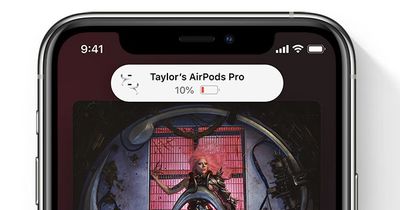
If your AirPods are getting low on battery and need to be charged, your iPhone or iPad will let you know with a notification so you can charge them up before they die completely.
Optimized Charging
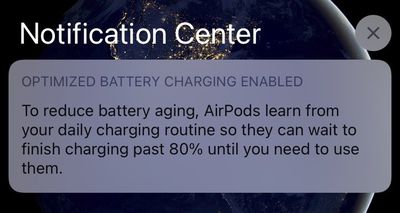
To maximize the longevity of the AirPods, Apple added a new Optimized Battery Charging feature in iOS 14. Optimized Battery Charging lets the AirPods learn your daily charging routine and will wait to finish charging past 80 percent until they're needed.
Apple uses a similar battery optimization feature for iPhones and Macs to extend the total battery life of the devices. Avoiding having a lithium ion battery at max charge continually can better preserve battery health over time.
Headphones Accommodations
Headphones Accommodations is an Accessibility feature for those who are hard of hearing, and it's able to amplify soft sounds and adjust frequencies to make music, movies, calls, and more sound more crisp and clear.
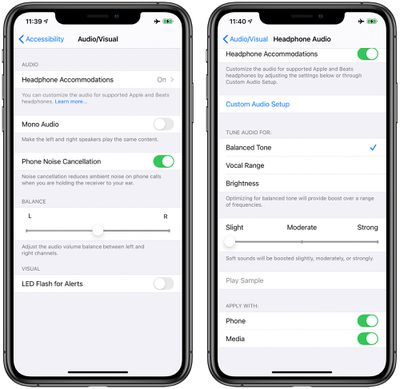
You can get to the Headphones Accommodations functionality in the Accessibility section of the Settings app by tapping on AirPods > Audio Accessibility Settings > Headphone Accommodations.
From there, you can get access to all of the different options available such as tuning audio for Balanced Tone, Vocal Range, or Brightness or adjusting the volume of soft sounds to be louder.
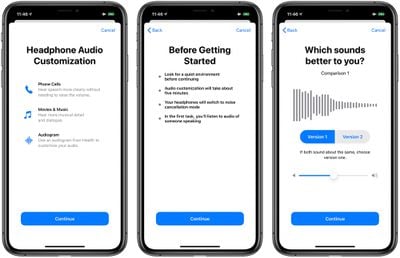
There's also a Custom Audio Setup that walks through a test with soft speaking and different music to determine whether you have specific audio preferences that should be compensated for with the Headphone Accommodations feature.
Headphone Accommodations works with the Transparency mode on AirPods Pro too, making quiet voices louder and tuning the sounds of the environment around you to meet your audio needs.
Hearing Health
Apple expanded Hearing Health protections in iOS 14 and watchOS 7 and the iPhone now sends notifications to the Apple Watch when you're listening to music too loud and can reduce your headphones volume to a safe level once you've hit the World Health Organization's recommended safe weekly listening dose.
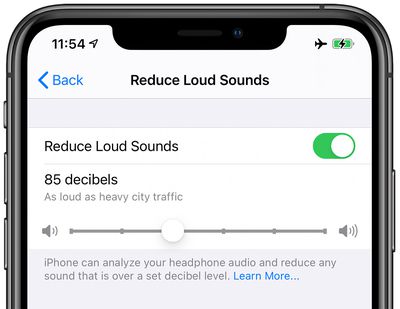
Reduce Loud Sounds, a new feature under Sounds & Haptics, can be enabled to analyze headphone audio and reduce any sound that is over a certain decibel level, which you can set yourself. These features work with the AirPods and AirPods Pro, along with other headphone options.
Control Center Volume Monitor
If you have the "Hearing" feature added to Control Center when you listen to music with the AirPods or other headphones, you can see a live meter of the volume level to make sure the decibel level is safe.
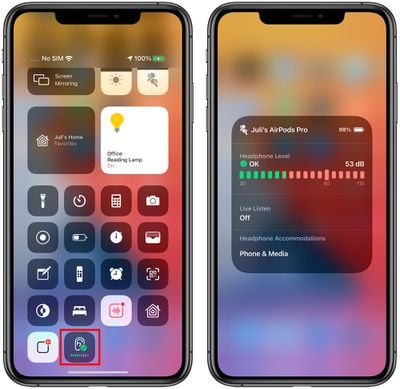
Just swipe down from Control Center and tap on the ear icon (after it's been added to Control Center) to see the live reading.
AirPods Pro Motion API
Apple designed a Motion API for the AirPods Pro that developers can take advantage of. The Motion API lets developers access orientation, user acceleration, and rotational rates, which is useful for fitness apps and games.
Developers can build the API into apps that AirPods Pro owners will be able to download.
Guide Feedback
Have questions about the new iOS 14 AirPods capabilities, know of a feature we left out, or or want to offer feedback on this guide? Send us an email here.


















