
Everything New in iOS 15.2 Beta 2: Legacy Contacts, Hide My Email Improvements, and More

Apple today released the second beta of an upcoming iOS 15.2 update to developers for testing purposes, and the software update adds quite a few new features. This guide highlights everything new that we've found in the second iOS 15.2 beta.
iOS 15

Legacy Contacts

With Legacy Contacts, you can set a trusted person to be able to access your Apple ID and your data (or "Digital Legacy") after you die. The person that you designate as your contact can access your photos, messages, notes, files, contacts, calendar events, apps, device backups, and more. iCloud Keychain passwords remain inaccessible, as does licensed media.
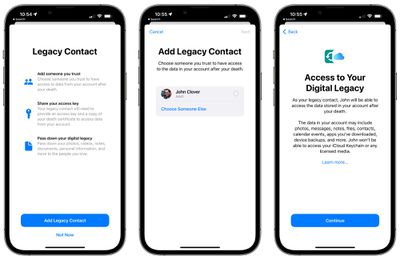
legacy contact 2
The Legacy Contact option can be accessed by opening up the Settings app, selecting "Password & Security," and choosing "‌Legacy Contact‌" from the list. From there, you can select a trusted person to access your account after you pass away.

Find My Lost Item Scanning

In the Find My app, Apple has added a new option for "Items That Can Track Me." Tapping on this allows users to search for nearby items that might be used to track their location.
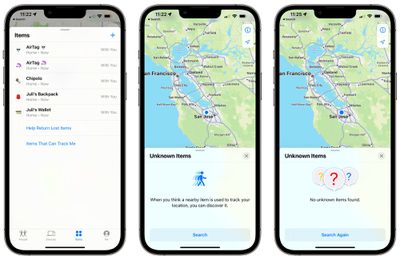
apple unknown items scan
When activated, the Unknown Items feature scans for anything that's nearby, and will let users know either way if there's a device that belongs to someone else nearby. If an item is detected, Apple offers instructions on how to disable the device so that it can no longer be used for tracking purposes.

There's also a "Help Return Lost Items" option that also scans for nearby devices that might be lost, and it works similarly to the tracking scan. If a lost device is found, Apple provides instructions on how to find who it belongs to.

iPadOS TV app

In iPadOS 15, Apple has introduced a new design for the TV app. The TV app features a sidebar, which makes navigation between the various sections of the TV app simpler.

tv app design ios 15 2
In iOS 15.2, there's a dedicated "Store" tab in the TV app for accessing movies and TV shows that can be purchased. The new design and the addition of a Store tab may help separate Apple TV+ content from paid content, as the existing design has been confusing for some users.
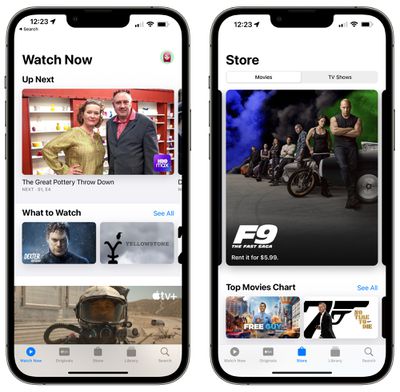
tv app store tab ios 15 2

Always-On Dark Mode for CarPlay Maps App

Code in iOS 15.2 suggests that there's a new option to turn Dark Mode on permanently for the CarPlay Maps app.

Hide My Email in the Mail App

You can use Hide My Email directly from the Mail app after installing the iOS 15.2 beta. When composing an email, just tap on the "From" field and select the "Hide My Email" option to generate a random email address.
ios15 mail privacy feature
Hide My Email is available to everyone who has an ‌iCloud‌+ plan, and it's a useful feature for protecting your email address.

All the emails sent to the random Apple-created email address are forwarded to you so you can respond if needed, but the person on the receiving end does not see your real email address. And if you start getting spam emails from someone, you can just delete the email address and put a stop to it.

Display Repair Restriction Changes

Apple today told The Verge that it is introducing a software update that will change an iPhone 13 policy that caused Face ID to be non-functional when repairs were made to a broken display. Apple has a microcontroller that pairs the ‌iPhone‌ 13 to its display, and when performing a display repair, the microcontroller must be paired to the display using Apple's tools.

Independent repair shops do not have access to those tools, and they were upset about being unable to easily perform display repairs. Apple is removing the microcontroller pairing requirement that disabled ‌Face ID‌ for ‌iPhone‌ 13 models with swapped displays, and code suggests that the change is in the iOS 15.2 beta.

Communication Safety

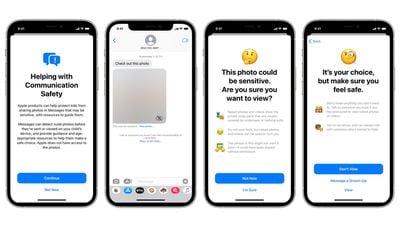
With the second beta of iOS 15.2, Apple is enabling Communication Safety in Messages for children. The feature is designed to scan incoming messages on children's devices for nudity, and it is opt-in and must be enabled by parents. It is limited to the accounts of children and is not the same as the CSAM functionality that Apple still has in development.
communication safety 1

Bugs

Apple says there are a few remaining bugs in the beta. Streaming in the Music app can cause higher CPU usage and faster battery drain, and users who import a verifiable vaccination record are not able to add it to the Wallet app at this time.

Macro Mode Toggle

iOS 15.2 adds a manual toggle for Macro mode, in the form of a flower icon that can be tapped to toggle Macro mode off when the camera is close to an object.

To get the option of the new toggle, users need to go to Settings, navigate to Camera, and turn off Auto Macro. Then, when close enough to an object, the toggle will appear automatically. Apple has also added new Preserve Settings for Auto Macro.

Guide Feedback

See a new feature in iOS 15.2 that's not listed here? Let us know in the comments.

Related Forum: iOS 15

Popular Stories

Apple Logo Zoomed

Tim Cook Teases Plans for Apple's Upcoming 50th Anniversary

Thursday February 5, 2026 12:54 pm PST by
Apple turns 50 this year, and its CEO Tim Cook has promised to celebrate the milestone. The big day falls on April 1, 2026. "I've been unusually reflective lately about Apple because we have been working on what do we do to mark this moment," Cook told employees today, according to Bloomberg's Mark Gurman. "When you really stop and pause and think about the last 50 years, it makes your heart ...
wwdc sans text feature

Apple Rumored to Announce New Product on February 19

Thursday February 5, 2026 12:22 pm PST by
Apple plans to announce the iPhone 17e on Thursday, February 19, according to Macwelt, the German equivalent of Macworld. The report, citing industry sources, is available in English on Macworld. Apple announced the iPhone 16e on Wednesday, February 19 last year, so the iPhone 17e would be unveiled exactly one year later if this rumor is accurate. It is quite uncommon for Apple to unveil...
Finder Siri Feature

Why Apple's iOS 26.4 Siri Upgrade Will Be Bigger Than Originally Promised

Friday February 6, 2026 3:06 pm PST by
In the iOS 26.4 update that's coming this spring, Apple will introduce a new version of Siri that's going to overhaul how we interact with the personal assistant and what it's able to do. The iOS 26.4 version of Siri won't work like ChatGPT or Claude, but it will rely on large language models (LLMs) and has been updated from the ground up. Upgraded Architecture The next-generation...
iOS 26

iOS 26.3 and iOS 26.4 Will Add These New Features to Your iPhone

Tuesday February 3, 2026 7:47 am PST by
While the iOS 26.3 Release Candidate is now available ahead of a public release, the first iOS 26.4 beta is likely still at least a week away. Following beta testing, iOS 26.4 will likely be released to the general public in March or April. Below, we have recapped known or rumored iOS 26.3 and iOS 26.4 features so far. iOS 26.3 iPhone to Android Transfer Tool iOS 26.3 makes it easier...
iphone 17 pro dark blue 1

iPhone 18 Pro Max Rumored to Deliver Next-Level Battery Life

Friday February 6, 2026 5:14 am PST by
The iPhone 18 Pro Max will feature a bigger battery for continued best-in-class battery life, according to a known Weibo leaker. Citing supply chain information, the Weibo user known as "Digital Chat Station" said that the iPhone 18 Pro Max will have a battery capacity of 5,100 to 5,200 mAh. Combined with the efficiency improvements of the A20 Pro chip, made with TSMC's 2nm process, the...

Top Rated Comments

simon3163 Avatar
56 months ago
So I can sit on a train and disable everyone’s AirTags ???!
Score: 9 Votes (Like | Disagree)
MaskedCarrot Avatar
56 months ago
"Always-On Dark Mode for CarPlay Maps App"

How about a toggle in Maps between light and dark mode on the phone.

I have my phone set to Dark Mode, but I can't stand how the Maps is always on Dark mode also unless I change the whole system to light mode. During the day, it's really hard to read the maps on the phone in Dark mode.

So it would be nice if Apple would put a toggle in their apps that let you toggle between Light and Darks modes independently of how you have iOS set.
Score: 7 Votes (Like | Disagree)
Prof. Avatar
56 months ago
After i die, can i set up an option to nuke all my data? On all my devices?
Score: 6 Votes (Like | Disagree)
840quadra Avatar
56 months ago

Display Repair Restriction Changes

Apple today told The Verge that it is introducing a software update ('https://www.geekwebguides.com/2021/11/09/apple-lifting-iphone-13-display-restrictions/') that will change an iPhone 13 policy that caused Face ID to be non-functional when repairs were made to a broken display. Apple has a microcontroller that pairs the iPhone 13 to its display, and when performing a display repair, the microcontroller must be paired to the display using Apple's tools.

Independent repair shops do not have access to those tools, and they were upset about being unable to easily perform display repairs. Apple is removing the microcontroller pairing requirement that disabled Face ID for iPhone 13 models with swapped displays, and code suggests that the change is in the iOS 15.2 beta.
This is AWESOME to hear! Horray Apple for properly reacting to this issue. As a legacy Apple device owner, I enjoy my ability to repair my, and friend's phones, Macs, and other equipment.

This is Awesome!
Score: 5 Votes (Like | Disagree)
bkaus Avatar
56 months ago

So I can sit on a train and disable everyone’s AirTags ???!
Sounds like you can find them. But I think the disable instructions involve removing the battery. So that gets awkward.
Score: 4 Votes (Like | Disagree)
LogicalApex Avatar
56 months ago

As I understood it you can only receive email sent to those addresses, forwarded to your Apple ID address, or one of your choice, but not reply from your randomly_generated_cupertino_solid_state@icloud.com? ?
You can reply from the hidden email. You cant initiate from it, but it sounds like that is changing in 15.2.
Score: 3 Votes (Like | Disagree)
















