

Those who use the Notes and Reminders apps will be pleased to hear that iOS 15 and iPadOS 15 bring some useful new features. The Notes app has enhanced functionality on the iPad with the Quick Note feature, while Reminders features better Siri integration and natural language support.
The guide below highlights the new features that you'll find in the Notes and Reminders apps in iOS 15.
Notes
The major new feature in the Notes app, Quick Note, is exclusive to the iPad, but Apple has added some general quality of life improvements and new features for those who share notes between multiple people.
Tags
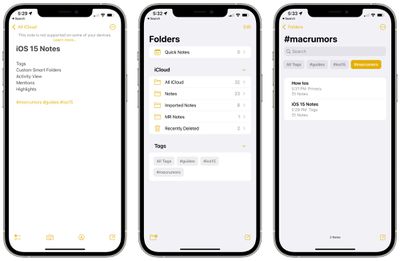
When writing a note, you can use hashtags to tag it with a word or a phrase for organizational purposes. You can use any tag you want, like #cooking, #plants, #work, #reminders, etc.
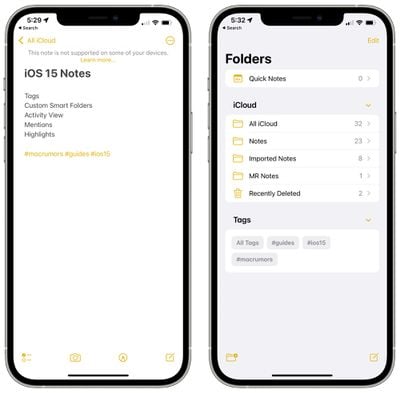
Once you create a tag, it's added to the "Tags" section in the Notes app overview. You can tap on any of the tag names to see all notes that contain that tag.
Custom Smart Folders
To go along with tags, there's a new Smart Folders option that you can use to create a folder to house tags.
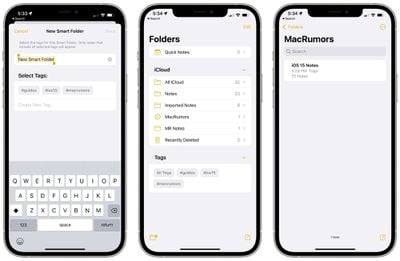
When creating a Smart Folder, you can choose a name and select which tags you want it to include. You can choose tags you've already created or add new tags that will be used in future notes.
Tags and Smart Folders offer a new way to organize your notes and it's a system that's quicker and more simple than manually organizing your notes into different folders.
Activity View
The Notes app has offered sharing features for some time now, but in iOS 15, Apple is making it easier to collaborate and work on a note with another person.
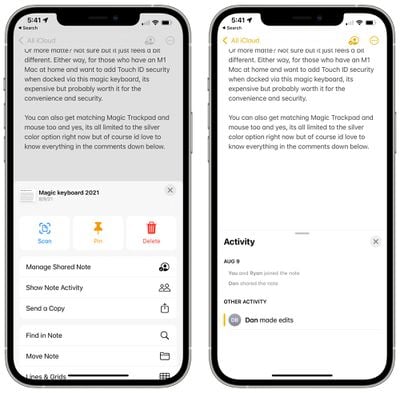
On any shared note, if you tap the three dots in the upper right hand corner or the little person icon, you can get to an Activity View that shows you the edits that each person has made and who has interacted with the note.
If you tap on "Highlights" or swipe right in a note, you can see an overview of the portions of the note that each person has contributed. If you have a gift list or grocery list, for example, you can see the items that each person involved with the note has added.
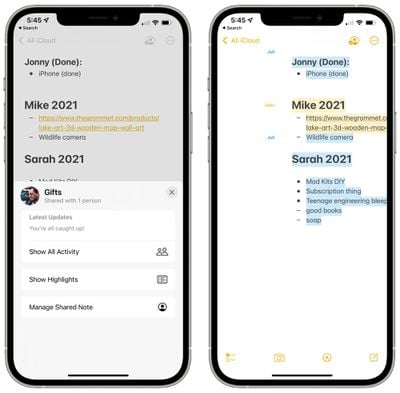
Edit times and dates are included, and each person's contributions are shown in a different color. When you open a note, you'll also see a notification of the changes that have been made since the last time you opened the note.
Mentions
In shared notes or folders, you can add an @ sign and type in the name of a person the note is shared with to bring their attention to it and to let them know if there's been an important update.
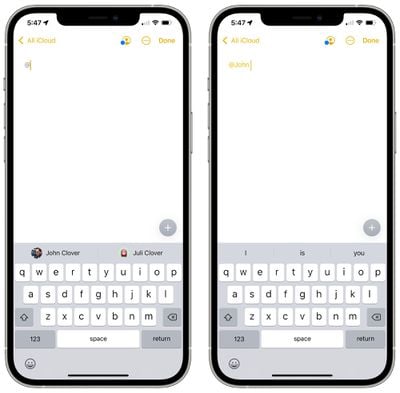
With an @mention, the person receives a notification about the note, which is similar to how @mentions work in other apps.
Quick Note - iPadOS 15
On the iPad, if you tap in the lower right corner with an Apple Pencil or swipe with a finger, you can bring up a Quick Note to jot down a thought or an idea.
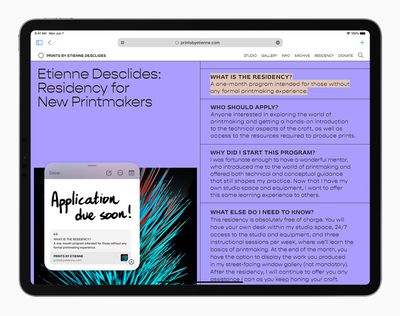
You can bring up a Quick Note from the Home Screen, in any app, when using Split View, or anywhere else in iPadOS.
You can type in a Quick Note or use the Apple Pencil to write, and Quick Note size can be adjusted or it can be collapsed down to the side of the iPad so you can bring it right back up when you need it.
Links from an app or website can be added to Quick Note for context, and when you go back to the same place in the app or on the site, a thumbnail of the Quick Note appears to remind you of your earlier note.
Quick Notes are all stored in the Quick Note folder in the Notes app and they can be viewed on the iPhone or a device that doesn't support Quick Note as a standard note.
Reminders
Some of the same new features that Apple added to Notes are also available in the Reminders app, along with a few useful bonus features like natural language support.
Tags
As with Notes, you can now add any hashtag to a reminder as a new organizational method. You can group up all reminders that are tagged with a certain word, such as "groceries," so it's a great way to split your reminders up without having to use different lists.
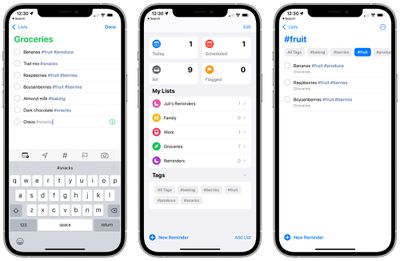
Once you've added at least one tag to a reminder, the Reminders app will have a new Tag Browser that aggregates all of the tag names. Tapping on a tag shows all of the reminders using that tag.
Custom Smart Lists
Smart Lists are how your different Reminder tags can be aggregated together. Smart Lists can be made to organize reminders based on tags, dates, times, locations, flags, and priority.
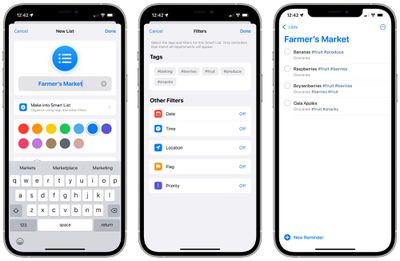
For tags, you can create lists that will aggregate multiple tags like #cooking and #groceries so you can create the organizational system that works for you.
Natural Language Support
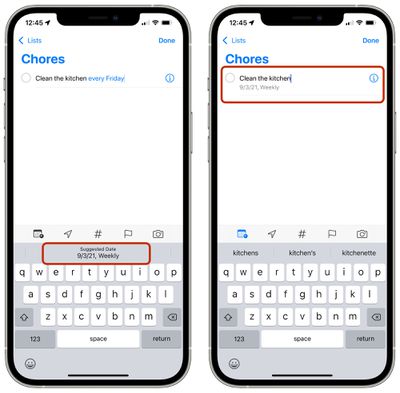
In iOS 15, you can use more natural phrases to create reminders more quickly. "Jog every other morning," will create an every other day reminder, for example. You can use phrases like "clean the kitchen every Friday" or "check the mail every day at 4:00 p.m." and the iPhone and iPad will accurately interpret what you're aiming for.
Deleting Completed Reminders
It's easier to delete completed roundups in iOS 15. In any list with a lot of reminders, you can tap on the new "Clear" label. Depending on how old the reminder is, you might see options for deleting all completed reminders, completed reminders older than a year, completed reminders older than six months, and completed reminders older than a month.
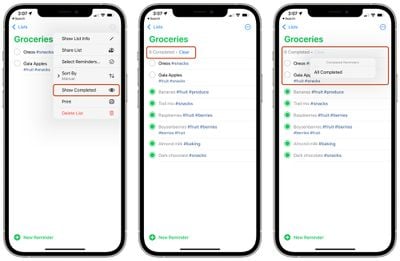
If your completed reminders aren't visible, you can tap on the icon with the three dots and then select "Show Completed." From there, the "Clear" option for removing finished reminders will be available.
Swiping to delete, a feature that was already available, can also be used to clear completed reminders, but the new feature for clearing all finished reminders is quicker.
Announce Reminders with Siri
When a reminder that you need to attend to pops up when you're wearing AirPods or compatible Beats headphones, Siri will announce it similar to notifications or incoming messages.

This feature can be toggled on in the Settings app under Siri and Search > Announce Notifications > Reminders.
Expand Suggested Attributes
Adding a tag is a new quick suggestion in the Reminders toolbar along with date, location, flag, and photo.
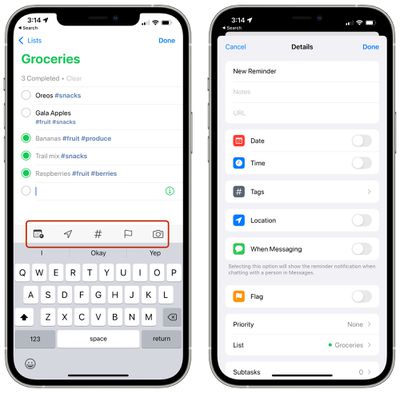
Tapping on the info icon also now provides tags as an option alongside date, time, location, flags, when messaging a certain person, and priority.
Guide Feedback
Have questions about the new Notes and Reminders changes in iOS 15, know of a feature we left out, or want to offer feedback on this guide? Send us an email here.






















