
Everything New With Translation in iOS 15: System-Wide Support, Live Text Translation and More - MacRumors
Skip to Content

Everything New With Translation in iOS 15: System-Wide Support, Live Text Translation and More

Major features like SharePlay, Safari updates, Photos changes, and more have received most of the attention when it comes to iOS 15 coverage, but there are some notable new translation-related features that are being introduced in the update.
iOS 15 Translate Feature
System-wide translation, Live Text translation, and other new options add useful new functionality to the iPhone. This guide highlights everything that's new with the Translate app and the translation features in iOS 15.

System-Wide Translation

Apple in iOS 14 introduced a new Translate app that can be used to translate conversations from one language to another, and also added translation features to Safari.
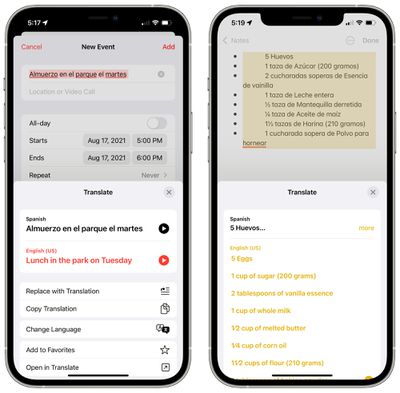
system wide translation ios 15
In iOS 15, translation capabilities are expanding further and can be used system-wide. You can select any text anywhere in iOS 15 and choose the new "Translate" option to translate it into your preferred language.

Live Text

iOS 15 adds a Live Text feature that lets your iPhone detect text in any image or photo on your device. You can select text in images and it works like any other text on your iPhone.
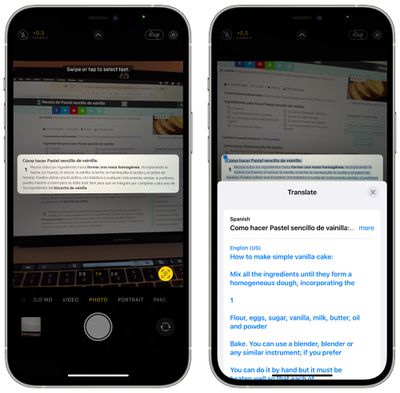
live text translation ios 15
You can copy text, paste text, and use the built-in system-wide translation feature to translate text. So if you're in another country and need to read a sign or a menu in a foreign language, you can snap a quick picture, highlight the text, and choose the translate option to see just what it says.

Live Text can be selected and translated in ‌Photos‌, screenshots, Quick Look, Safari, and even live previews with the Camera app.

Translate App

In addition to the system-wide translation feature, Apple has made several improvements to the dedicated Translate app, which is designed for communicating with someone who speaks another language.

Conversation Updates

The Translate app's conversation feature has been updated to make it easier to get into conversation mode. Just tap on the Conversation tab in landscape or portrait view, which is located at the bottom of the Translate app.
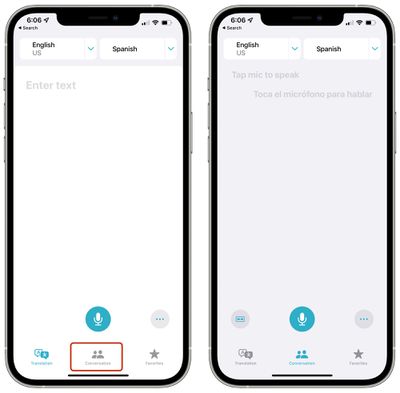
translate conversation tab ios 15
Chat bubbles have been added to the conversation mode so that it's easier to follow along with the chat.

Auto Translate

The Translate app is now able to auto translate speech without the need to tap on the microphone button when in conversation mode.
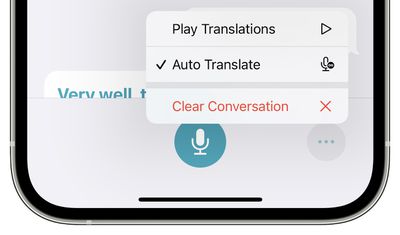
translate ios 15 auto translate
It automatically detects when you start speaking and when you stop, so the other person can just respond without the need for interacting with the iPhone.

Face to Face View

The conversation view has a face to face option so that each person participating in the conversation through the Translate app can see their own side of the chat.
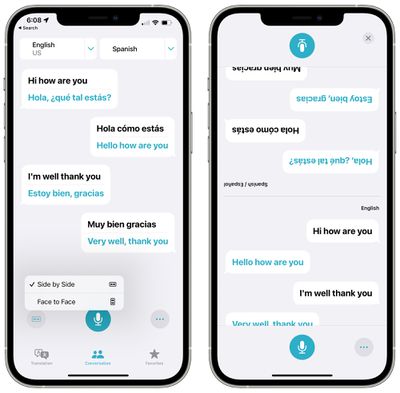
translate face to face mode ios 15

Language Selection Improvements

Apple has made it easier to select languages through drop-down menus.
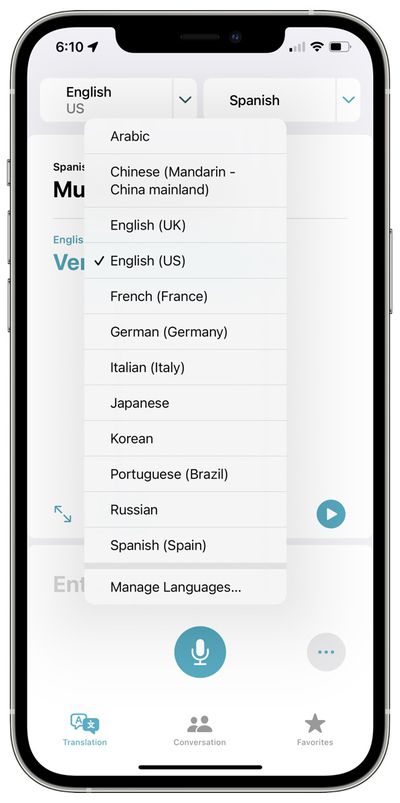
ios 15 translate app language drop down

Guide Feedback

Have questions about the updated Translate app features in iOS 15, know of a feature we left out, or want to offer feedback on this guide? Send us an email here.


Related Forum: iOS 15

Popular Stories

iOS 26

iOS 26.4 Adds Two New Features to CarPlay

Tuesday March 24, 2026 1:55 pm PDT by
iOS 26.4 was released today, and it includes a couple of new features for CarPlay: an Ambient Music widget and support for voice-based chatbot apps. To update your iPhone 11 or newer to iOS 26.4, open the Settings app and tap on General → Software Update. CarPlay will automatically offer the new features so long as the iPhone connected to your vehicle is running iOS 26.4 or later....
Apple Business hero

Apple Unveils 'Apple Business' All-in-One Platform

Tuesday March 24, 2026 8:53 am PDT by
Apple today announced Apple Business, a new all-in-one platform that unifies device management, productivity tools, and customer outreach features. The service is designed to be a consolidated replacement for several of Apple's existing business-focused offerings, including Apple Business Essentials, Apple Business Manager, and Apple Business Connect. It provides organizations with a single...
AirPods Pro Firmware Feature

Apple Releases New Firmware for AirPods Pro 3, AirPods Pro 2 and AirPods 4

Tuesday March 24, 2026 12:31 pm PDT by
Apple today released new firmware for the AirPods Pro 2, AirPods Pro 3, and the AirPods 4. The firmware has a version number of 8B39, up from 8B34 on the AirPods Pro 3, 8B28 on the AirPods Pro 2, and 8B21 on the AirPods 4. There is no word on what's included in the firmware, but Apple has a support document with limited notes. Most updates are limited to bug fixes and performance...

Top Rated Comments

60 months ago
Does it translate America into ‘sensible’, ie: the rest of the world?
MM/DD/YYYY
fluid ounces
horse power
pounds per square inch
Fahrenheit
miles per hour

OMG its still the 1800’s in the USA, aliens take this primitive race and bring them into 2021.
Score: 17 Votes (Like | Disagree)
60 months ago
eh?
some twisted logic you go there dude,
days last 12 hours,
months 30 days,
years 365 days


Yep, water, as a reference, it freezes at 0C and boils at 100C, okay, every country in the world uses Celsius, one country does' not, must be logical right, the majority must be doing it all wrong ahaha

Attachment Image
Score: 8 Votes (Like | Disagree)
60 months ago

MM/DD is more practical, it’s like putting the hours before the minutes, you are grouping what matters most first.
It’s more practical for you. Not for me, though. In Danish we say “the thirteenth of november”, not “november thirteen”. For computers, YMD is more practical at times, but not really for humans. It’s cultural and subjective.


Meanwhile Fahrenheit is more practical than Celsius.
It’s more practical for you. Not for me, though. Either would work, but I like having round number such as 0 and 100 mean sensible things. Especially 0, since we get frost here.
Score: 7 Votes (Like | Disagree)
60 months ago
But still maps can’t give directions in a language other then the phone language. (Which it could do until iOS 13). Loads of people have the phone set to English. (For Siri), but want directions in their native language. Ever hear American Siri try try to give directions for Dutch streets? It’s hilarious, but it doesn’t work very well. every other navigation tool on iOS does it. But not maps.
Score: 4 Votes (Like | Disagree)
60 months ago
Well I guess if they still dont include Polish I’ll just have to keep using google translate.
Surely if they are improving the app they can add some more languages?
Score: 4 Votes (Like | Disagree)
60 months ago

The system in which you grew up is the one that makes sense to you.
To be fair, I would say that’s true unless you are a scientist or engineer, in which case the imperial system is gibberish no matter what.
Score: 3 Votes (Like | Disagree)















