

With iOS 16 and iPadOS 16, Apple has added a number of improvements to the Mail app to bring it in line with competing email apps. The Mail app includes search updates, an undo send option, and tools for getting reminders about emails that you need to follow up on, plus more.
This guide covers everything that you need to know about the Mail app in iOS 16, available now, and in iPadOS 16, coming in October.
Improved Search
Search in the Mail app has been improved and you'll now see a wider range of suggestions when you start typing in a search term. You'll see more relevant email messages come up, and Apple also says that search corrects typos and uses synonyms for search terms.
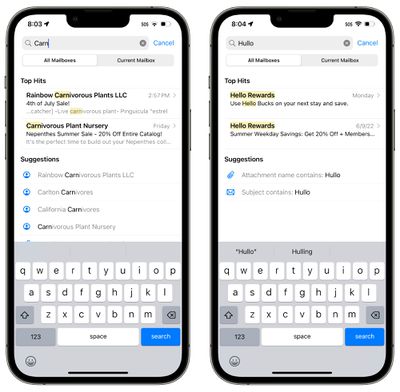
It's not significantly different from the iOS 15 search function, but it does make search quicker, more accurate, and more intuitive to use.
Improved search is available for all users, while the typo correction feature is available in English (Australia, Canada, India, Singapore, UK, and United States).
Undo Send
After you send an email in iOS 16 or iPadOS 16, you have a 10 second period in which to unsend the email if you make a mistake. 10 seconds is shorter than the amount of time that other mail apps like Gmail give you to unsend an email (30 seconds), but it's better than no unsend option at all.
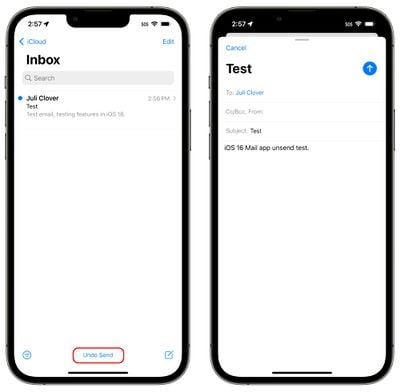
Once you send an email in iOS 16, you'll see an "Undo Send" button at the bottom of the interface in the Mail app. You'll need to tap it within 10 seconds to unsend the email, which takes you back to the compose interface. From there, you can correct your error and resend or delete the email entirely.
Scheduled Send
When you're ready to send an email that you've written, you can schedule a time to send it, which is a new feature in iOS 16. To do so, long press on the send icon (the blue arrow) and then select an option.
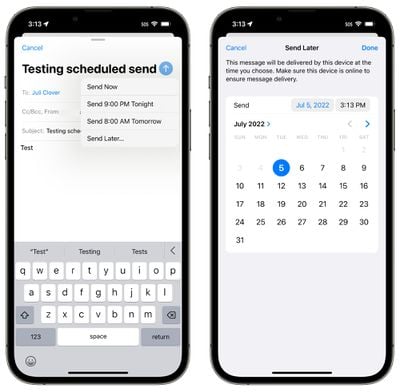
Apple has preset options that include "Send Now," "Send 9:00 PM Tonight," and "Send 8:00 AM Tomorrow." If those preset times don't work for you, you're able to tap on "Send Later..." and choose any date or time that you want.
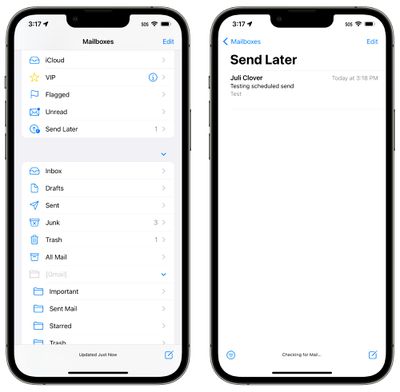
Before it goes out, the email will be listed in a "Send Later" mailbox that's listed under options like Flagged and Unread. You can tap into this email inbox to see the messages you have scheduled and what time they're scheduled for.
Mail Reminders
If you opened up an email and don't have the time to respond to it, you can have the Mail app remind you to get back to it later. Apple allows you to select a date and time to have messages resurface in your inbox so nothing goes missing.
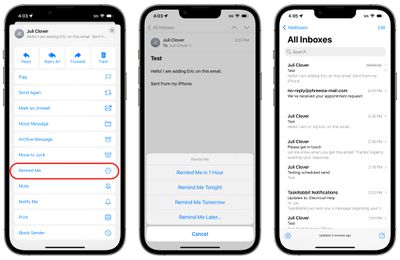
To use the Remind Me feature, tap the Reply button on any email in your inbox. From there, scroll down to "Remind Me" and tap it. Apple will give you the preset options to be reminded about it in an hour, "tonight," and "tomorrow." You can also for the "Remind Me Later..." option that lets you set a specific date and time to get a reminder to respond.
When the reminder time rolls around, the Mail app will move the email to the top of your inbox with a "Remind Me" label so you can respond.
Follow Up
Apple has added a "Follow Up" feature that is designed to move sent email messages to the top of your inbox so you can send a follow-up if you don't hear back from the person you sent the email to.
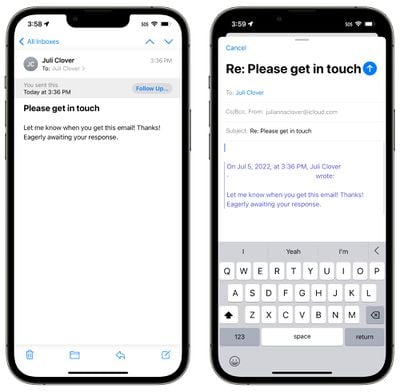
On certain emails in your inbox where you've indicated that you're awaiting a response, you'll see a "Follow Up" option. Tapping it will take you to the compose interface with an email addressed to the person that you're waiting to hear from.
Notifications for Missing Recipients and Attachments
If you mention an attachment or a person that you are planning to include on an email in the body of the email and then forget to add that information, the Mail app will let you know.
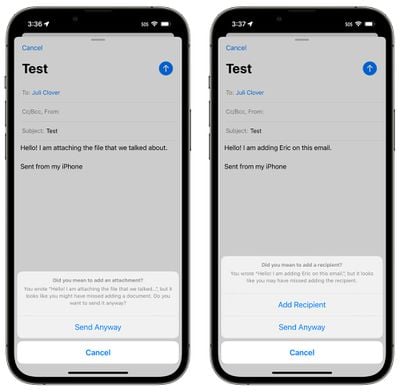
This feature brings the Mail app in line with competing mail services like Gmail, informing you if you forget an attachment or to add someone you meant to add to an email.
Rich Links
Links to websites, songs in Apple Music, and more are displayed as rich links in iOS 16, rather than plaintext. This means if someone sends you a link in the mail app, you can see a preview of the contents right in the message without having to click on the link.
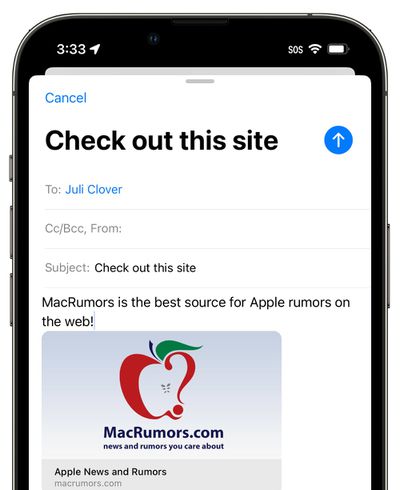
Apple already uses rich links in apps like Messages, so the iOS 16 update brings the Mail app in line with Apple's other apps.
Focus Filters for Mail
Apple in iOS 16 added a new Focus option called Filters. Filters are designed to allow users to filter out content within apps, displaying a specific Mail account or Calendar, if you have multiple. When you use a Focus with a filter set, the app with the filter will only show what you've selected, hiding everything else.
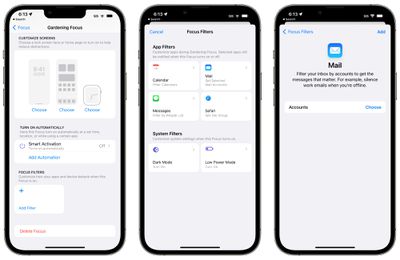
For the Mail app, you can choose any Mail account to associate with a Focus. With a filter set, when you're in that Focus, the Mail app will only show the accounts you've selected. It's useful if you want to filter out personal emails while working, and vice versa, for example.
Guide Feedback
Have questions about the iOS 16 Mail app, know of a feature we left out, or want to offer feedback on this guide? Send us an email here.


















