iOS 17.3 Beta: All the New Features So Far

Apple started testing the iOS 17.3 and iPadOS 17.3 betas in December, and while we are not expecting these updates to be as feature rich as iOS and iPadOS 17.2, there are some notable features that have been found so far.
iOS 17
This guide aggregates everything that is coming in the iOS 17.3 update, and we'll update it throughout the beta testing period.

Stolen Device Protection

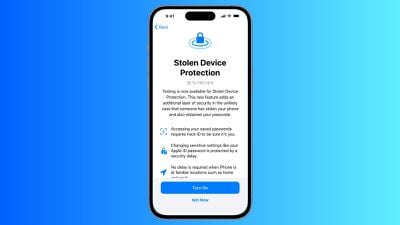
Earlier this year, there were news reports about a slate of iPhone thefts where the thief spied on a victim to learn the device passcode before stealing the phone, leading to drained bank accounts and an untraceable ‌iPhone‌.

ios stolen device protection
As a solution, Apple introduced Stolen Device Mode in iOS 17.3 to add extra security. If someone should obtain both your ‌iPhone‌ and your passcode, this feature prevents total catastrophe. With Stolen Device Mode enabled, accessing passwords in iCloud Keychain, turning off Lost Mode, erasing content, and making purchases in Safari requires biometric authentication with Face ID or Touch ID.

Certain actions such as changing an Apple ID password require ‌Face ID‌ and have a one-hour security delay. So if you (or someone else) tried to change your ‌Apple ID‌ login, you would need both ‌Face ID‌ authentication and then an hour wait period before the password could be updated. These wait periods are waived when you are in a trusted location like home or work.

As outlined in our report on the feature, here are actions that require biometric authentication when the Stolen Device Protection is activated:

  • Viewing/using passwords or passkeys saved in ‌iCloud‌ Keychain
  • Applying for a new Apple Card
  • Viewing an ‌Apple Card‌ virtual card
  • Turning off Lost Mode
  • Erasing all content and settings
  • Taking certain Apple Cash and Savings actions in Wallet
  • Using payment methods saved in Safari
  • Using your ‌iPhone‌ to set up a new device

Note that these actions do not have a passcode backup, so you can't use a passcode to skirt ‌Face ID‌ or ‌Touch ID‌. Actions that require biometric authentication and have a one-hour security delay include the following:

  • Changing your ‌Apple ID‌ password
  • Updating select ‌Apple ID‌ account security settings, including adding or removing a trusted device, trusted phone number, Recovery Key, or Recovery Contact
  • Changing your ‌iPhone‌ passcode
  • Adding or removing ‌Face ID‌ or ‌Touch ID‌
  • Turning off Find My
  • Turning off Stolen Device Protection

Stolen Device Protection is available on all iPhones that are able to run iOS 17, which includes the ‌iPhone‌ XS and newer. It is an opt-in feature that can be turned on in the Settings app by going to ‌Face ID‌ & Passcode and toggling on Stolen Device Protection.

Collaborative Apple Music Playlists

Apple first tested collaborative Apple Music playlists in iOS 17.2, but the feature was removed before the software was released.
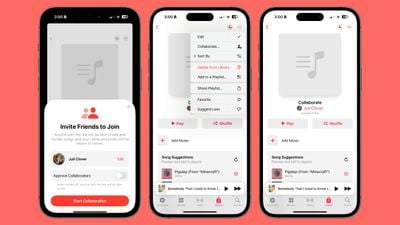
apple music collaborative playlists
Collaborative ‌Apple Music‌ playlists are back in the iOS 17.3 beta, suggesting Apple just needed a little bit more time to work out the kinks.

In iOS 17.3, you can take any of your existing playlists or create a new one and then invite others to join in to add songs and listen to the playlist. You can invite friends, family members, and others who share your musical preferences, and there doesn't appear to be a limit on how many people can contribute.

We have a MacRumors collaborative music playlist available for those who want to join in and share music with other MacRumors readers.

To use the collaboration feature, go to a playlist in the ‌Apple Music‌ app and then tap on the person icon. You will be able to generate a link that you can send to others, and everyone who is invited can access the playlist. There is an option to approve each person that joins, and leaving this off just opens it up to anyone with the link.

The person who created the playlist can remove people, remove songs, and turn off collaboration at any time.

Apple in iOS 17.3 added a neat emoji reaction feature that allows listeners to add an emoji to any song that's playing to express their feelings about it. There are standard quick access emoji options like a heart and thumbs up, but with the "+" button, any emoji can be added.
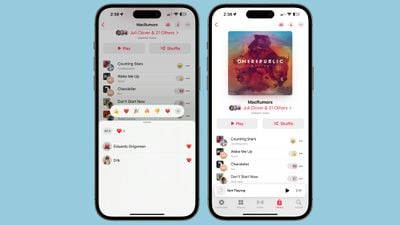
apple music collaborative playlist emoji
When you're listening to a song in the playlist that has emoji reactions, those emoji animate as the song begins to play.

Release Date

iOS 17.3, iPadOS 17.3, macOS 14.3, tvOS 17.3, and watchOS 10.3 are all expected to see a public release sometime around January. Beta testing will be slightly delayed by the Christmas and New Year's holidays.


Related Forums: iOS 17, iPadOS 17

Popular Stories

Apple Logo Zoomed

Tim Cook Teases Plans for Apple's Upcoming 50th Anniversary

Thursday February 5, 2026 12:54 pm PST by
Apple turns 50 this year, and its CEO Tim Cook has promised to celebrate the milestone. The big day falls on April 1, 2026. "I've been unusually reflective lately about Apple because we have been working on what do we do to mark this moment," Cook told employees today, according to Bloomberg's Mark Gurman. "When you really stop and pause and think about the last 50 years, it makes your heart ...
wwdc sans text feature

Apple Rumored to Announce New Product on February 19

Thursday February 5, 2026 12:22 pm PST by
Apple plans to announce the iPhone 17e on Thursday, February 19, according to Macwelt, the German equivalent of Macworld. The report, citing industry sources, is available in English on Macworld. Apple announced the iPhone 16e on Wednesday, February 19 last year, so the iPhone 17e would be unveiled exactly one year later if this rumor is accurate. It is quite uncommon for Apple to unveil...
Finder Siri Feature

Why Apple's iOS 26.4 Siri Upgrade Will Be Bigger Than Originally Promised

Friday February 6, 2026 3:06 pm PST by
In the iOS 26.4 update that's coming this spring, Apple will introduce a new version of Siri that's going to overhaul how we interact with the personal assistant and what it's able to do. The iOS 26.4 version of Siri won't work like ChatGPT or Claude, but it will rely on large language models (LLMs) and has been updated from the ground up. Upgraded Architecture The next-generation...
iOS 26

iOS 26.3 and iOS 26.4 Will Add These New Features to Your iPhone

Tuesday February 3, 2026 7:47 am PST by
While the iOS 26.3 Release Candidate is now available ahead of a public release, the first iOS 26.4 beta is likely still at least a week away. Following beta testing, iOS 26.4 will likely be released to the general public in March or April. Below, we have recapped known or rumored iOS 26.3 and iOS 26.4 features so far. iOS 26.3 iPhone to Android Transfer Tool iOS 26.3 makes it easier...
iphone 17 pro dark blue 1

iPhone 18 Pro Max Rumored to Deliver Next-Level Battery Life

Friday February 6, 2026 5:14 am PST by
The iPhone 18 Pro Max will feature a bigger battery for continued best-in-class battery life, according to a known Weibo leaker. Citing supply chain information, the Weibo user known as "Digital Chat Station" said that the iPhone 18 Pro Max will have a battery capacity of 5,100 to 5,200 mAh. Combined with the efficiency improvements of the A20 Pro chip, made with TSMC's 2nm process, the...

Top Rated Comments

ericesque Avatar
28 months ago

Allow me to MOVE photos to different albums instead of making a copy elsewhere. So dumb!!
Albums aren’t like file folders. Albums are just a way to view a set of photos. Similar to the way Tags work. So you also don’t have copies in each album. You can think of it as the source image is “tagged” as being part of multiple albums.
Score: 11 Votes (Like | Disagree)
Englishmike2 Avatar
28 months ago

But that’s dumb in my opinion. For instance my dog. Say I take 200 pics of him and I want to create an album called “Tralfaz”. I should be able to move all 200 pics to that album and that’s the only place they appear. Instead, Apple has me duplicating images/videos to another folder taking up double the space. Kind of like mail. I have two accounts, I can move mail to one or the other and if I go all inboxes, I see it all. Rename “Recents” to all images and let me make albums. Android has it right.
Doesn’t use double the space.
Score: 6 Votes (Like | Disagree)
gank41 Avatar
28 months ago

How about they fix iCloud fort starters ... dodgy, misrepresented & unethical money grabbing POS.
What’s wrong with iCloud?
Score: 5 Votes (Like | Disagree)
Iwavvns Avatar
28 months ago

Oh look here….a guy that never wants something to work differently than it does. Just buys and accepts [emoji849]
Well, first of all I research products before I buy them. And, if they don’t work as expected after I start using them then I change my habits to work with the product or I take it back and find something else, crying is not going to fix the problem.
Score: 4 Votes (Like | Disagree)
Iwavvns Avatar
28 months ago

But that’s dumb in my opinion. For instance my dog. Say I take 200 pics of him and I want to create an album called “Tralfaz”. I should be able to move all 200 pics to that album and that’s the only place they appear. Instead, Apple has me duplicating images/videos to another folder taking up double the space. Kind of like mail. I have two accounts, I can move mail to one or the other and if I go all inboxes, I see it all. Rename “Recents” to all images and let me make albums. Android has it right.
What would happen if you dropped all of your expectations and just used the service the way it actually works? it sounds like this would be less stressful, no?
Score: 4 Votes (Like | Disagree)
slomtbr Avatar
28 months ago

I’d wish there would be a ”lost mode” in addition to Stolen mode…
https://support.apple.com/guide/icloud/use-lost-mode-mmfc0f0165/icloud
Score: 4 Votes (Like | Disagree)