

Apple introduced several new safety-focused features in iOS 17, including measures to keep you safe when you're traveling and to prevent you from seeing images you don't want to see.
This guide highlights all of the safety functions that Apple added to iOS 17, and it accompanies our iOS 17 privacy and security guide.
Sensitive Content Warnings
With Sensitive Content Warnings, incoming files, videos, and images are scanned on-device and blocked if they contain nudity. It is a function that will put a stop to unsolicited nude photos and similar content.
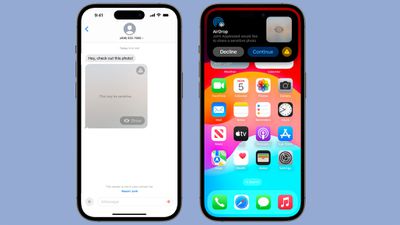
The opt-in blurring can be applied to images in Messages, AirDrop, Contact Posters for the Phone app, FaceTime messages, and third-party apps. This is separate from the Communication Safety features implemented for children, and is designed for people of all ages.
All nudity will be blocked by default if the feature is enabled, but it can be viewed by tapping on the "Show" button. Sensitive Content Warnings can be enabled in the Settings app.
- Open up the Settings app.
- Choose Privacy & Security.
- Tap on Sensitive Content Warning.
- Tap to toggle on Sensitive Content Warning.
You can turn on Sensitive Content Warnings for specific services, including AirDrop, Messages, and Video Messages. All detection of images is done on device, and there are Safety Resources that can be accessed.
Messages Check In
Messages Check In is a feature that lets you inform other people when you're going somewhere so they can keep tabs on you and make sure that you get to that location safely.
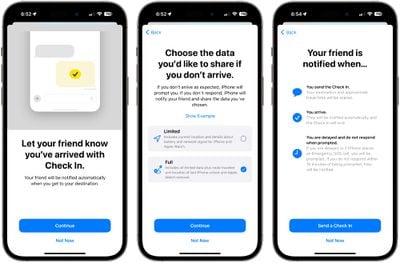
It tells a friend or family member your destination and the time that you're meant to be there, and if you don't check in at the proper time, they can ping you to see what's going on and get access to your location in case of emergency. Here's how to use it:
- Open up the Messages app.
- Open the conversation with the person you want to use Check In with.
- Tap on the "+" button next to the text input bar.
- Tap on More.
- Tap on Check In.
- Tap on Continue.
- Follow the prompts to start the feature.
With Check In, a friend or family member will be notified of your destination and approximate travel time, with another automatic notification sent when you reach your destination. So if you're going from a friend's house to your house late at night, you can set up Check In and your friend will get an alert when you make it home.
If you are not making progress toward your destination, you'll be prompted and will have 15 minutes to respond on your iPhone. If you don't respond, your friend will get an alert.
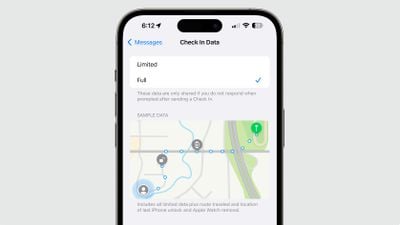
There are two data sharing options for Check In. With "Limited," current location, details about battery level, and network signal for your iPhone and Apple Watch are shared. With "Full" data selected, all of that information will be shared along with route traveled and location of last iPhone unlock and Apple Watch removal.
Check In requires your friends or family members to be running iOS 17 in order to get your alerts.
Communication Safety
Apple last year introduced Communication Safety, an opt-in feature that warns children when sending or receiving photos that contain nudity. It blurs nude photos and provides children with helpful resources and suggests that they get in touch with a trusted adult.
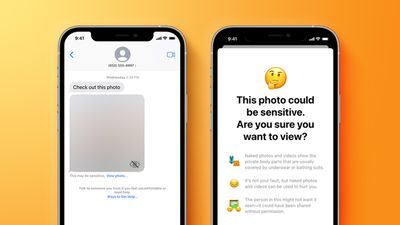
Communication Safety in iOS 17 is expanding worldwide, so it will be available in more countries than it was previously. It will be turned on by default for children under the age of 13 who are signed in to their Apple ID and who are part of a Family Sharing group.
Parents can enable it for older teens as well, with the option to turn it on available in the Settings app under Screen Time.
In addition to being available worldwide, Communication Safety's protections will expand to AirDrop, the systemwide photo picker, FaceTime messages, and third-party apps in addition to the Messages app.
Offline Maps
The Maps app works offline in iOS 17, providing access to turn-by-turn directions and information for the area that you're in even if you do not have a cellular or Wi-Fi connection.
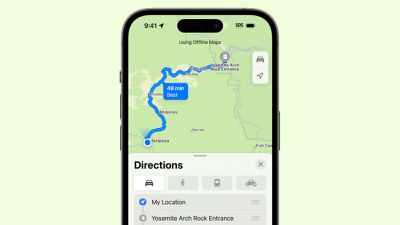
Offline Maps is useful if you're planning to travel somewhere remote, such as when hiking or traveling in rural areas. Downloading a map can be done by putting in a location, tapping on the "More" button, and then choosing the "Download Map" option.
You can select the size of the area that you want to save, and multiple areas can be downloaded. You can manage Map downloads by opening up the Maps app, tapping on your profile picture, and selecting Offline Maps.
Maps can be updated, deleted, renamed, and resized, and you can download new maps from this interface too. Downloads can be set to automatically update, and there is an option to use offline maps even when a connection is available.
Follow Up Medication Reminders
The Medications section in the Health app can send a follow up reminder if you haven't marked a medication as taken 30 minutes after the initial notification.
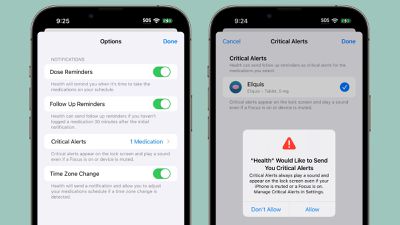
Apple has also added a Critical Alerts feature for important medications, ensuring that notifications appear on the Lock Screen and play a sound even if the iPhone is muted or a Focus mode is turned on.
Read More
More information on the additions in the iOS 17 update can be found in our iOS 17 roundup.






















