iOS 18: What's New With the Maps App - MacRumors
Skip to Content

iOS 18: What's New With the Maps App

Almost all of Apple's built-in apps are getting new features in iOS 18, and that includes the Maps app. The Maps app isn't getting any fun new AI additions, but Apple does have some useful changes in store.

Generic iOS 18 Maps Feature

Hiking Trails

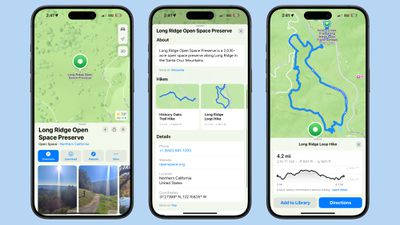
Apple added topographic maps to the Apple Watch last year, and now detailed topographic maps are also coming to the iPhone. The Maps app features detailed trail networks and hikes, including all 63 U.S. national parks.
ios 18 maps hikes
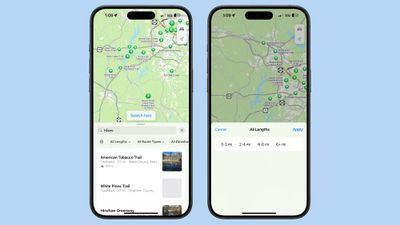
You can do a search for "hikes" or "hiking routes" in the Maps app to see nearby trail options, with Apple including hike length, elevation, ratings, and other details.

Hikes can be filtered by length, route type (loop, point to point, or out and back), and elevation, and can be saved for offline access.
ios 18 maps hike filters
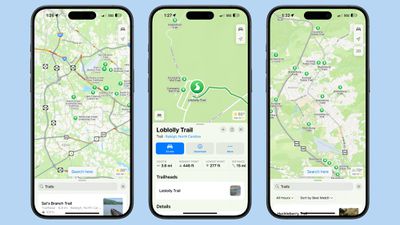
You can zoom into hiking areas to see specific trails, or search for trails. If you tap on a trail, Apple has information that includes length, highest point, lowest point, and distance. You can also see a full overview of the trail's path and get lengths for each section.
ios 18 maps find trails
Trails and hikes are separate entities in the Maps app. A search for hikes essentially brings you to the general area where specific trails are located, and you can zoom in with the Maps app to find the trail you want to take.

Custom Routes

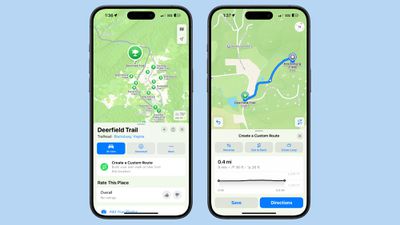
Apple Maps supports custom routes in iOS 18, so you can plan out a specific hiking route that you want to take. At a trailhead, you can tap on the "Create a Custom Route" option to initiate the custom routing experience.
ios 18 maps custom route
From there, you tap on the map to begin setting points for your route, and the Maps app will provide length and elevation details. You can also have the Maps app finish a route automatically by tapping on the Reverse, Out and Back, or Close Loop options.
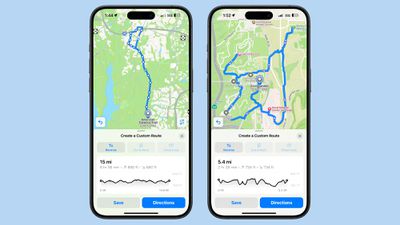
ios 18 maps custom route 2
For hikes and trails, the Maps app will not let you create an unsafe route that does not stick to existing trails, so it's difficult to make a dangerous map out into the middle of nowhere.

Route creation is not limited to hikes and trails. You can add a pinned spot to a map, tap on the "More" option and choose Create Custom Route.

Search Here

Apple made it easier to search in locations you might be thinking of visiting or those you want to explore by adding a "Search here" button. If you look up a place, such as San Diego, and then tap on search, it'll search in the area that's on your screen rather at your physical location.

If you search for something and then pan around the map, the search will update reliably in the new location. When you zoom in, you'll see a dedicated "Search here" button that gives you more control over where you want to search.

Saving Favorites

If you find a favorite hike, trail, or custom route, you can save it to your Library to save it for later. To do so, find the relevant hike and then tap on the "Add to Library" button.
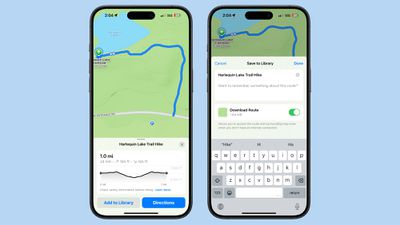
ios 18 maps trail save library
You can rename hikes and add specific information that you might want to revisit later, as well as download the route for offline usage.

Tapping on the "+" button when viewing any location on the map, including a hike, will also add that location to the library.

Favorites are stored in the Maps app and can be accessed by tapping on your profile picture and choosing the Library section.

Library

All saved content from the Maps app including locations, routes, guides, and pins are stored in the new Library section of the Maps app rather than in separate sections as in iOS 17.
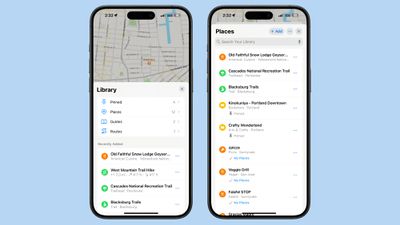
ios 18 maps library
The Library also shows all of your Recently Added content.

Notes

You can tap on any place in the Maps app and select the Add a Note option from the menu. From there, you can make a note about what you want to remember about a location.
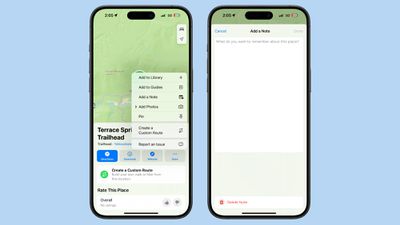
ios 18 maps add a note
Notes are private and are kept on-device. They are only visible to the note creator.

Read More

Additional information on new features that Apple has added in iOS 18 can be found in our iOS 18 roundup.


Related Forums: iOS 18, iPadOS 18

Popular Stories

iOS 26

iOS 26.4 Adds Two New Features to CarPlay

Tuesday March 24, 2026 1:55 pm PDT by
iOS 26.4 was released today, and it includes a couple of new features for CarPlay: an Ambient Music widget and support for voice-based chatbot apps. To update your iPhone 11 or newer to iOS 26.4, open the Settings app and tap on General → Software Update. CarPlay will automatically offer the new features so long as the iPhone connected to your vehicle is running iOS 26.4 or later....
Apple Business hero

Apple Unveils 'Apple Business' All-in-One Platform

Tuesday March 24, 2026 8:53 am PDT by
Apple today announced Apple Business, a new all-in-one platform that unifies device management, productivity tools, and customer outreach features. The service is designed to be a consolidated replacement for several of Apple's existing business-focused offerings, including Apple Business Essentials, Apple Business Manager, and Apple Business Connect. It provides organizations with a single...
AirPods Pro Firmware Feature

Apple Releases New Firmware for AirPods Pro 3, AirPods Pro 2 and AirPods 4

Tuesday March 24, 2026 12:31 pm PDT by
Apple today released new firmware for the AirPods Pro 2, AirPods Pro 3, and the AirPods 4. The firmware has a version number of 8B39, up from 8B34 on the AirPods Pro 3, 8B28 on the AirPods Pro 2, and 8B21 on the AirPods 4. There is no word on what's included in the firmware, but Apple has a support document with limited notes. Most updates are limited to bug fixes and performance...

Top Rated Comments

BreuerEditor Avatar
21 months ago
I would really love to see custom driving routes. My parents, in their older ages, don’t like taking highways that much, but avoiding all highways results in extra turns or roads they’re not familiar with. I would love the ability to essentially record your driving route and make that your preferred method.
Score: 13 Votes (Like | Disagree)
21 months ago
Really needs to be noted in this article that the custom route feature is NOT specific to walking/hiking. It also applies for driving routes as well where it is VASTLY more useful and more widely appreciated.

Not sure why this was written as if it was specific to the hiking feature. C’mon macrumors editors!!
Score: 11 Votes (Like | Disagree)
Razorpit Avatar
21 months ago
Custom driving routes, I remember having that functionality back in 2002 with my Garmin. 😄
Score: 9 Votes (Like | Disagree)
21 months ago
STILL no Calendar integration for adding future transit trips to your schedule?!?!? Google Maps has had this for like a decade!!
Score: 9 Votes (Like | Disagree)
ericg301 Avatar
21 months ago

STILL no Calendar integration for adding future transit trips to your schedule?!?!? Google Maps has had this for like a decade!!
and yet google maps doesn't know that if i get in the car at 10AM, i'm most likely heading to my 10:30 appointment.
Score: 8 Votes (Like | Disagree)
21 months ago
1. Still no Music integration in Maps. Le sigh. I just want to be able to see the currently playing song, be able to pause/play, and skip to the next song. Google handles this really well.

2. Apple has been doing better about listing businesses but they need to step it up. I can zoom in on a strip mall with say 10 stores and Apple Maps will have one listed. So then I have to use Google Maps which will list everything. Businesses tend to not register with Apple (which is their fault) but Apple needs to pick up the slack here.
Score: 6 Votes (Like | Disagree)