

The Phone app doesn't often get updated, but with iOS 18 and Apple Intelligence, it's getting a major overhaul that includes one of the best new features in the iOS 18 software.

This guide highlights everything new with the Phone app.
Record Phone Calls
After placing or answering a call on an iPhone running iOS 18.1, you can initiate a recording that gives you an audio copy of the call.
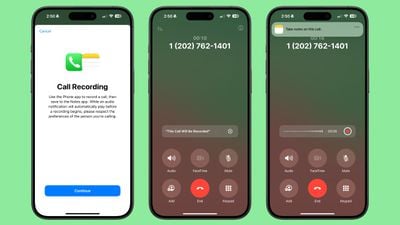
- Open the Phone app.
- Make a call.
- Tap on the record button in the top left corner to start a recording.
When you tap on the record button, everyone on the call is informed that the call is being recorded through an audible message. The message repeats for each person that is recording, so if two iPhone users are on a call and both record, the message will play twice.
There is no confirmation dialogue when a call is being recorded, so someone who does not want to be recorded would need to hang up the call as there is no opt out.
While the call is in progress, audio is recorded and saved to the Notes app for later access. When you open up the Notes app, you'll see a Call Recording labeled with the date and the time with an option to tap on Play to repeat the call or to tap into the note for more information.
Transcribe and Summarize Phone Calls
Calls that are saved in the Notes app are automatically transcribed, so you can see a full transcription of what was said on the call. You can get to a transcription by tapping into a Call Recording note.
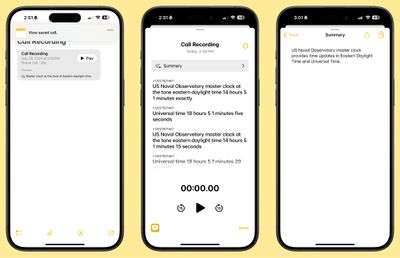
As you listen to the call, the transcript will update so you can read along with what's being said.
Transcriptions have a "Summary" button so you can get a quick summary of what was said in the call, plus there is a search option for searching for key words and phrases. Note that the Summary function requires an Apple Intelligence-compatible device, but recording and transcribing are general features available to everyone.
Transcripts can be added to a different note, or copied, and the audio can be saved to the Files app or shared.
Search Call History
In iOS 18, Apple added a search feature for the Recents tab, which means you can now search through all of your incoming and outgoing calls and voicemails.
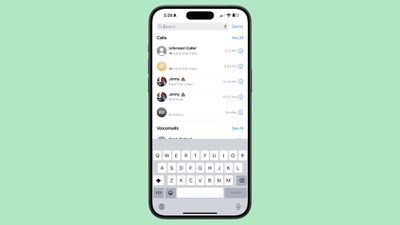
- Open up the Phone app.
- Tap on the Recents tab.
- Search for the person or number you're looking for with the search bar at the top of the interface.
You can type in phone numbers or names to see calls that have been placed, received, or missed, and contacts that have the name or phone number you're searching for.
Along with name or phone number, you can search for the date of a call, the type of call (such as FaceTime), or use multiple search parameters. If you wanted to see all calls from Eric in June, for example, you could type in "Eric" tap the name when it comes up to set the parameter, and then add in "June" to the search bar.
There are options to "See All" calls and voicemails when conducting a search to view more results.
Swap SIM cards
If you have two SIMs on your iPhone, such as for personal and work purposes, you can swap between them using a Control Center toggle. In prior versions of iOS, you had to change numbers using the Settings app.
To swap numbers, open up Control Center, navigate to the connectivity controls, and long press on Cellular Data.
Contact Suggestions
When you start typing in a number with the Keypad in iOS 18, you'll see a list of contacts so you can quickly get to who you want to call.
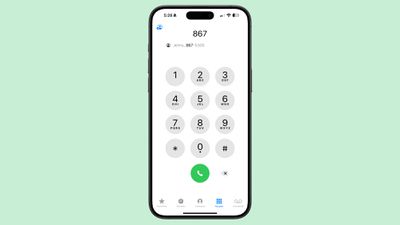
Type in the first digit or two of a number and then tap on the "More" icon to see all of your options. You can tap one from there to dial.
T9 Dialing
Related to the contact suggestion feature, you can actually search for names instead of numbers using T9 characters. If you have a contact in your phone under "Eric," you can type in 3 for E, 7 for R, 4 for I, and 2 for C, and the contact card for Eric will pop up.
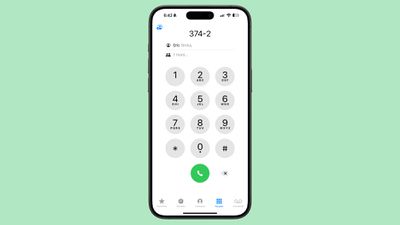
T9 dialing dates back to the days before touchscreens, allowing smartphone users to type using predictive text that associated numbers with letters. The iPhone has not supported T9 dialing until now.
Phone App Release Info
Call recording and transcribing are iOS 18 features that will be available to anyone, but the functionality won't be added to iOS devices until iOS 18.1. Summarizing transcripts is an Apple Intelligence feature that will be limited to devices compatible with Apple Intelligence. That includes the iPhone 15 Pro, iPhone 15 Pro Max, or iPhone 16, as well as M-series iPads and Macs.
Read More
Additional information on new features that Apple has added in iOS 18 can be found in our iOS 18 roundup.






















