
iOS 26: Everything New With FaceTime - MacRumors
Skip to Content

iOS 26: Everything New With FaceTime

All of Apple's communication apps received updates with iOS 26, including FaceTime. There's a redesigned interface that puts more emphasis on your contacts, new translation features, and more.

iOS 26 Glass FaceTime Feature

Live Translation

Along with the Phone and Messages apps, ‌FaceTime‌ supports Live Translation as long as you have a phone that works with Apple Intelligence.

ios 26 live translation facetime
With Live Translation, you can video chat with someone who speaks a different language than you do. The ‌FaceTime‌ app displays live captions that are translated into your language as the person speaks. Your response can also be translated back into their language as long as they also have a device that supports ‌Apple Intelligence‌ and runs ‌iOS 26‌, iPadOS 26, or macOS 26.

You'll need to download language packs to use Live Translation, and it works with a limited number of languages. ‌FaceTime‌'s Live Translation feature works with English, French, German, Portuguese (Brazil), and Spanish (Spain).

To use Live Translation on a ‌FaceTime‌ call, initiate the call and then tap on the button with three dots. From there, tap on the Live Translation option and select the to and from languages. Everything spoken will be translated and displayed in the same way Live Captions are displayed. To stop a translation, just tap on the Stop button.

Interface Updates

Apple updated the ‌FaceTime‌ interface in ‌iOS 26‌. Rather than a list of names of recent and suggested contacts, you'll see a card-style view that includes a full image of your contact that they've shared, if one is available. If they've sent you a video message, that will automatically play in the background as you scroll for an animated look. You can tap on one of the cards to place a ‌FaceTime‌ Audio or ‌FaceTime‌ Video call, depending on how you last contacted them.
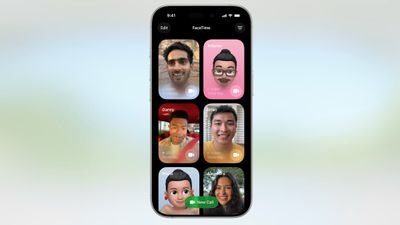
ios 26 facetime interface
Long pressing on a card brings up an option to delete it.

The "New Call" button is at the bottom of the ‌FaceTime‌ app rather than at the top, and filtering options can be accessed by tapping on the menu button at the top right. When you're on a call, the buttons are now at the bottom right of the display.
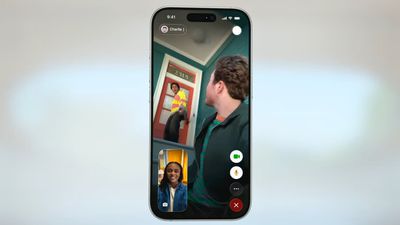
ios 26 facetime on call
Like all of Apple's other apps, ‌FaceTime‌ adopts the Liquid Glass aesthetic. Contact cards feature rounded corners, buttons have a rounded design, and the New Call button and some of the other interface buttons have a glass-like design.

Call Screening

Like the Phone app, ‌FaceTime‌ has new call filtering options. There's still a Silence Unknown Callers toggle, but missed calls and voicemails from unsaved numbers will now be sorted into an Unknown Callers list that's hidden from view unless you select it.
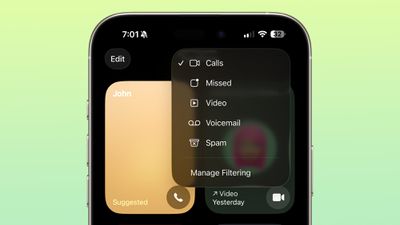
ios 26 facetime call filtering
Calls that are identified as spam will be silenced and automatically added to a new Spam list.

Call filtering is opt-in, so if you often get calls from unknown numbers, you can turn it on. If you don't want to miss any calls, you can leave it off. The toggle for spam and unknown callers can be found in the ‌FaceTime‌ section of the Settings app under Call Filtering.

In the ‌FaceTime‌ app, you can get to the different filtered sections by tapping on the menu button in the upper right of the app. Sections include Calls, Missed, Video, Voicemail, Unknown Callers, and Spam.

Sensitive Content Blocking

In ‌iOS 26‌, the Sensitive Content Warning and Communication Safety features are available for ‌FaceTime‌ video calls. When nudity is detected, the ‌FaceTime‌ video will pause and a warning about nude content will be displayed.
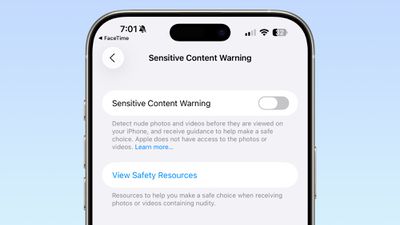
ios 26 facetime sensitive content
Communication Safety is a feature that is designed for the accounts of children and teens, and it provides warnings if images and videos of nudity are detected. Communication Safety is on by default for accounts created for children up to age 17.

Adults can use Communication Safety features too, in the form of Sensitive Content Warnings. Sensitive Content Warnings are an opt-in feature that prevents users of all ages from being subject to unwanted nude photos and videos.

Both options blur nudity in the Messages app and pause video in ‌FaceTime‌. There is no situation where an adult will see their ‌FaceTime‌ calls paused for nudity unless they have turned on the Sensitive Content Warning feature.

Sensitive Content Warnings can be turned on in the Privacy and Security section of the Settings app. Adults can also opt to turn on Communication Safety in the Screen Time section of the Settings app.

Sensitive Content Warnings and Communication Safety use on-device machine learning to analyze photos and videos. Apple does not receive an alert that nudity was detected, and does not have access to any photos or videos.

Read More

We have a dedicated iOS 26 roundup that goes into detail on all of the new features that are available in the update.


Related Roundups: iOS 26, iPadOS 26
Related Forum: iOS 26

Popular Stories

iOS 27 Feature Dark

Apple Now Pushing iPhone Users Still on iOS 26 to Install iOS 27

Thursday October 8, 2026 1:17 pm PDT by
Starting today, iPhone users still running iOS 26 will see iOS 27.0.1 as the prominent software update in the Settings app under General → Software Update, with iOS 26.7.1 now relegated to a smaller "Also Available" section at the bottom. iOS 27 was released on September 14, but until now that update and later iOS 27.0.1 were shown under the "Also Available" section, with iOS 26.7 and...
apple lock security bug vulnerability fix privacy

iOS 26.7.1 Fixes Vulnerability Used in Targeted Attacks

Monday September 28, 2026 11:45 am PDT by
iOS 26.7.1, iPadOS 26.7.1, macOS Tahoe 26.7.1, and macOS Sequoia 15.8.1 address a major vulnerability that Apple believes was used against a small number of people. Apple's security support pages say there was a CoreGraphics out-of-bounds write issue that could be exploited with a maliciously crafted file, allowing for arbitrary code execution. It has been fixed with improved bounds...


M5 MacBook Pro

RIP, MacBook Ultra

Monday October 19, 2026 9:37 am PDT by
Apple today sent out invites for an experience in Los Angeles on Wednesday, October 28, and the "Pro and tell" tagline on the invitation likely means that the rumored MacBook models with touch-enabled OLED displays will stick with MacBook Pro branding instead of the once-rumored "MacBook Ultra" name. The long-rumored "iPhone Ultra" ended up being named iPhone Duo, so speculation that Apple...

Top Rated Comments

ipedro Avatar
16 months ago
The only new feature I want in FaceTime is for it to detect that someone is out in public and insist that they turn off their mutha****in speakerphone. 😒
Score: 16 Votes (Like | Disagree)
fizzyfizz Avatar
16 months ago
Wish they'd include an option to swipe away my own face when chatting. I mean, why do I need to see a little video of myself?!
Score: 10 Votes (Like | Disagree)
cybercommand Avatar
16 months ago
Apple needs to hurry up and get their act together when it comes to languages. It’s been years.
Score: 10 Votes (Like | Disagree)
16 months ago

The only new feature I want in FaceTime is for it to detect that someone is out in public and insist that they turn off their mutha****in speakerphone. 😒
Amen bro. the absolute worst of the worst. people have no manners
Score: 8 Votes (Like | Disagree)
16 months ago
Why not Spanish spoken in Mexico
Score: 6 Votes (Like | Disagree)
16 months ago

“‌FaceTime‌ supports Live Translation as long as you have a phone that works with Apple Intelligence ('https://www.geekwebguides.com/guide/apple-intelligence/').”

Interesting. Yesterday, I was driving to town in a no service area, and asked Siri, “Siri, shuffle playlist 90’s favourites.”

She replied, “To do that you’ll need to be online.”

😟
Other greatest hits from useless Siri:

"To do that, you'll need to unlock your phone"

"Here is what I found on the internet (for whatever you asked)"

Siri is beaten by Google Assistant on a 5-year-old Android 12 $99 Budget phone. it's embarrassing and terrible
Score: 4 Votes (Like | Disagree)
Latest Stories
Apple Updates More Apps With iPhone Duo Support
16 minutes ago
Apple Will Label Apps 'Made for iPhone Duo' in App Store
3 hours ago
Amazon Takes $49 Off iPad With Prices Starting at $399.99
4 hours ago
F1 on Apple TV Now Available in Dolby Atmos
4 hours ago
Apple Reveals More Than 50 Apps That Will Be Updated for iPhone Duo
5 hours ago
Apple Blocks Certificates That Could Help Attackers Fake Websites
6 hours ago
Giant iPhone Duo Installations Spotted at Apple Fifth Avenue
7 hours ago
iPhone Duo 2 Prototypes Include Under-Display Face ID
7 hours ago
Tesla App Gains iPad and iPhone Duo Support
11 hours ago
Apple Reportedly Boosts iPhone Duo Orders by 44%
11 hours ago
Fortnite Returning to Australian App Store After Court Ruling
12 hours ago
Apple Ordered to Open iPhone to Rival App Stores in Australia
12 hours ago
Apple Suppliers Face Hurdles Cutting Circuit Board Emissions
13 hours ago
Things Updated for iPhone Duo With Adaptive Layout
13 hours ago
Simplicity and Siri AI Are HomeView's Killer Features, Apple Says
13 hours ago
iPhone Duo Reviewers Really Miss Face ID
18 hours ago
Does the iPhone Duo Run Hot? Here's What Reviews Found
20 hours ago
Apple Music's New Look is Now Live on Apple's Website
20 hours ago
Anthropic Launches Claude Duet, a Proactive AI Agent
21 hours ago
What 32,000 Folds Did to the iPhone Duo's Hinge
22 hours ago
iPhone Duo's Hidden FaceTime Camera Takes 'Trash' Photos
23 hours ago
iPhone Duo Has 'Edge Light' Feature That Debuted on Macs Last Year
1 day ago
Apple Support App Updated for iPhone Duo's Larger Display
1 day ago
Amazon Sweetens the Deal on Entry-Level 16-Inch MacBook Pro With $570 Off
1 day ago
iPhone Duo Tips Over on MagSafe Stands When Unfolded
1 day ago
Apple Music's New Look Officially Announced
1 day ago
iPhone Duo Supports Apple Pencil Starting With iOS 27.2
1 day ago
iPhone Duo Accessories Roundup: Cases and Screen Protectors From OtterBox, ZAGG, and More
1 day ago
Apple Stores Will Have 'Limited' Availability of iPhone Duo for Walk-In Customers
1 day ago
iPhone Duo Reviews Explain Why Device is Both 'Fun' and 'Frustrating'
1 day ago









































