iOS 26: New Lock Screen Features - MacRumors
Skip to Content

iOS 26: New Lock Screen Features

When you're not using your iPhone, the Lock Screen is what you see most often. Liquid Glass is everywhere in iOS 26, and it starts right when you pick up your device. The Lock Screen got a Liquid Glass overhaul, plus a few other new features.
iOS 26 Lock Screen Features
Here's what you'll see first when you upgrade to ‌iOS 26‌.

Liquid Glass

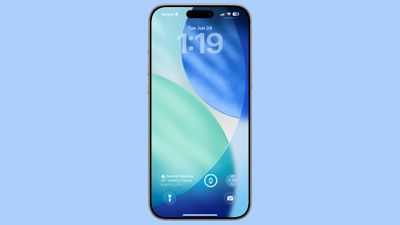
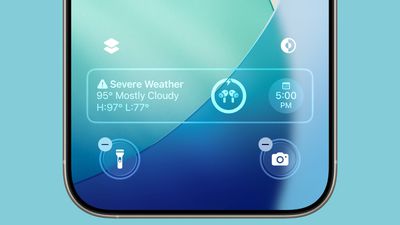
The two customizable control buttons on the Lock Screen are larger and have a floating, glass-like appearance like the other Liquid Glass interface options in ‌iOS 26‌. The clock has a frosted glass appearance with the new "Glass" option, using lighting effects to make it look like glass in the real world.
ios 26 home screen
Glass can be selected for any of the clock fonts, and you can choose a color to tint the glass. Apple has multiple preset options, or you can select your own.

When you tilt your iPhone, light reflects and glints with the movement, for a realistic glass effect.
ios 26 b2 widgets
Notifications that are on your Lock Screen have a Liquid Glass aesthetic with a frosted glass look that leaves your wallpaper visible behind them.

Clock

In addition to having a Liquid Glass aesthetic, the clock can be resized to better match your iPhone's wallpaper using a new adaptive feature. When you're customizing your Lock Screen, you can grab the corner of the time and drag it down to expand it.
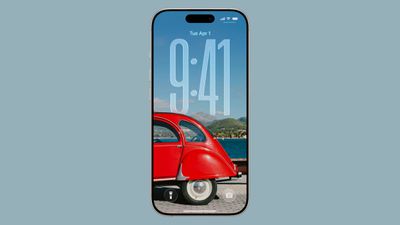
ios 26 lock screen time
Adjusting the size of the time only works with the first font option, and only with the standard Arabic, Western numbering.
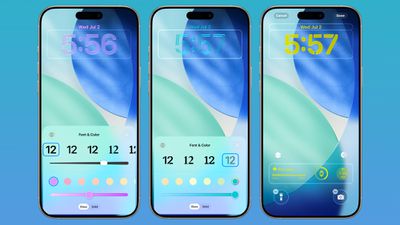
lock screen time colors ios 26
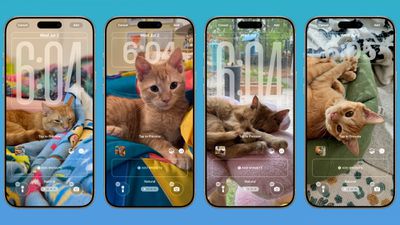
With photo wallpapers, the time can automatically expand to fill in missing space, and it can change based on the image if you have Photo Shuffle set. The subject in photo wallpapers is meant to always be visible, and can overlap the time in unique ways in ‌iOS 26‌.

ios 26 lock screen time features
There is a Photos watch face for the Apple Watch that also supports time that changes size and position based on the wallpaper.

Wallpaper

There is a new default wallpaper that was designed for ‌iOS 26‌. It's multiple shades of blue, with the same floating glass aesthetic that the rest of ‌iOS 26‌ features. The wallpaper can subtly shift with iPhone movement.
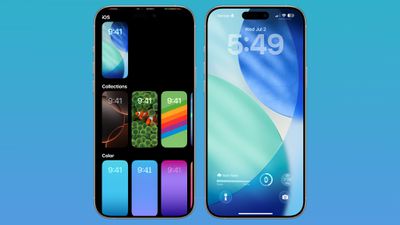
ios 26 lock screen wallpaper
It's a small detail, but the icons for selecting different wallpaper categories have been updated to better match the Liquid Glass design.

Spatial Scenes

Aside from the Liquid Glass time, Spatial Scenes are the biggest change to the Lock Screen. 2D photos that you set as wallpaper can be turned into 3D spatial images that separate the subject of the photo from the background using depth information.
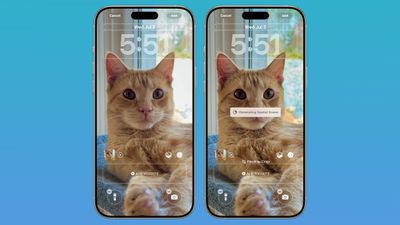
ios 26 wallpaper spatial scene
When you move your iPhone, Spatial Scenes shift and move along with it, making the images feel alive. Spatial Scenes is a feature in the ‌Photos‌ app too, and it can be added to any image that you've taken with your iPhone, including older ones.

Tap on the small icon with a mountain and a sun to activate the Spatial Scenes setting when choosing a photo wallpaper.

Widgets

Lock Screen widgets can be placed on the top of the display under the time, or at the bottom of the display. In earlier versions of iOS, you could only put widgets at the top of the screen. With the adaptive clock and new wallpaper options, widgets can also shift down automatically to ensure the subject of an image is always visible.
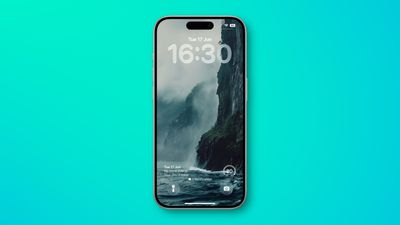
ios 26 bottom widgets lock screen

Apple Music

Apple added a new Lock Screen widget for Apple Music search, but there are no other new Lock Screen widget options. What is new, though, is a new full screen Now Playing interface that shows album art. Artwork expands and animates right on the Lock Screen.
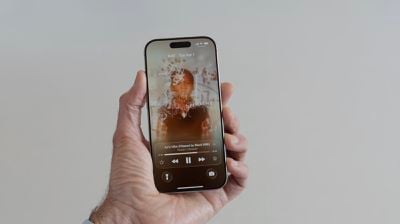
iOS 26 Lock Screen Full Screen Album Art

Read More

We have a dedicated iOS 26 roundup that goes into detail on all of the new features that are available in the update.


Related Roundups: iOS 26, iPadOS 26
Related Forum: iOS 26

Popular Stories

iOS 27 Feature Dark

Apple Now Pushing iPhone Users Still on iOS 26 to Install iOS 27

Thursday October 8, 2026 1:17 pm PDT by
Starting today, iPhone users still running iOS 26 will see iOS 27.0.1 as the prominent software update in the Settings app under General → Software Update, with iOS 26.7.1 now relegated to a smaller "Also Available" section at the bottom. iOS 27 was released on September 14, but until now that update and later iOS 27.0.1 were shown under the "Also Available" section, with iOS 26.7 and...
apple lock security bug vulnerability fix privacy

iOS 26.7.1 Fixes Vulnerability Used in Targeted Attacks

Monday September 28, 2026 11:45 am PDT by
iOS 26.7.1, iPadOS 26.7.1, macOS Tahoe 26.7.1, and macOS Sequoia 15.8.1 address a major vulnerability that Apple believes was used against a small number of people. Apple's security support pages say there was a CoreGraphics out-of-bounds write issue that could be exploited with a maliciously crafted file, allowing for arbitrary code execution. It has been fixed with improved bounds...


M5 MacBook Pro

RIP, MacBook Ultra

Monday October 19, 2026 9:37 am PDT by
Apple today sent out invites for an experience in Los Angeles on Wednesday, October 28, and the "Pro and tell" tagline on the invitation likely means that the rumored MacBook models with touch-enabled OLED displays will stick with MacBook Pro branding instead of the once-rumored "MacBook Ultra" name. The long-rumored "iPhone Ultra" ended up being named iPhone Duo, so speculation that Apple...

Top Rated Comments

AndyUnderscoreR Avatar
17 months ago
There's barely a single screenshot there that would pass the WCAG Color Contrast Checker.

I won't be installing IOS26 unless there's an option to ensure you always have a readable screen.
Score: 17 Votes (Like | Disagree)
17 months ago
Well yes it’s cool and all, but I would like a review for people with less than perfect eyesight. Hope they will have a option not to go with this as it seems difficult to focus on the text and images.
Score: 16 Votes (Like | Disagree)
klasma Avatar
17 months ago

When you're not using your iPhone, the Lock Screen is what you see most often.
That must be a sad life. ;)
Score: 12 Votes (Like | Disagree)
17 months ago
gotta a feeling that message boards will light up (with complaints) once iOS 26 goes public
Score: 12 Votes (Like | Disagree)
Justin Cymbal Avatar
17 months ago

Widgets

Lock Screen widgets can be placed on the top of the display under the time, or at the bottom of the display. In earlier versions of iOS, you could only put widgets at the top of the screen. With the adaptive clock and new wallpaper options, widgets can also shift down automatically to ensure the subject of an image is always visible.
The ability to display more than just two widgets on the lock screen would be a nice feature to have (in a future version of iOS)

Now that we can place widgets on either the top or bottom of the lock screen, it would be nice to be able to place them on BOTH the top and bottom - to enable the ability to have 4 widgets simultaneously displayed on the lock screen
Score: 7 Votes (Like | Disagree)
17 months ago
Screaming Windows Vista from 2007. The company of innovation became the company of copycat.
Score: 6 Votes (Like | Disagree)
Latest Stories
Apple Updates More Apps With iPhone Duo Support
10 minutes ago
Apple Will Label Apps 'Made for iPhone Duo' in App Store
3 hours ago
Amazon Takes $49 Off iPad With Prices Starting at $399.99
4 hours ago
F1 on Apple TV Now Available in Dolby Atmos
4 hours ago
Apple Reveals More Than 50 Apps That Will Be Updated for iPhone Duo
5 hours ago
Apple Blocks Certificates That Could Help Attackers Fake Websites
6 hours ago
Giant iPhone Duo Installations Spotted at Apple Fifth Avenue
7 hours ago
iPhone Duo 2 Prototypes Include Under-Display Face ID
7 hours ago
Tesla App Gains iPad and iPhone Duo Support
11 hours ago
Apple Reportedly Boosts iPhone Duo Orders by 44%
11 hours ago
Fortnite Returning to Australian App Store After Court Ruling
12 hours ago
Apple Ordered to Open iPhone to Rival App Stores in Australia
12 hours ago
Apple Suppliers Face Hurdles Cutting Circuit Board Emissions
12 hours ago
Things Updated for iPhone Duo With Adaptive Layout
13 hours ago
Simplicity and Siri AI Are HomeView's Killer Features, Apple Says
13 hours ago
iPhone Duo Reviewers Really Miss Face ID
18 hours ago
Does the iPhone Duo Run Hot? Here's What Reviews Found
20 hours ago
Apple Music's New Look is Now Live on Apple's Website
20 hours ago
Anthropic Launches Claude Duet, a Proactive AI Agent
21 hours ago
What 32,000 Folds Did to the iPhone Duo's Hinge
22 hours ago
iPhone Duo's Hidden FaceTime Camera Takes 'Trash' Photos
23 hours ago
iPhone Duo Has 'Edge Light' Feature That Debuted on Macs Last Year
1 day ago
Apple Support App Updated for iPhone Duo's Larger Display
1 day ago
Amazon Sweetens the Deal on Entry-Level 16-Inch MacBook Pro With $570 Off
1 day ago
iPhone Duo Tips Over on MagSafe Stands When Unfolded
1 day ago
Apple Music's New Look Officially Announced
1 day ago
iPhone Duo Supports Apple Pencil Starting With iOS 27.2
1 day ago
iPhone Duo Accessories Roundup: Cases and Screen Protectors From OtterBox, ZAGG, and More
1 day ago
Apple Stores Will Have 'Limited' Availability of iPhone Duo for Walk-In Customers
1 day ago
iPhone Duo Reviews Explain Why Device is Both 'Fun' and 'Frustrating'
1 day ago