
Apple Maps in iOS 26: Track Your Location History and Get Smarter Route Alerts - GeekWebGuides
Skip to Content

Apple Maps in iOS 26: Track Your Location History and Get Smarter Route Alerts

The Apple Maps app in iOS 26 includes some useful new features for keeping track of where you've been and getting alerts if there are any delays that will impact your daily commute. In this guide, we've rounded up a list of everything new with Maps.

iOS 26 Maps Glass

Visited Places

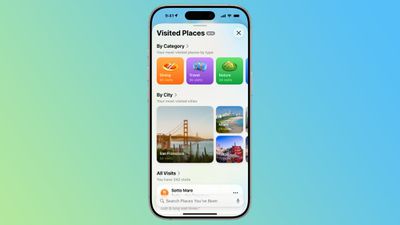
‌Apple Maps‌ is able to keep track of the places that you've visited, either in your hometown or while traveling. It can track the restaurants, shops, parks, and landmarks that you go to, so you can look back and remember where you've been.
ios 26 visited places
Google has long offered a timeline that automatically saves visits to places, and Apple's new Visited Places option matches the functionality available in the Google Maps Timeline.

After you upgrade to ‌iOS 26‌, the Maps app pops up an alert letting you know about the new feature, so that you can opt in or opt out.

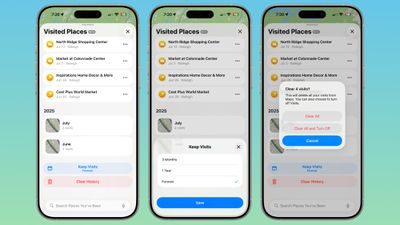
You can see your Visited Places by opening up the Maps app, tapping on your profile picture, tapping on Places, and then tapping into Visited Places. In this interface, the locations that you've visited are listed by month, plus there's a search option.

There are options to change how long visits are kept (three months, one year, and forever), and to clear your current history. You can also remove locations one-by-one by tapping on them, and report incorrect location readings. When you clear your history, ‌Apple Maps‌ pops up an option that lets you clear everything or clear everything and turn off Visited Places entirely.
ios 26 maps app visited places overview
If you want to turn Visited Places off or enable it at a later date, you can do so by going to Settings > Apps > Maps > Location. From there, toggle off Visited Places. You can also access the toggle by going to Privacy and Security > Location Services > Maps.

Precise Location needs to be toggled on for Visited Places to work, and places that you've been are stored on-device. The information is not uploaded to Apple's servers.

Preferred Routes

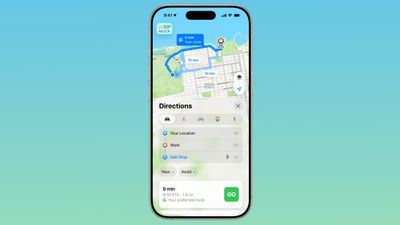
Using on-device intelligence, ‌Apple Maps‌ is able to learn the routes that you prefer to take to locations that you visit frequently, such as work, home, and school, and it keeps track of when you typically visit those places.
ios 26 maps app preferred route
If there's a road closure or traffic that's going to impact your commute, the Maps app is able to alert you about the issue and offer up an alternative route so you can get there on time.

A Maps Suggestions Home Screen widget shows the same information if there are any route issues. This is an under-the-hood feature that only shows up when it's needed, so if you have a short commute that doesn't involve roads that frequently see traffic, you might not have it pop up.

You can turn it on or off by going to Settings > Maps > Location and toggling off the "Preferred Routes and Predicted Destinations" setting.

Liquid Glass Redesign

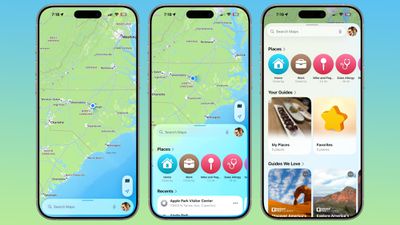
The Maps app has adopted Apple's Liquid Glass redesign, and it brings some subtle interface changes. The search bar and navigation menu are translucent so you can see some of the Maps background behind it, and place icons are larger than before.
ios 26 maps app interface
Icons have the layered glass look, and the various menus, cards, and buttons are more rounded than before. The Share Sheet has a popover design and it too is transparent.

The Library tab that was accessible when you tap your profile picture is now called Places, and it has improved spacing and a new Visited Places section.

Turn-by-turn directions are in a smaller pop-up bar rather than taking up the top of the Maps display, and time of arrival, length of travel, and distance are shown more prominently.

Voice Controls

The Voice Volume section in the Maps app is now Voice Controls, and there are added toggles for Muted, Alerts Only, or Unmuted so adjusting how turn-by-turn directions are communicated is more intuitive.
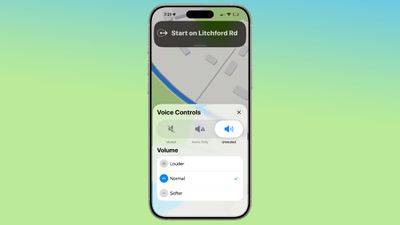
ios 26 maps voice control
These controls did exist in iOS 18, but only as toggles that had no explanation on the right side of the display when turn-by-turn directions are in progress.

Place Information

When you tap into or type a location on the Maps app, the Call, Menu, and Website buttons are now more prominently listed at the top of the interface, as are the location's hours and the order option if one is available. There's now a floating button to get directions to a place, and it's always available at the bottom right of the app.
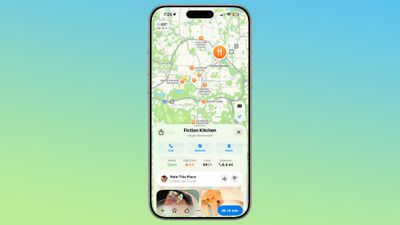
ios 26 maps place interface

Improved Incident Reports

It's easier to report an incident like a crash with a new incident button that's located on the right side of the iPhone when getting turn-by-turn directions, and more incident types have been added.
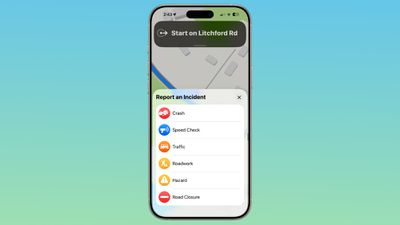
ios 26 maps report incident
You can report a crash, speed check, traffic, roadwork, hazard, or road closure. In iOS 18, options are limited to crash, speed check, and hazard.

Read More

We have a dedicated iOS 26 roundup that goes into detail on all of the new features that are available in the update.


Related Roundups: iOS 26, iPadOS 26
Related Forum: iOS 26

Popular Stories

iOS 27 Feature Dark

Apple Now Pushing iPhone Users Still on iOS 26 to Install iOS 27

Thursday October 8, 2026 1:17 pm PDT by
Starting today, iPhone users still running iOS 26 will see iOS 27.0.1 as the prominent software update in the Settings app under General → Software Update, with iOS 26.7.1 now relegated to a smaller "Also Available" section at the bottom. iOS 27 was released on September 14, but until now that update and later iOS 27.0.1 were shown under the "Also Available" section, with iOS 26.7 and...
apple lock security bug vulnerability fix privacy

iOS 26.7.1 Fixes Vulnerability Used in Targeted Attacks

Monday September 28, 2026 11:45 am PDT by
iOS 26.7.1, iPadOS 26.7.1, macOS Tahoe 26.7.1, and macOS Sequoia 15.8.1 address a major vulnerability that Apple believes was used against a small number of people. Apple's security support pages say there was a CoreGraphics out-of-bounds write issue that could be exploited with a maliciously crafted file, allowing for arbitrary code execution. It has been fixed with improved bounds...
M5 MacBook Pro

RIP, MacBook Ultra

Monday October 19, 2026 9:37 am PDT by
Apple today sent out invites for an experience in Los Angeles on Wednesday, October 28, and the "Pro and tell" tagline on the invitation likely means that the rumored MacBook models with touch-enabled OLED displays will stick with MacBook Pro branding instead of the once-rumored "MacBook Ultra" name. The long-rumored "iPhone Ultra" ended up being named iPhone Duo, so speculation that Apple...

Top Rated Comments

17 months ago

Jealous spouses will appreciate this feature!
Coldplay concerts be damned.
Score: 17 Votes (Like | Disagree)

jz0309 Avatar
17 months ago

After you upgrade to iOS 26, the Maps app pops up an alert letting you know about the new feature, so that you can opt in or opt out
Good, I'll be opting out.

I remember a co-worker with an Android phone "discovering" this and how excited he was about it. I found it creepy back then and still today, don't want this.
Glad it's an option.
Score: 11 Votes (Like | Disagree)
17 months ago

Um... This is navigation 101, and something that TomTom were doing a decade or more ago. I see spouting this as embarrassing given it should have been doing this since Jesus was a boy.
I believe the point of this new feature is that Apple Maps will proactively alert you before you even get in your car. You may be eating breakfast before work and get an alert that you may want to leave early and take another route. That's how I read it anyway.
Score: 9 Votes (Like | Disagree)
springsup Avatar
17 months ago


This is a perfect image for iOS 26.
Score: 7 Votes (Like | Disagree)
etichi Avatar
17 months ago
Get in the car with your wife and siri immediately recommends it’s time for you to go to that massage parlor you like to frequent.
Score: 6 Votes (Like | Disagree)
17 months ago

Apple Maps is able to keep track of the places that you've visited, either in your hometown or while traveling. It can track the restaurants, shops, parks, and landmarks that you go to, so you can look back and remember where you've been.
Jealous spouses will appreciate this feature!
Score: 6 Votes (Like | Disagree)
Latest Stories
Apple Updates More Apps With iPhone Duo Support
7 minutes ago
Apple Will Label Apps 'Made for iPhone Duo' in App Store
3 hours ago
Amazon Takes $49 Off iPad With Prices Starting at $399.99
4 hours ago
F1 on Apple TV Now Available in Dolby Atmos
4 hours ago
Apple Reveals More Than 50 Apps That Will Be Updated for iPhone Duo
5 hours ago
Apple Blocks Certificates That Could Help Attackers Fake Websites
6 hours ago
Giant iPhone Duo Installations Spotted at Apple Fifth Avenue
7 hours ago
iPhone Duo 2 Prototypes Include Under-Display Face ID
7 hours ago
Tesla App Gains iPad and iPhone Duo Support
11 hours ago
Apple Reportedly Boosts iPhone Duo Orders by 44%
11 hours ago
Fortnite Returning to Australian App Store After Court Ruling
12 hours ago
Apple Ordered to Open iPhone to Rival App Stores in Australia
12 hours ago
Apple Suppliers Face Hurdles Cutting Circuit Board Emissions
12 hours ago
Things Updated for iPhone Duo With Adaptive Layout
13 hours ago
Simplicity and Siri AI Are HomeView's Killer Features, Apple Says
13 hours ago
iPhone Duo Reviewers Really Miss Face ID
18 hours ago
Does the iPhone Duo Run Hot? Here's What Reviews Found
20 hours ago
Apple Music's New Look is Now Live on Apple's Website
20 hours ago
Anthropic Launches Claude Duet, a Proactive AI Agent
21 hours ago
What 32,000 Folds Did to the iPhone Duo's Hinge
22 hours ago
iPhone Duo's Hidden FaceTime Camera Takes 'Trash' Photos
23 hours ago
iPhone Duo Has 'Edge Light' Feature That Debuted on Macs Last Year
1 day ago
Apple Support App Updated for iPhone Duo's Larger Display
1 day ago
Amazon Sweetens the Deal on Entry-Level 16-Inch MacBook Pro With $570 Off
1 day ago
iPhone Duo Tips Over on MagSafe Stands When Unfolded
1 day ago
Apple Music's New Look Officially Announced
1 day ago
iPhone Duo Supports Apple Pencil Starting With iOS 27.2
1 day ago
iPhone Duo Accessories Roundup: Cases and Screen Protectors From OtterBox, ZAGG, and More
1 day ago
Apple Stores Will Have 'Limited' Availability of iPhone Duo for Walk-In Customers
1 day ago
iPhone Duo Reviews Explain Why Device is Both 'Fun' and 'Frustrating'
1 day ago










































