
iOS 26: What's New With the Podcasts App - MacRumors
Skip to Content

iOS 26: What's New With the Podcasts App

The Podcasts app didn't get as many iOS 26 updates as some of Apple's other apps, but there are some design changes and feature tweaks that are worth knowing about.
iOS 26 Podcasts Glass Feature

Liquid Glass

Like all of Apple's apps, the Podcasts app adopts the new Liquid Glass design language. UI elements have a glass-like, translucent look that let the background art shine through.
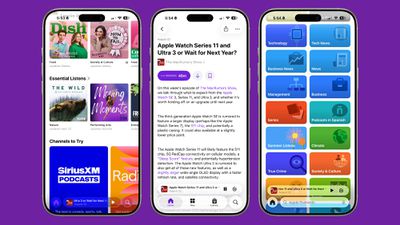
ios 26 podcasts design
Buttons have a more rounded design and the navigation bar no longer takes up the entire bottom of the app. The Browse tab is now the New tab, and the Search tab has the search bar at the bottom of the display.

There's also an updated Liquid Glass icon that looks like several stacked layers of glass.

Updated Speed Controls

‌iOS 26‌ includes options to change the playback speed of a podcast. When you're playing a show, tap on the "1x" button in the corner and you'll be able to change the speed. Apple offers multiple playback speeds ranging from 0.5x to 3x. In iOS 18, you could only select from four fixed speed options: 1.25x, 1.5x, 1.75, and 2x.

ios 26 podcasts speed
To change the playback speed, tap one of the preset options or drag a finger over one of the options to bring up a dial that allows for more granular 0.1x adjustments.

Enhance Dialogue

The Podcasts app includes an Enhance Dialogue feature that is designed to isolate voices so they sound clearer amid any background noise.
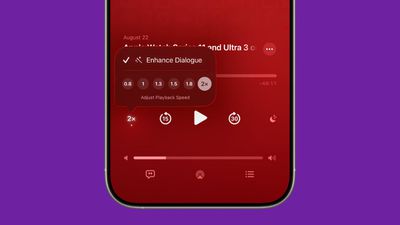
ios 26 enhance dialogue podcasts
To use Enhance Dialogue, play a show in the Podcasts app. From there, open up the fullscreen playback controls, tap the "1x" playback speed button, and choose the Enhance Dialogue option.

Per-Show Settings

The Podcasts app will remember your Enhance Dialogue and playback speed preference for each individual podcast, so it doesn't need to be turned on every time you listen and settings won't affect other podcasts.

Read More

More on the features that are available in ‌iOS 26‌ can be found in our iOS 26 roundup.

Related Roundups: iOS 26, iPadOS 26
Related Forum: iOS 26

Popular Stories

iOS 26

iOS 26.4 Adds Two New Features to CarPlay

Tuesday March 24, 2026 1:55 pm PDT by
iOS 26.4 was released today, and it includes a couple of new features for CarPlay: an Ambient Music widget and support for voice-based chatbot apps. To update your iPhone 11 or newer to iOS 26.4, open the Settings app and tap on General → Software Update. CarPlay will automatically offer the new features so long as the iPhone connected to your vehicle is running iOS 26.4 or later....
Apple Business hero

Apple Unveils 'Apple Business' All-in-One Platform

Tuesday March 24, 2026 8:53 am PDT by
Apple today announced Apple Business, a new all-in-one platform that unifies device management, productivity tools, and customer outreach features. The service is designed to be a consolidated replacement for several of Apple's existing business-focused offerings, including Apple Business Essentials, Apple Business Manager, and Apple Business Connect. It provides organizations with a single...
AirPods Pro Firmware Feature

Apple Releases New Firmware for AirPods Pro 3, AirPods Pro 2 and AirPods 4

Tuesday March 24, 2026 12:31 pm PDT by
Apple today released new firmware for the AirPods Pro 2, AirPods Pro 3, and the AirPods 4. The firmware has a version number of 8B39, up from 8B34 on the AirPods Pro 3, 8B28 on the AirPods Pro 2, and 8B21 on the AirPods 4. There is no word on what's included in the firmware, but Apple has a support document with limited notes. Most updates are limited to bug fixes and performance...

Top Rated Comments

8 months ago

How hard would it be for them to add a REPEAT function so we can loop a podcast? Too advanced for them?
Not knocking your needs, but realistically, how many people actually want to put a podcast episode on loop?
Score: 6 Votes (Like | Disagree)
8 months ago

Not knocking your needs, but realistically, how many people actually want to put a podcast episode on loop?
Sleep stuff. For whatever reason, some spoken or soundscape “simulated environment” noise tracks are as podcasts rather than being available in Apple Music. Now, why should THAT fact make it so I have no way to put the thing I’m listening to on repeat? I’m listening to a thing. It’s digital. I want it to repeat.
Score: 4 Votes (Like | Disagree)
nutmac Avatar
8 months ago
Better than nothing but I want Overcast's shorter silences (Smart Speed) and clear consistent volume (Voice Boost) features.
Score: 4 Votes (Like | Disagree)
Starfia Avatar
8 months ago
So Apple has updated the Podcasts app with Liquid Glass.

Fascinating. 🤔
Score: 4 Votes (Like | Disagree)
8 months ago
Can’t see Apple caring unless they launch Apple Podcasts +
Score: 3 Votes (Like | Disagree)
8 months ago

You’ve seen the ambient music options in control center? Just checking
Yes. Those samples are as short as 4 seconds in some cases. Literally. Anyway, if someone puts up a podcast of 30 minutes of forest sound or whatever, I’d like to be able to repeat it. It’s literally 2025.
Score: 3 Votes (Like | Disagree)

















