Here's What's New With Visual Intelligence in iOS 27 - MacRumors
Skip to Content

Here's What's New With Visual Intelligence in iOS 27

Visual Intelligence is getting a big upgrade in iOS 27. It's now easier to find than it was before, and there are new ‌Visual Intelligence‌ capabilities. Apple also expanded it to the iPad and the Mac, so you can use the same features across devices.

iOS 27 visual intelligence feature

Camera App

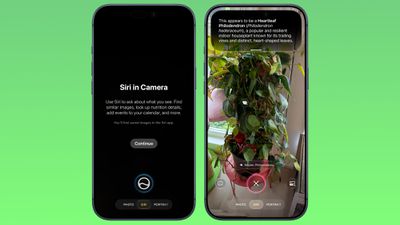
Apple moved ‌Visual Intelligence‌ to the Camera app in ‌iOS 27‌, and it's accessible through a new Siri Mode that lives with the Photo, Video, and other camera mode options. You can swipe over to ‌Siri‌ Mode and take a picture so ‌Siri‌ can see what you see.

ios 27 siri mode camera
‌Siri‌ will give you details about whatever you're looking at when you swipe down, and you can ask follow-up questions.

‌Siri‌ Mode replaces Camera Control as the primary method for accessing ‌Visual Intelligence‌, but you can still get to it by holding down the Camera Control button.

Smart Suggestions

‌Siri‌ Mode will suggest relevant actions based on what you're taking a photo of. If you take a photo of a plant, ‌Siri‌ will offer to identify it. If you take a photo of a plate of food, ‌Siri‌ can give you the nutritional information.

Siri Integration

‌Visual Intelligence‌ is integrated with ‌Siri‌ AI, and ‌Siri‌ can answer questions about what you're looking at. Complex questions were previously handed off to ChatGPT, but that's no longer necessary.
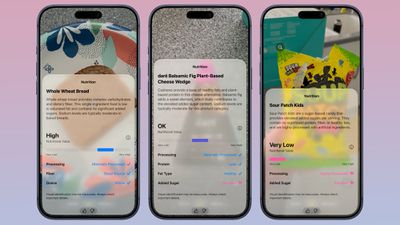
ios 27 visual intelligence nutrition
The smarter, more capable version of ‌Siri‌ can do much of what ChatGPT can do, pulling information from the web to answer questions.

New iOS 27 Visual Intelligence Features

  • Nutritional Insights - You can take a picture of a meal or a food item to check its nutritional value. ‌Siri‌ doesn't tell you specific calories in an item, but it can tell you if what you're eating has nutritional value and what's good or bad about it.
  • Bill Splitting (U.S. only) - If you take a photo of a restaurant bill, you can split out what you ate and then send money via Apple Cash. Or calculate what everyone owes and request money.
  • Import Multiple Events - You can import multiple events into the Calendar or Reminders app at one time from a schedule or list.
  • Import Contacts - You can import contacts from a photo of a business card.
  • Wallet Passes - You can turn a photo of a barcode from a membership or pass into a Wallet pass.

‌Visual Intelligence‌ is much more powerful than before because of ‌Siri‌'s ability to search the web for answers. It can read laundry labels and give you clear instructions, look up items and find reviews on the web, identify odd devices or cables and tell you what they're for, scale recipes, read ingredient lists for you to check for allergens, transcribe messy written notes or lists into text, decipher confusing parking signs, offer plant care advice, solve math problems on a worksheet, and whatever else you can think to ask AI to do.

Other Visual Intelligence Capabilities

‌Visual Intelligence‌ has a long list of things it can be used for, and these options have been available in earlier versions of iOS.

  • Identify plants, animals, insects, landmarks, art, sculptures, books, and more.
  • Add items to your calendar from a piece of paper like an event poster or flyer.
  • Use Google Image Search to find similar images.
  • Search Etsy, Amazon, Anthropologie, and other apps for an item that you capture with the camera.
  • Provide details about a business in front of you, like hours of operation.
  • Translate, summarize, and read text aloud.

Siri App Integration

All of your ‌Visual Intelligence‌ ‌Siri‌ requests are saved in the ‌Siri‌ app so you can revisit them later. The ‌Siri‌ app can be set to retain conversations for a month, a year, or forever.

Visual Intelligence on Other Platforms

Apple expanded ‌Visual Intelligence‌ to iPadOS 27, macOS Golden Gate, and visionOS 27. On Mac, you can use a Command-Shift-Space keyboard shortcut to access ‌Visual Intelligence‌ and select a part of your display to ask a question about. On ‌iPad‌, you can access ‌Visual Intelligence‌ by taking a screenshot or swiping up from the lower left corner with Apple Pencil.

On Vision Pro, you can use ‌Visual Intelligence‌ just by looking at something, including physical items around you.

Device Requirements

‌Visual Intelligence‌ in ‌iOS 27‌ requires an iPhone 15 Pro or later. For Mac, you need an Apple silicon chip, and on the ‌iPad‌, you need an Apple silicon chip or the A17 Pro iPad mini.

Availability

‌iOS 27‌ is available to developers and public beta testers, so you can try it out now ahead of its September launch.

Related Roundups: iOS 27, iPadOS 27
Related Forum: iOS 27

Popular Stories

iOS 27 0 1

iOS 27.0.1 is Coming Soon

Wednesday September 23, 2026 1:06 pm PDT by
After releasing iOS 27 last week, Apple is already testing a follow-up iOS 27.0.1 update for iPhones, according to MacRumors logs. iOS 27.0.1 will likely be a minor update with bug fixes and/or security patches. Shortly after Apple launches new iPhone models, some software bugs are usually discovered as the devices get into the hands of millions of customers around the world. This year, so...

Face ID iPhone 18 Pro

Apple Confirms iPhone 18 Pro Bug Fix Update is Coming Next Week

Thursday September 24, 2026 6:10 am PDT by
Apple has confirmed to 9to5Mac's Benjamin Mayo that it plans to release a software update early next week with a fix for a Face ID issue affecting some iPhone 18 Pro users. Yesterday, we reported that Apple is testing iOS 27.0.1, which is likely to be the update with the...
iPhone Handoff Feature

AT&T Responds to iOS 27's New iPhone Handoff Feature

Wednesday September 23, 2026 7:06 am PDT by
Apple added a new iPhone Handoff feature to iOS 27 that allows you to switch between two iPhones while using the same phone number on each device. T-Mobile and Deutsche Telekom are the first carriers to offer iPhone Handoff, and Apple said Verizon and EE will add support later this year, but AT&T is noncommittal about the feature. A spokesperson for AT&T told CNET that the carrier sees...

Top Rated Comments

M4irmidnight Avatar
18 weeks ago
Can Siri be removed from the camera wheel ?
Score: 8 Votes (Like | Disagree)
fatTribble Avatar
18 weeks ago

Can Siri be removed from the camera wheel ?
I’m hoping we’ll at least be able to reorder items so that if you won’t use Siri often you can put it at the end.
Score: 7 Votes (Like | Disagree)
chars1ub0w Avatar
18 weeks ago
Which parts of visual intelligence are on-device and which parts require an internet connection to Apple servers?
Score: 6 Votes (Like | Disagree)
18 weeks ago
* Nutritional Insights - You can take a picture of a meal or a food item to check its nutritional value. ‌Siri‌ doesn't tell you specific calories in an item, but it can tell you if what you're eating has nutritional value and what's good or bad about it.

This sounds like exactly the kind of brain-dead thing that people who use AI think will actually work and help them.
Score: 5 Votes (Like | Disagree)
18 weeks ago

Right? Nutrition is complex. Whilst I accept the at least trying to check the nutritional value of food is better than nothing, it can't be reduced to a basic traffic-light system or simple sliding scale. Everyone's needs are different and whilst there are some broadly good and broadly bad food stuffs for everyone, you need to properly understand what you are consuming and why. A quick -"AI says it's good" is not going to do it.
Not only is nutrition complex, it's beyond absurd to think that a photograph can tell you anything about how healthy a meal of even moderate complexity is — whether it was made with whole grains, how much fat or sodium is in it, what kind of fat, how much protein, whether sugar was added, what all the ingredients are if they were blended. These things just aren't visible. Anyone who has thought about nutrition for more than a minute can understand this. People who keep thinking AI is finally going to work reliably, like magic, are probably the biggest dupes in world history. It's right up there with the monarchy convincing people they ruled by divine right. I feel stupider already just thinking about having to live in a world with this kind of thing.
Score: 3 Votes (Like | Disagree)
Taq'aix Avatar
18 weeks ago
This IS totally not going to cause cognitive atrophy.
Score: 3 Votes (Like | Disagree)
Latest Stories
Apple Updates More Apps With iPhone Duo Support
10 minutes ago
Apple Will Label Apps 'Made for iPhone Duo' in App Store
3 hours ago
Amazon Takes $49 Off iPad With Prices Starting at $399.99
4 hours ago
F1 on Apple TV Now Available in Dolby Atmos
4 hours ago
Apple Reveals More Than 50 Apps That Will Be Updated for iPhone Duo
5 hours ago
Apple Blocks Certificates That Could Help Attackers Fake Websites
6 hours ago
Giant iPhone Duo Installations Spotted at Apple Fifth Avenue
7 hours ago
iPhone Duo 2 Prototypes Include Under-Display Face ID
7 hours ago
Tesla App Gains iPad and iPhone Duo Support
11 hours ago
Apple Reportedly Boosts iPhone Duo Orders by 44%
11 hours ago
Fortnite Returning to Australian App Store After Court Ruling
12 hours ago
Apple Ordered to Open iPhone to Rival App Stores in Australia
12 hours ago
Apple Suppliers Face Hurdles Cutting Circuit Board Emissions
12 hours ago
Things Updated for iPhone Duo With Adaptive Layout
13 hours ago
Simplicity and Siri AI Are HomeView's Killer Features, Apple Says
13 hours ago
iPhone Duo Reviewers Really Miss Face ID
18 hours ago
Does the iPhone Duo Run Hot? Here's What Reviews Found
20 hours ago
Apple Music's New Look is Now Live on Apple's Website
20 hours ago
Anthropic Launches Claude Duet, a Proactive AI Agent
21 hours ago
What 32,000 Folds Did to the iPhone Duo's Hinge
22 hours ago
iPhone Duo's Hidden FaceTime Camera Takes 'Trash' Photos
23 hours ago
iPhone Duo Has 'Edge Light' Feature That Debuted on Macs Last Year
1 day ago
Apple Support App Updated for iPhone Duo's Larger Display
1 day ago
Amazon Sweetens the Deal on Entry-Level 16-Inch MacBook Pro With $570 Off
1 day ago
iPhone Duo Tips Over on MagSafe Stands When Unfolded
1 day ago
Apple Music's New Look Officially Announced
1 day ago
iPhone Duo Supports Apple Pencil Starting With iOS 27.2
1 day ago
iPhone Duo Accessories Roundup: Cases and Screen Protectors From OtterBox, ZAGG, and More
1 day ago
Apple Stores Will Have 'Limited' Availability of iPhone Duo for Walk-In Customers
1 day ago
iPhone Duo Reviews Explain Why Device is Both 'Fun' and 'Frustrating'
1 day ago