10 Tips and Tricks for the iPad Pro Magic Keyboard - GeekWebGuides
Skip to Content

10 Tips and Tricks for the iPad Pro Magic Keyboard

If you've just picked up Apple's new Magic Keyboard for your 2018 or 2020 iPad Pro, here's a list of our favorite tips and tricks that you need to know.


1. Use Your Free USB-C Port

Apple made a neat design decision to integrate a USB-C port into the side of the Magic Keyboard. This lets you power your connected ‌iPad Pro‌ via pass-through charging, leaving your tablet's onboard USB-C port free to plug in other accessories like an SD card reader or a digital camera. You could even charge an Apple Watch from the free USB-C port, or connect your ‌iPad Pro‌ to an external display.

2. Reclaim the Escape Key

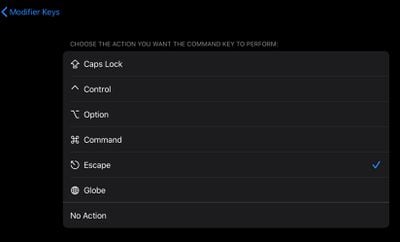
The Magic Keyboard for ‌‌iPad Pro‌‌ lacks an Escape key, but there are a couple of ways you can get around this. Try hitting the Command key and the period key in combination. If that doesn't work in the context that you need an Escape function, you can use an option in iPadOS 13.4 that lets you remap modifier keys for various actions.
settings
To do so, first make sure your Magic Keyboard is connected to your ‌iPad Pro‌, then launch the Settings app and select General -> Keyboard -> Hardware Keyboard. Select the Modifier Keys option, then choose the modifier key that you'd like to use as an Escape key. Choose the Escape action on the next screen, and you'll be good to go.

3. Gain Quick Access to the Virtual Keyboard
virtual keyboard magic keyboard
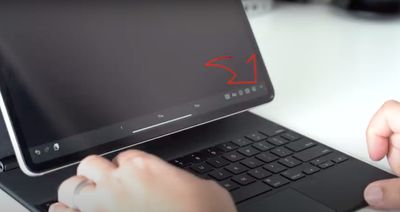
If you need to use the onscreen virtual keyboard to do things like type accented characters or use dictation, tap the down arrow key on your Magic Keyboard, then touch and hold the downward-facing chevron in the bottom-right corner of the iPad's screen. To hide the keyboard again, tap the key in the bottom-right corner of the screen.

4. Control Touchscreen Actions With Keys
ipadpromagickeyboardtrackpad
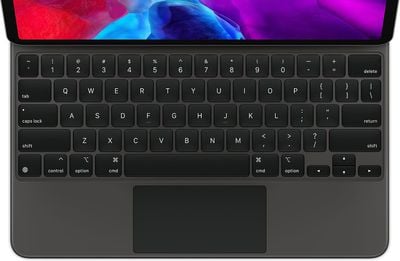
If you have difficulty using your ‌iPad Pro‌'s touchscreen, you can replicate many of the functions and actions using the keys on a Magic Keyboard. With the Magic Keyboard connected, launch the Settings app and select Accessibility -> Keyboards -> Full Keyboard Access.

Toggle on the switch next to Full Keyboard Access, and you'll be able to control and customize several keyboard shortcuts to replicate a range of functions, movements, interactions, gestures, and more.

5. Adjust Backlight Brightness

Perhaps the only drawback of the Magic Keyboard is that its layout lacks a row of function keys. That leaves users with no dedicated keys for adjusting some system settings, including keyboard backlight brightness.

The Magic Keyboard actually uses the ‌iPad Pro‌'s sensors to detect the lighting in your environment and will adjust the backlit keys accordingly. But if for some reason you find it too bright or too dim, you can adjust this manually. Granted, it's not as convenient as tapping a key when you want to watch a video with the lights out, but at least it's there.
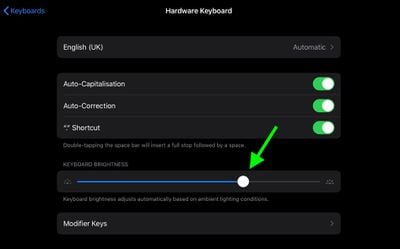
settings
Launch the Settings app and select General -> Keyboard -> Hardware Keyboard, then simply drag the Keyboard Brightness slider to the right or left to make the keys brighter or dimmer.

MacStories' iOS Shortcut magician Federico Viticci has also created a handy shortcut that launches the Hardware Keyboard section of Settings directly. As Viticci suggests, the most convenient way of using it is as a widget on the ‌iPad‌ Home screen.

6. Customize Cursor Behavior
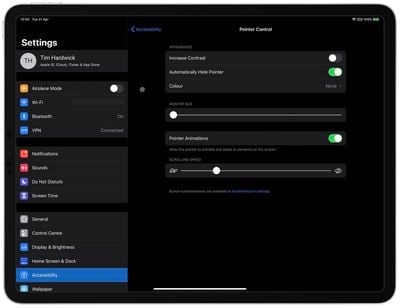
ipad cursor accessibility options 2
iPadOS includes options that let you customize the appearance and behavior of the trackpad's round cursor. These include increasing the cursor's contrast, changing its color, making it bigger or smaller, changing scrolling speed, and disabling the auto-hide after inactivity. These settings can be found in the Settings app under Accessibility -> Pointer Control.

7. Tap-to-Click and Two-Finger Secondary Click

If you own a Mac, you're likely already familiar with Tap to Click. It lets your trackpad register a tap with a single finger as a virtual click, allowing you to do things like launch apps and open menus without physically clicking the pad.
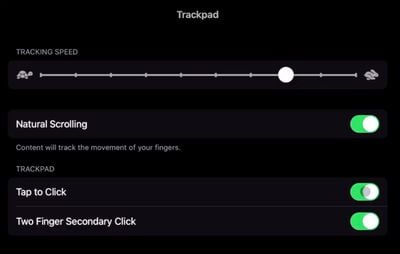
magic keyboard trackpad secondary click
Apple has included the same feature in iPadOS 13.4, so you can use it with your Magic Trackpad. Launch Settings and choose General -> Trackpad, then switch on the toggle next to Tap to Click. Now you can tap the trackpad's surface with one finger to register a click, instead of having the physically depress the trackpad.

You can also make a two-finger tap or click behave as a secondary click (or right-click, if you're used to a two-button mouse). Simply enable the Two Finger Secondary Click toggle in the same Trackpad settings screen above.

8. Trackpad Gestures

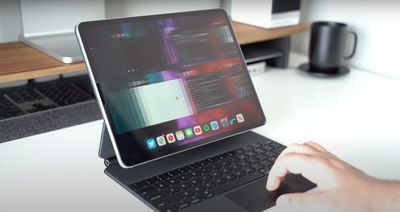
As you'd expect, the Magic Keyboard supports the new trackpad gestures in iPadOS 13.4. For example, you can enter the Slide Over multitasking interface by moving the cursor over to the right side of the screen or dragging an app over from the Dock.

You can also use two- and three-finger gestures. On the Home screen, for example, a two-finger swipe downwards on your trackpad will bring up Spotlight search. When you're using Photos, you can pinch in and out to control picture zoom. You can also use two fingers to scroll up or down when navigating a web page in Safari.
ipad pro magic keyboard gesture multi tasking
Try swiping downwards with three fingers to be taken back to the Home screen no matter what you're doing on the ‌iPad‌. Likewise, a three-finger swipe up on the trackpad will open up the iPadOS multitasking interface. And swiping to the left or the right with three fingers will also switch between your open apps.

9. Access Emoji Keyboard

It's easy to access emoji while using the Magic Keyboard. Whenever you're in typing mode, press the globe key in the bottom-corner of the keyboard layout.

ipad emoji keyboard
As long as you're using only English, the emoji keyboard will appear on the screen. To make it disappear again, simply tap the globe key on the keyboard once again.

10. "Easel Mode" and Other Orientations

Hold your ‌iPad Pro‌ in landscape orientation, prop the bottom side against the ridge below the keys, and rest its top side against the Magic Keyboard cover. Now you have a stable elevated drafting stand or "easel," perfect for drawing.
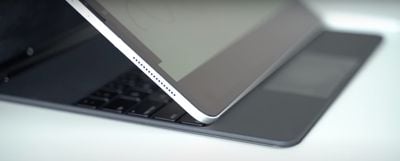
magic keyboard ipad pro easel
You can also try this stand trick in portrait orientation for some FaceTime, or whenever you want to have the screen closer to you. It's not quite as stable, but it works. (Hat tip to GeekWebGuides forum member GrindedDown for this one.)

Alternatively, with the ‌iPad Pro‌ attached in the normal way, try flipping the Magic Keyboard over backwards, then take your iPhone and slip it in between the keyboard and the top of your ‌iPad‌, and you'll have another decent angle for drawing.
Related Roundup: iPad Pro
Buyer's Guide: iPad Pro (Caution)

Popular Stories

new ipad cyber

New Entry-Level iPad Not Expected Until Early 2027

Sunday October 11, 2026 8:57 am PDT by
Apple's next entry-level iPad models, codenamed J581 and J582, will not arrive until early 2027, according to Bloomberg's Mark Gurman. He added that Apple plans a major iPad Air refresh to add an OLED display and a new iPad Pro in 2027. The latter could gain a vapor chamber to improve thermals and performance. A new iPad mini is still expected to arrive at the end of October this...
ipad 10th gen blue

iPad Could Get Significantly Thinner Bezels, Leaker Says

Monday October 5, 2026 8:39 am PDT by
The iPad is set to gain significantly narrower borders around its display, according to the leaker known as "Instant Digital" on Weibo. The post gives no model or timeline; it could refer to the entry-level iPad or to Apple's tablet lineup in general. Refreshes of the entry-level iPad, iPad mini, iPad Air, and iPad Pro are in the pipeline. The next iPad mini is already rumored to gain OLED and ...
iPhone Duo Trio

Here's What Apple's Apps Look Like on the iPhone Duo

Tuesday October 20, 2026 11:12 am PDT by
With just three days to go until the iPhone Duo is released, Apple is getting ready for the launch. Behind the scenes, the App Store now has screenshots of Apple's built-in apps running on the Duo. We've seen some apps in marketing materials, but images of the ones we haven't seen give us an idea of what it will be like using the iPhone Duo day to day. Many apps are shown in landscape...

Top Rated Comments

4jasontv Avatar
85 months ago

Use Your Free USB-C Port
That USB port is far from free. /s
Score: 16 Votes (Like | Disagree)
85 months ago
Absultly lov myy magc keybord - usin it now
Score: 13 Votes (Like | Disagree)
Aluminum213 Avatar
85 months ago

So basically a whole lot of problems could have been solved with a row of function keys?
That function row magic keyboard is exclusive to the next iPad Pro model :)
Score: 12 Votes (Like | Disagree)
The Game 161 Avatar
85 months ago

Just buy a Macbook. It'll work and save you money.
Not everybody wants a MacBook
Score: 10 Votes (Like | Disagree)
85 months ago

More functionality at the same price but thinner and less weight? Yeah, who in their right mind wants that?
Just this morning i had to explain to my 2.5yo that you can’t draw on a macbook‘s screen, cant touch the screen, cant pull the screen out to use as a tablet..
Score: 9 Votes (Like | Disagree)
notabadname Avatar
85 months ago
The quality of this thing is excellent. The backlighting is fantastic and I like the feel of typing. Really beats the smart-cover experience in every way. I am very happy I bought this.
Score: 9 Votes (Like | Disagree)
Latest Stories
iPhone Duo Launch Begins as First Orders Reach Customers
2 hours ago
1Password for Agents Keeps Your Passwords Hidden From AI
3 hours ago
iPhone Duo 24 Hours Later: Your Questions Answered
4 hours ago
Apple's iWork Apps Get 'Intelligent Assistant' and iPhone Duo Support
4 hours ago
Apple is Apparently Considering a Slightly Larger iPhone Duo
5 hours ago
Giant iPhone Duo Displays Coming to Four Apple Stores
6 hours ago
Apple Pulls Keynote, Pages and Numbers From App Store [Update: Back]
6 hours ago
Apple Updates More Apps With iPhone Duo Support
7 hours ago
Apple Will Label Apps 'Made for iPhone Duo' in App Store
10 hours ago
Amazon Takes $49 Off iPad With Prices Starting at $399.99
10 hours ago
F1 on Apple TV Now Available in Dolby Atmos
11 hours ago
Apple Reveals More Than 50 Apps That Will Be Updated for iPhone Duo
11 hours ago
Apple Blocks Certificates That Could Help Attackers Fake Websites
13 hours ago
Giant iPhone Duo Installations Spotted at Apple Fifth Avenue
13 hours ago
iPhone Duo 2 Prototypes Include Under-Display Face ID
14 hours ago
Tesla App Gains iPad and iPhone Duo Support
18 hours ago
Apple Reportedly Boosts iPhone Duo Orders by 44%
18 hours ago
Fortnite Returning to Australian App Store After Court Ruling
19 hours ago
Apple Ordered to Open iPhone to Rival App Stores in Australia
19 hours ago
Apple Suppliers Face Hurdles Cutting Circuit Board Emissions
19 hours ago
Things Updated for iPhone Duo With Adaptive Layout
20 hours ago
Simplicity and Siri AI Are HomeView's Killer Features, Apple Says
20 hours ago
iPhone Duo Reviewers Really Miss Face ID
1 day ago
Does the iPhone Duo Run Hot? Here's What Reviews Found
1 day ago
Apple Music's New Look is Now Live on Apple's Website
1 day ago
Anthropic Launches Claude Duet, a Proactive AI Agent
1 day ago
What 32,000 Folds Did to the iPhone Duo's Hinge
1 day ago
iPhone Duo's Hidden FaceTime Camera Takes 'Trash' Photos
1 day ago
iPhone Duo Has 'Edge Light' Feature That Debuted on Macs Last Year
1 day ago
Apple Support App Updated for iPhone Duo's Larger Display
1 day ago