Apple today released macOS Monterey to the public after several months of beta testing, and it brings a whole slew of useful new features and changes to apps like Safari, Maps, FaceTime, Notes, Photos, Messages, and More, along with some great quality of life improvements.
We've rounded up 10 of our favorite macOS Monterey features, but let us know what you like about the update in the comments below.
Erase All Content & Settings
With macOS Monterey, restoring a Mac to factory settings works a lot more like it does on the iPhone and iPad with iOS. With an Erase All Content & Settings button, you now erase your Mac without needing to go through the hassle of reinstalling the operating system.
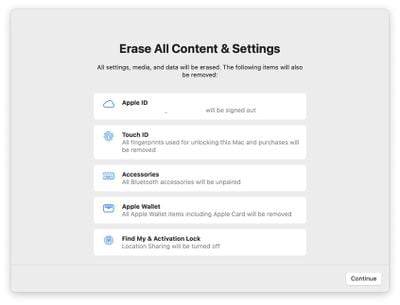
The feature wipes the Mac but leaves the operating system in place so the machine can be sold or traded in, and it's so much more convenient than prior methods that it's made the number one spot in our list. Note that you need to have a Mac with a T2 chip for Erase All Content and Settings to be available as it is not compatible with older machines.
AirPlay to Mac
With enhanced AirPlay support on the Mac, content from an iPhone or iPad can be AirPlayed to the display of a Mac, something that wasn't possible before. AirPlay to Mac also works with Mac-to-Mac transfers so you can display one Mac's screen on another.
AirPlay to Mac allows users to extend or mirror an Apple device's display to a Mac, and since two Macs are supported, a Mac can use another Mac as an external display in a sort of Target Display Mode feature clone.
AirPlay to Mac works both wirelessly or wired using a USB-C cable, with the wired connection useful for cutting down on any possible latency. You can also use AirPlay to turn your Mac into a speaker that's paired with other AirPlay 2 speakers for multiroom audio, and you can AirPlay Apple Fitness+ workouts to the Mac.
AirPlay to Mac works with the 2018 or later MacBook Pro or MacBook Air, 2019 or later iMac or Mac Pro, the iMac Pro, and the 2020 or later Mac mini.
FaceTime Updates
Many of the FaceTime features that have been made available in iOS 15 are also included in the macOS Monterey version of FaceTime. There's a Create a Link feature for FaceTime calls that makes it much easier to get people to join your call as it's similar to how Zoom and other video apps work, and it's great for scheduling calls.
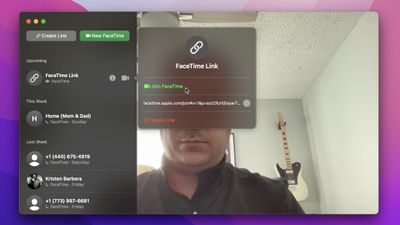
PC and Android users can now join FaceTime calls from the web using those FaceTime links created by Apple users.
Apple has also added a Portrait mode effect to FaceTime calls on the Mac so you can blur out the background behind you while you chat. A new Grid view can show everyone in the call at one time, and there are new audio modes. Voice Isolation minimizes background noise and focuses on your voice, while Wide Spectrum can be used to highlight all sounds if there are multiple people on your end of the call.
FaceTime on macOS Monterey will be gaining all of the SharePlay features made available on iOS devices in iOS 15.1, but SharePlay was not ready for release when macOS Monterey launched and it will be coming at a later date.
Quick Note
The Notes app in macOS Monterey has been enhanced with a new Quick Note feature that's designed for jotting down notes no matter what you're doing. If you place your cursor in the very bottom right corner of the display, a little note icon will pop up.
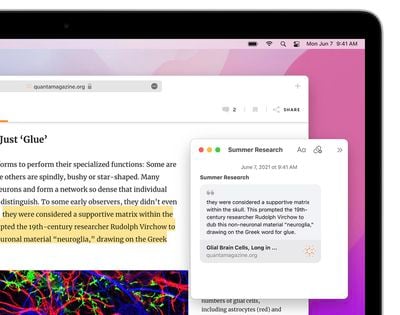
Clicking it opens up a Quick Note where you can write down a thought, add a link, save a photo, and more. Quick Notes are saved in a dedicated section in the Notes app, and can be accessed across all devices.
Safari Tab Groups
Apple initially planned to tweak the design of Safari in macOS Monterey, adding a redesigned tab bar that better blends into the background of the webpage, but after complaints, that plan was scrapped and Safari largely looks like it did in Big Sur.
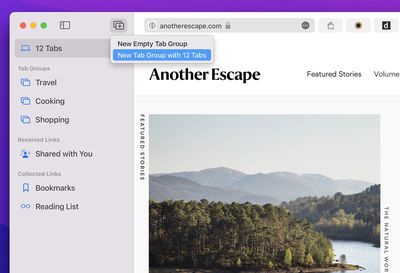
If you like, you can enable the new "Compact" design in the Preferences section of Safari, but there is a more notable Safari change - Tab Groups.
With Tab Groups, you can save groups of tabs together and then revisit them later. If you're planning a vacation, for example, you might have several tabs that you want to keep open and revisit later without having the tabs take up your entire Safari tab bar, with Tab Groups allowing you to save everything and open it back up later.
Animated Memoji Avatar
Memoji can now be set as your macOS avatar, showing up on the Lock Screen in place of the standard still image. In System Preferences, click on your profile and you can create or choose a Memoji to serve as your avatar.
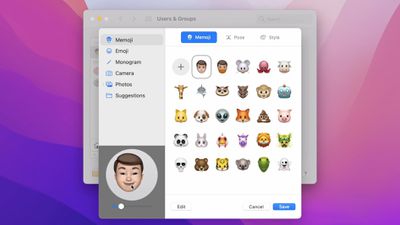
You can choose a favorite pose and a style, which adds a background color, and then click save to set it. Memoji will animate on the Mac's Lock Screen when you log into your Mac. If you do something like enter your password wrong, you'll see the Memoji react.
Emojis and initial monograms are also options for Mac avatars in Monterey, plus there's a new "Suggestions" tab that houses various profile picture options.
Focus
Focus is a more tailored version of Do Not Disturb that's meant to let you focus on what you're doing at the current moment while blocking out unnecessary distractions.
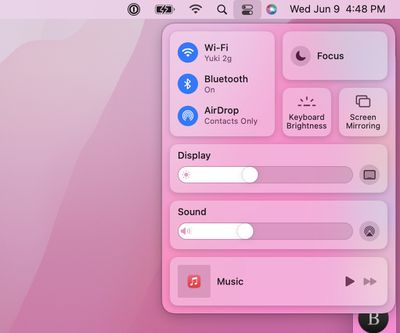
As an example, you can create a "Work" focus mode that minimizes notifications from non-work related apps to help you better concentrate without interruption. Apple has built-in Focus modes for things like Sleep and Driving, and you can create custom Focus modes. With Focus, you can choose the apps and the people that are allowed to contact you at different times.
If you're in a Focus mode and someone tries to send you a message, they'll be notified that your notifications are silenced (though it's still possible to get through in an emergency), and if you turn on Focus on one device, it's automatically synced to all your devices.
Shortcuts
The Shortcuts app that was first introduced on iPhone and iPad is now available on the Mac, so you can access all of your favorite Shortcuts. Apple has designed Mac-specific shortcuts that are available in the Gallery, and you can make your own.
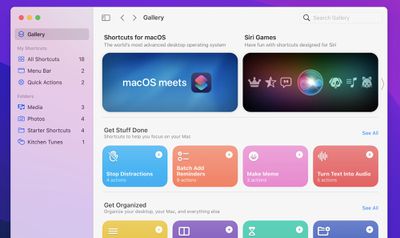
Shortcuts has been updated with Next Action Suggestions to make it easier to create new shortcuts, and your Automator app workflows can be converted into shortcuts. For Pro users, there's AppleScript integration and shell script compatibility.
Shortcuts are deeply integrated into macOS Monterey and can be run from the Dock, menu bar, Finder, Spotlight, or using Siri, and they're universal, so Shortcuts made on your iPhone can be used on your Mac and vice versa.
Universal Control (Coming Soon)
One of the headline features of macOS Monterey, Universal Control will allow a single mouse and keyboard work across multiple Macs or iPads. So if you have a desktop setup with an iMac, a MacBook, and an iPad, you can use one mouse and one keyboard to control all three.

Universal Control is not yet available because it was not ready in time for macOS Monterey's launch, but it will be coming in a future macOS Monterey update.
Read More About macOS Monterey
There are tons more features in macOS Monterey that are worth checking out, and we have a full rundown of everything new in the update in our macOS Monterey roundup.