
macOS Sonoma Features You Should Check Out First

After three months of beta testing, macOS Sonoma is finally available to everyone. macOS updates often don't get as much attention as iOS updates during the beta testing process, but there are plenty of notable reasons to install the new software.


Aerial Screensavers

If you're a fan of the aerial screensavers on the Apple TV, you're in luck because Apple brought them to the Mac in macOS Sonoma.
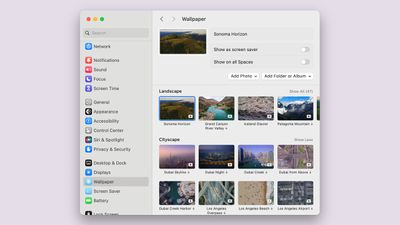
macos sonoma new aerial wallpaper
There are more than 100 videos to choose from across categories that include Landscape, Cityscape, Underwater, and Earth. Most of these are from the ‌Apple TV‌, but there are some from the Sonoma region of California that are new this year. The aerial screensavers accompany matching wallpapers that animate when you wake your display for a seamless transition from screensaver to wallpaper.

Interactive Desktop Widgets

Widgets aren't constrained to the Today Center in macOS Sonoma, and the focus on widgets is perhaps the most notable change in the update. ‌Widgets‌ can be added directly to the desktop, and they are interactive, just like widgets on iPhone.
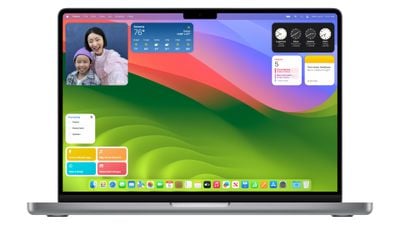
macos sonoma widgets
You can check off Reminders, control smart home products, and interact with third-party apps from your Mac's desktop without the need to open up the full app. ‌Widgets‌ blend in to the background when not in use, and through Continuity, there's also an option to see and use your ‌iPhone‌ widgets on your desktop without having to install the corresponding Mac app.

Videoconferencing

Apple added a Presenter Overlay that is designed to let you share your screen in FaceTime or third-party video apps like Zoom without blocking your face. The feature basically shows you over your background, so you can present and remain on-screen.

For fun, there are also new 3D reactions that pop up with hand gestures during ‌FaceTime‌ calls and calls in apps like Zoom. Reactions include Love (hearts), Like (thumbs up), Dislike (thumbs down), Balloons, Confetti, Lasers, Fireworks, and Thunderstorm. The gestures that trigger the effect are listed below.

  • Heart - Heart emoji
  • Thumbs up - Thumbs up emoji
  • Two thumbs up - Fireworks
  • Single thumbs down - Thumbs down emoji
  • Two thumbs down - Storm
  • Peace sign with one hand - Balloons
  • Peace sign with two hands - Confetti
  • "Rock on" sign with two hands - Lasers

You will need an Apple silicon Mac to see the reactions, and they can pop up in any app that uses the camera.

Safari Profiles

Safari supports separate profiles, so you can divide work browsing from personal browsing. Profiles have distinct browser history, extensions, Tab Groups, cookies, and favorites.
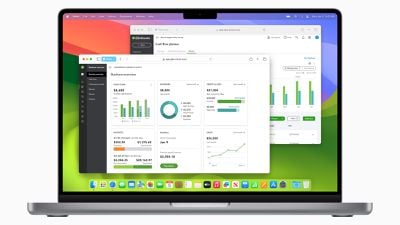
macOS Sonoma Safari Profiles
You can create different browsing profiles for any purpose, so it serves as an extension of the Tab Groups feature that came out with macOS Ventura. You can do Work and Personal, separate out hobbies, plan trips with a separate profile, and more.

Web Apps

A website like MacRumors.com can now be added to the macOS dock as a web app, so you can get to your favorite websites right from the dock. Web apps saved to the dock feature a simplified toolbar and support notifications.
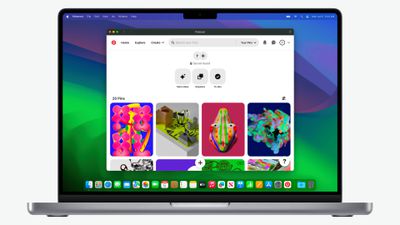
macOS Sonoma Web App 1

Game Mode

If you have an Apple silicon Mac you game on, you can turn on Game Mode, which prioritizes CPU and GPU performance for gaming purposes. Game Mode cuts down on audio latency for AirPods and input latency for select game controllers, speeding up your response times.

macos sonoma presenter overlay

Compatibility

Compared to macOS Ventura, macOS Sonoma drops support for the 2017 MacBook Pro, the 2017 iMac, and the 2017 12-inch MacBook. It can run on the Macs below:

  • iMac - 2019 and later
  • iMac Pro - 2017 and later
  • Mac mini - 2018 and later
  • MacBook Air - 2018 and later
  • MacBook Pro - 2018 and later
  • Mac Pro - 2019 and later
  • Mac Studio - 2022 and later

Read More

More on the new features that are available in macOS Sonoma can be found in our macOS Sonoma roundup.


Related Forum: macOS Sonoma

Popular Stories

Apple Logo Zoomed

Tim Cook Teases Plans for Apple's Upcoming 50th Anniversary

Thursday February 5, 2026 12:54 pm PST by
Apple turns 50 this year, and its CEO Tim Cook has promised to celebrate the milestone. The big day falls on April 1, 2026. "I've been unusually reflective lately about Apple because we have been working on what do we do to mark this moment," Cook told employees today, according to Bloomberg's Mark Gurman. "When you really stop and pause and think about the last 50 years, it makes your heart ...
wwdc sans text feature

Apple Rumored to Announce New Product on February 19

Thursday February 5, 2026 12:22 pm PST by
Apple plans to announce the iPhone 17e on Thursday, February 19, according to Macwelt, the German equivalent of Macworld. The report, citing industry sources, is available in English on Macworld. Apple announced the iPhone 16e on Wednesday, February 19 last year, so the iPhone 17e would be unveiled exactly one year later if this rumor is accurate. It is quite uncommon for Apple to unveil...
Finder Siri Feature

Why Apple's iOS 26.4 Siri Upgrade Will Be Bigger Than Originally Promised

Friday February 6, 2026 3:06 pm PST by
In the iOS 26.4 update that's coming this spring, Apple will introduce a new version of Siri that's going to overhaul how we interact with the personal assistant and what it's able to do. The iOS 26.4 version of Siri won't work like ChatGPT or Claude, but it will rely on large language models (LLMs) and has been updated from the ground up. Upgraded Architecture The next-generation...
iOS 26

iOS 26.3 and iOS 26.4 Will Add These New Features to Your iPhone

Tuesday February 3, 2026 7:47 am PST by
While the iOS 26.3 Release Candidate is now available ahead of a public release, the first iOS 26.4 beta is likely still at least a week away. Following beta testing, iOS 26.4 will likely be released to the general public in March or April. Below, we have recapped known or rumored iOS 26.3 and iOS 26.4 features so far. iOS 26.3 iPhone to Android Transfer Tool iOS 26.3 makes it easier...
iphone 17 pro dark blue 1

iPhone 18 Pro Max Rumored to Deliver Next-Level Battery Life

Friday February 6, 2026 5:14 am PST by
The iPhone 18 Pro Max will feature a bigger battery for continued best-in-class battery life, according to a known Weibo leaker. Citing supply chain information, the Weibo user known as "Digital Chat Station" said that the iPhone 18 Pro Max will have a battery capacity of 5,100 to 5,200 mAh. Combined with the efficiency improvements of the A20 Pro chip, made with TSMC's 2nm process, the...

Top Rated Comments

tmmacops Avatar
31 months ago
Not to be a jerk, but I find desktop widgets to be a waste. I have virtual desktops and most have a full screen of apps. I can’t see any of the widgets so a bit of a waste.

It’s an ok update, but not really seeing much. Couldn’t care less about screensavers. How about improving Mail, Calendar, and some of the other built in stuff?
Score: 36 Votes (Like | Disagree)
erikkfi Avatar
31 months ago
Widgets were better when they had their own Space (as part of Dashboard). I don't understand why I'd want a bunch of attention-grabbing widgets on my desktop. Am I misunderstanding how this works?
Score: 27 Votes (Like | Disagree)
Lynxpoint Avatar
31 months ago
I will likely update at some point, but not for any of these features.
1. I don't use screensavers
2. I don't like desktop widgets (don't use on iPad or iPhone)
3. Don't do screen sharing
4. Tried doing third party web apps in dock and did not like the clutter effect on dock, so ditched it
5. Safari profiles might be useful, although I currently accomplish the equivilant of this through the use of different browsers.
Score: 25 Votes (Like | Disagree)
BeatCrazy Avatar
31 months ago
Call me a simpleton, the aerial screensavers are my favorite feature of Sonoma.

The last few macOS releases were very limited in background/screensaver options.
Score: 22 Votes (Like | Disagree)
jchap Avatar
31 months ago
Just installed macOS Sonoma 14.0 on a MacBook Pro 16-inch 2019 (Core i9, 64 GB RAM) this morning.

Interesting to find this setting in System Settings, where you can now just click on the desktop to temporarily show the desktop and hide everything else!


Attachment Image
Score: 20 Votes (Like | Disagree)
jayducharme Avatar
31 months ago

If I add the stock widget to my desktop, it doesn't display my stocks. If I click on it, it says open on iPhone to continue? What am I missing?
A bug-free OS?
Score: 11 Votes (Like | Disagree)















