Most iPhone users will be aware of their device's built-in calculator, but not everyone will know some of the tricks that you can perform with the app that can save you time. Here are some of our favorite tips.

1. Swipe to Delete Numbers

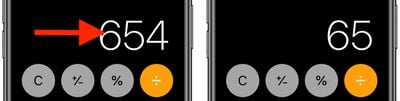
It's a common misconception that if you type the wrong number into the Calculator app, you have to start the whole sum all over again. Happily, that isn't the case: Simply swipe right or left with a finger across the number display to remove the last number you typed, and repeat the action if necessary to remove several numbers.
calculator

2. Scientific calculator

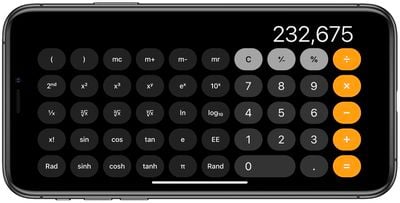
The default calculator app includes a built-in scientific calculator that you can use to perform logarithms, square roots, trigonometric calculations, and more advanced math equations.
calculator
To access the scientific calculator, simply rotate your iPhone to landscape mode. If it's not showing up, make sure the portrait orientation lock is disabled in Control Center. To switch back to the regular calculator, rotate your phone to portrait mode.

3. Copy and Paste

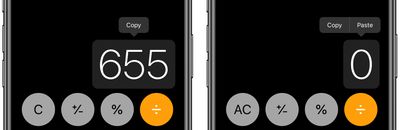
You don't need to memorize the results of your calculations to input them into other apps. Use the clipboard functions instead - just long press on the number field to copy or paste the result.
calculator

4. Copy Last Result

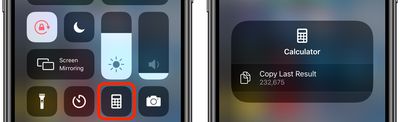
If you've switched to another app, you can still quickly paste the last figure that you calculated without returning to the calculator to copy it.
calculator
Using either a swipe up or a swipe down, launch the Control Center on your iPhone, then long press the Calculator button, and you'll see a handy option to Copy Last Result.

5. Spotlight Calculations

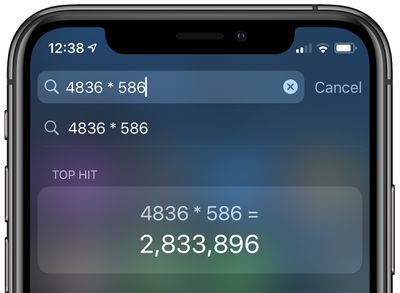
Did you know that calculator functions are built into Spotlight Search on your iPhone?
spotlight
Simply swipe down from the Home screen to bring up Spotlight, and you can perform basic calculations by typing them directly into the Search field at the top of the screen without having to open the Calculator app.

Bonus Tip for Apple Watch Users

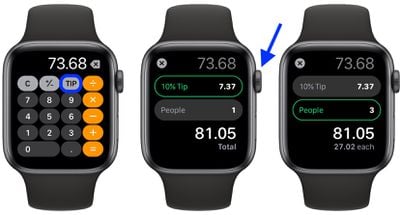
The Calculator app on Apple Watch comes with a couple of additional features that make short work of calculating how much you should tip and how much each person in a group owes if you're splitting a bill.

The steps below show you how it's done. Note that the two features can be used together, but you can also use them independently by selecting a 0% tip and changing the number of people, or changing the tip and leaving the People field set to 1.

  1. Launch the Calculator app on your Apple Watch.
  2. Enter the total amount of the bill.
  3. Tap the TIP button in the top-right corner, just left of the divide button.
  4. With the Tip field highlighted in green, turn your watch's Digital Crown to change the percentage.
  5. To split the bill between a group of people, tap People and then use the Digital Crown to change the number (the maximum is 50).apple watch split the bill tip

You'll see the total amount below the two fields change to reflect your tip adjustments, and the amount below that will change depending on how many people are paying.

Here's another little tip: If you don't use the TIP function, you can actually change the button on the calculator layout to a standard percentage (%) function. Simply press firmly on the main calculator screen and tap either Tip Function or Percent.


Top Rated Comments

osta.doc Avatar
74 months ago
Why don’t go ahead and add this calculator app to the iPads? I had no idea that Apple didn’t install calculators on iPads, until I bought an iPad Pro a month ago.
Score: 22 Votes (Like | Disagree)
glenthompson Avatar
74 months ago
For us long time HP calculator users the lack of RPN makes it a no go. I willingly pay for 3rd party calculators with RPN.
Score: 9 Votes (Like | Disagree)
femike Avatar
74 months ago
Any news on the Apple's calculator and weather app for the iPad? After 10 years of developer time it should be almost ready by now.
Score: 8 Votes (Like | Disagree)
Mr. Awesome Avatar
74 months ago

just had to look up RPN in Wikipedia... ?
Lack of Calculator on IPad is worse - to me ?
According to Siri knowledge, it stands for Radio Philippines Network.
Score: 6 Votes (Like | Disagree)
citysnaps Avatar
74 months ago
I've pretty much forgotten how to use a non-RPN calculator.
Score: 6 Votes (Like | Disagree)
thisisnotmyname Avatar
74 months ago
article author: what did you buy for $72.5k that you are paying a 20% tip on?
Score: 4 Votes (Like | Disagree)

Popular Stories

Apple Logo Zoomed

Tim Cook Teases Plans for Apple's Upcoming 50th Anniversary

Thursday February 5, 2026 12:54 pm PST by
Apple turns 50 this year, and its CEO Tim Cook has promised to celebrate the milestone. The big day falls on April 1, 2026. "I've been unusually reflective lately about Apple because we have been working on what do we do to mark this moment," Cook told employees today, according to Bloomberg's Mark Gurman. "When you really stop and pause and think about the last 50 years, it makes your heart ...
Finder Siri Feature

Why Apple's iOS 26.4 Siri Upgrade Will Be Bigger Than Originally Promised

Friday February 6, 2026 3:06 pm PST by
In the iOS 26.4 update that's coming this spring, Apple will introduce a new version of Siri that's going to overhaul how we interact with the personal assistant and what it's able to do. The iOS 26.4 version of Siri won't work like ChatGPT or Claude, but it will rely on large language models (LLMs) and has been updated from the ground up. Upgraded Architecture The next-generation...
wwdc sans text feature

Apple Rumored to Announce New Product on February 19

Thursday February 5, 2026 12:22 pm PST by
Apple plans to announce the iPhone 17e on Thursday, February 19, according to Macwelt, the German equivalent of Macworld. The report, citing industry sources, is available in English on Macworld. Apple announced the iPhone 16e on Wednesday, February 19 last year, so the iPhone 17e would be unveiled exactly one year later if this rumor is accurate. It is quite uncommon for Apple to unveil...
iOS 26

iOS 26.3 and iOS 26.4 Will Add These New Features to Your iPhone

Tuesday February 3, 2026 7:47 am PST by
While the iOS 26.3 Release Candidate is now available ahead of a public release, the first iOS 26.4 beta is likely still at least a week away. Following beta testing, iOS 26.4 will likely be released to the general public in March or April. Below, we have recapped known or rumored iOS 26.3 and iOS 26.4 features so far. iOS 26.3 iPhone to Android Transfer Tool iOS 26.3 makes it easier...
iphone 17 pro dark blue 1

iPhone 18 Pro Max Rumored to Deliver Next-Level Battery Life

Friday February 6, 2026 5:14 am PST by
The iPhone 18 Pro Max will feature a bigger battery for continued best-in-class battery life, according to a known Weibo leaker. Citing supply chain information, the Weibo user known as "Digital Chat Station" said that the iPhone 18 Pro Max will have a battery capacity of 5,100 to 5,200 mAh. Combined with the efficiency improvements of the A20 Pro chip, made with TSMC's 2nm process, the...