How to Use Apple's New Intercom Feature

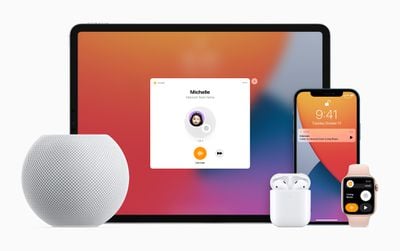
Alongside the HomePod mini, Apple introduced a new Intercom feature that's designed to let Apple device owners communicate with one another throughout the home, sending messages to specific rooms, areas, or people.
Apple HomePod mini iPad iPhone applewatch airpods intercom
Intercom works with the HomePod, ‌HomePod mini‌, iPhone, iPad, Apple Watch, AirPods, and even CarPlay, so you can dictate a voice message on any of your devices that you can have delivered to a single person in the family or all family members. Intercom is primarily designed as a feature for the ‌HomePod‌ and ‌HomePod mini‌.

We have a demo and walkthrough video on the new feature:

How to Set Up Intercom

After updating to ‌HomePod‌ software 14.2 and iOS 14.2, Intercom can be set up in the Home app. Intercom works if you have a ‌HomePod‌ or another compatible device, and there is no dedicated interface on the ‌iPhone‌ for using Intercom outside of the Home app.

  1. Install HomePod 14.2 software.
  2. Open up the Home app.
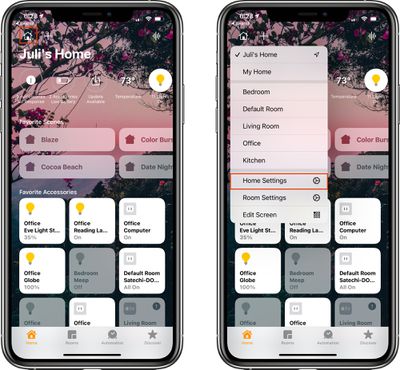
  3. Tap on the little house icon in the upper left corner. intercomsetup1
  4. Tap on "Home Settings."
  5. Scroll down to "Intercom" and tap it. intercomsetup2
  6. Adjust your notification settings and select the people in the home who are able to use the Intercom feature.
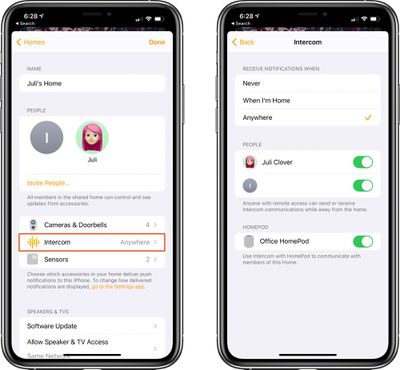
Those who have remote access to your Home app can send or receive Intercom messages even when away from home, with those messages displaying as audio notifications on ‌iPhone‌ and Apple Watch.

Note that anyone who wants to be able to use Intercom will need to be added as a person with access to the home. This can be done by entering the Home Settings screen and tapping on "Invite People."

Intercom Requirements

Using the Intercom feature on ‌HomePod‌, iOS devices, ‌CarPlay‌, and AirPods requires the HomePod 14.2 software update or later and iOS and iPadOS 14.2 or later. On Apple Watch, it appears to work with watchOS 7.1 and later.

How to Use Intercom to Send a Message to a HomePod

Intercom messages can be sent to the HomePods throughout a home using Siri on ‌iPhone‌, ‌iPad‌, Apple Watch, another ‌HomePod‌, and more. To send an Intercom message, just activate ‌Siri‌ on your ‌iPhone‌, ‌iPad‌, Apple Watch, ‌CarPlay‌, or AirPods and then say "Intercom" and your message.
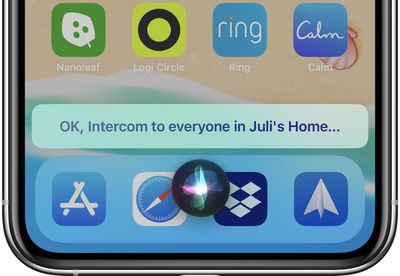
intercommessagesiri
So if you wanted to tell everyone that dinner is ready, just say "Intercom, dinner is ready" and the message "Dinner is ready" will be relayed to all of the HomePods in the Home.

Other commands like "Hey ‌Siri‌, tell everyone dinner is ready" also work as an alternative phrase for communicating through Intercom.
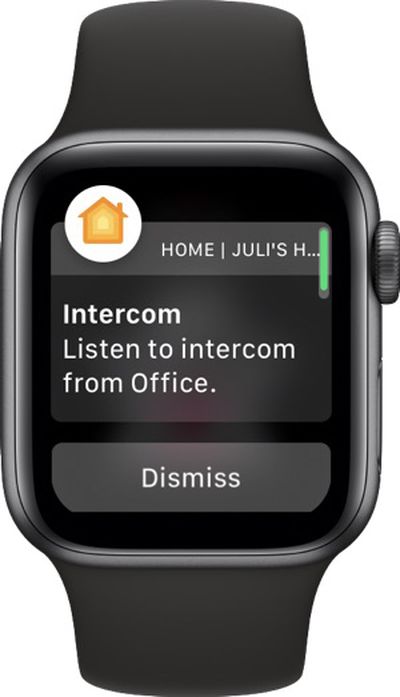
intercomapplewatch
In the Home app on ‌iPhone‌ and ‌iPad‌, there's also an option to tap on the small waveform in the upper right corner to record a message that's then sent to Intercom devices in the home.
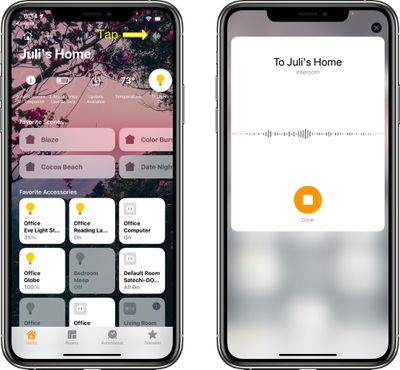
intercomwaveform

How to Use Intercom to Send a Message From a HomePod to Another Device

You can use the ‌HomePod‌ to send a message to other HomePods in the home or to the devices that belong to members of the family.

It's as simple as activating ‌Siri‌, saying "Intercom" and then the message, with the message able to be sent to every person in the family regardless of who's at home. It will play on ‌HomePod‌ speakers in the house as well as on individual iPhones, iPads, and Apple Watches.

How to Send a Message to a Specific Room

If you have HomePods in separate rooms, you can direct a message to that room by activating ‌Siri‌ and then saying "Intercom [room name] [message]."
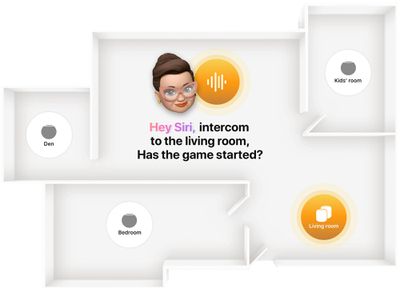
homepodminiintercom2
So for example if you wanted to tell everyone in the living room that dinner is ready, you would say "Hey ‌Siri‌, intercom living room dinner is ready."

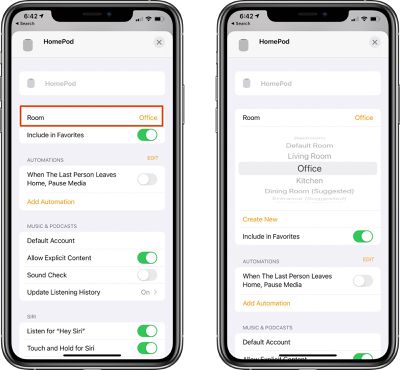
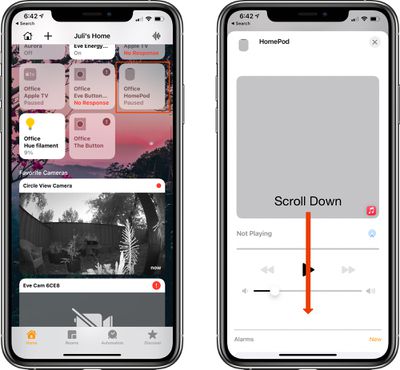
Note that to use the room command, HomePods need to be correctly assigned to a room in the Home app. Assigning or changing a room can be done by following these steps:

  1. Open the Home app.
  2. Select the ‌HomePod‌ or ‌HomePod mini‌ from the device list.
  3. Long press on the ‌HomePod‌ icon. homekitroom1
  4. Tap on the gear icon at the bottom of the interface that pops up or scroll down forcefully.
  5. Tap on "Room." homekitroom2fixed
  6. Select a room from the list of available rooms or tap "Create New."
  7. When done, close the interface by tapping the "X" at the top of the window.
How to Reply to an Intercom Message

If you receive an Intercom message in one room of the house and want to send a message back, you can activate ‌Siri‌ and then say "reply" along with your message.

So if you received an Intercom message that said "Dinner's ready," you can say "Hey ‌Siri‌ reply I'm on my way" to send a message right back.

Devices Compatible With Intercom

You can use iPhones, iPads, Apple Watches, and AirPods to send Intercom messages to the members of your household, and you can even send messages through ‌CarPlay‌ if you're driving.

Note that if your devices are using different languages, such as Spanish for the ‌HomePod‌ and English for the ‌iPhone‌, Intercom may not function properly.

Guide Feedback

Have questions about Intercom or want to offer feedback on this guide? Send us an email here.

Related Roundups: HomePod, HomePod mini

Popular Stories

Apple Logo Zoomed

Tim Cook Teases Plans for Apple's Upcoming 50th Anniversary

Thursday February 5, 2026 12:54 pm PST by
Apple turns 50 this year, and its CEO Tim Cook has promised to celebrate the milestone. The big day falls on April 1, 2026. "I've been unusually reflective lately about Apple because we have been working on what do we do to mark this moment," Cook told employees today, according to Bloomberg's Mark Gurman. "When you really stop and pause and think about the last 50 years, it makes your heart ...
wwdc sans text feature

Apple Rumored to Announce New Product on February 19

Thursday February 5, 2026 12:22 pm PST by
Apple plans to announce the iPhone 17e on Thursday, February 19, according to Macwelt, the German equivalent of Macworld. The report, citing industry sources, is available in English on Macworld. Apple announced the iPhone 16e on Wednesday, February 19 last year, so the iPhone 17e would be unveiled exactly one year later if this rumor is accurate. It is quite uncommon for Apple to unveil...
Finder Siri Feature

Why Apple's iOS 26.4 Siri Upgrade Will Be Bigger Than Originally Promised

Friday February 6, 2026 3:06 pm PST by
In the iOS 26.4 update that's coming this spring, Apple will introduce a new version of Siri that's going to overhaul how we interact with the personal assistant and what it's able to do. The iOS 26.4 version of Siri won't work like ChatGPT or Claude, but it will rely on large language models (LLMs) and has been updated from the ground up. Upgraded Architecture The next-generation...
iOS 26

iOS 26.3 and iOS 26.4 Will Add These New Features to Your iPhone

Tuesday February 3, 2026 7:47 am PST by
While the iOS 26.3 Release Candidate is now available ahead of a public release, the first iOS 26.4 beta is likely still at least a week away. Following beta testing, iOS 26.4 will likely be released to the general public in March or April. Below, we have recapped known or rumored iOS 26.3 and iOS 26.4 features so far. iOS 26.3 iPhone to Android Transfer Tool iOS 26.3 makes it easier...
iphone 17 pro dark blue 1

iPhone 18 Pro Max Rumored to Deliver Next-Level Battery Life

Friday February 6, 2026 5:14 am PST by
The iPhone 18 Pro Max will feature a bigger battery for continued best-in-class battery life, according to a known Weibo leaker. Citing supply chain information, the Weibo user known as "Digital Chat Station" said that the iPhone 18 Pro Max will have a battery capacity of 5,100 to 5,200 mAh. Combined with the efficiency improvements of the A20 Pro chip, made with TSMC's 2nm process, the...

Top Rated Comments

mr.steevo Avatar
69 months ago
I’m not activating this.

I foresee my children gleefully sending fart sounds throughout the house.

At least that’s what I’d have to tell my wife.
Score: 26 Votes (Like | Disagree)
44267547 Avatar
69 months ago

Or just walk a few steps closer to the person and tell them
Or...some of us have multi story homes where not everybody is in the same room or on same level. It’s weird you would say that, given the obvious of how this feature is intended for separation and convenience where not everyone is a ‘few steps away‘. (But then Again, you wouldn’t say that if you were actually purchasing this product, which you’re obviously not.)
Score: 13 Votes (Like | Disagree)
Apple_Robert Avatar
69 months ago
As a prospective buyer of the mini, this excellent article is very helpful. Thanks, Juli
Score: 12 Votes (Like | Disagree)
LeadingHeat Avatar
69 months ago
This is a great walkthrough! Thanks. I’m definitely looking forward to scaring the heck out of my dog when I see on the camera that she’s jumping off the couch when I’m gone.
Score: 9 Votes (Like | Disagree)
Vjosullivan Avatar
69 months ago

It can be surprisingly hard sometimes to find a clear guide to using things like this.
It really shouldn’t need such a detailed walk through to use something that should be so simple.
Score: 9 Votes (Like | Disagree)
macduke Avatar
69 months ago

Or just walk a few steps closer to the person and tell them
I’ll be sure to do that as I’m driving home to tell the kids to get washed up for the dinner I’m bringing home, to tell them to go to the bathroom and put their shoes on to hop in the car because I’m almost home, or to come help me carry in groceries. Not to mention that my house is big enough that I can’t even yell at the top of my lungs from one end to the other. Or you could use it between different buildings on your property like an external garage or workshop. Not everybody lives in a $3000/mo 400sqft studio apartment in some huge city.
Score: 5 Votes (Like | Disagree)