
26 New Features to Try in watchOS 26 - GeekWebGuides
Skip to Content

26 New Features to Try in watchOS 26

Apple released watchOS 26 yesterday, and if you have a Series 9 or later or an Ultra 2 or later, there are a surprising number of useful new features. Apple could have limited new additions like Sleep Score and Hypertension notifications to the newest Apple Watch models, but now you don't need to buy a new watch to get helpful features.
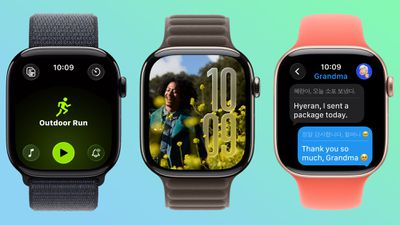
watchos 26 main

Design

  • Liquid Glass - ‌watchOS 26‌ adopts Liquid Glass, with translucent, glass-like buttons and interface elements. It's most visible with select watch faces, the Smart Stack, and Control Center.
  • Control Center - Control Center is customizable, and you can rearrange it and add third-party app controls. If you don't like your changes, you can revert to the original design.
  • Smart Stack - The Smart Stack uses a new prediction algorithm and it will prompt you if there is a suggestion that's immediately useful.
  • Widgets - Widgets in the Smart Stack are customizable, so you can rearrange them to show what's most important to you first. Third-party apps are supported.

Gestures

  • Wrist Flick - There's a wrist flick gesture for things like silencing incoming calls and dismissing notifications one-handed.

Health

  • Hypertension Notifications - ‌watchOS 26‌ adds hypertension notifications based on heart rate, letting you know if high blood pressure is detected over time. It's available on the Series 9 and later and Apple Watch Ultra 2 and later.
  • Sleep Score - Sleep Score gives you a number-based evaluation of your sleep quality. It takes into account sleep duration, the number of times you woke up in the night, and when you went to bed.

Fitness

  • Workout Buddy - There's an AI-powered Workout Buddy that motivates you during workouts and provides helpful insights.
  • Workout app - Apple redesigned the Workout app with an updated layout that makes options like custom workout, Workout Buddy, and Pacer easier to get to.
  • Media - There's an Autoplay Media option that will automatically play music that matches your workout. You can also select your own media to have autoplay when a workout is started.

Messages

  • Smart Actions - The Messages app can suggest smart actions like location sharing, providing an address, and more based on the context of a text.
  • Smart Replies - Smart replies have been improved so you should get more relevant one-tap responses for incoming messages.
  • Live Translation - The Messages app supports Live Translation, so incoming texts in another language can be translated to your language.
  • Backgrounds - Personalized backgrounds that you create for conversations on iPhone sync to the watch.

Phone

  • Call Screening - Call Screening asks callers for more information before your phone or Apple Watch rings.
  • Hold Assist - You can use the Hold Assist feature on the Apple Watch. It waits on the line for you so you can do other things.

Watch Faces

  • Photos - The Photos watch face uses Liquid Glass for the time, and the size and location of the time adjust based on the image that's being displayed. The shuffle option also uses Featured content from ‌Photos‌.
  • Flow - Flow is a watch face designed for Liquid Glass. It features an orb of color with Liquid Glass numbers.
  • Exactograph - Exactograph has hour, minute, and second dials for precise time keeping. If you tap on the face, it zooms in on the minutes and seconds dials so you can measure in even smaller increments of time.
  • Waypoint - Waypoint is only for the Apple Watch Ultra, but it shows points of interest in relation to where you are.
  • Hermes - There's a Hermes Faubourg Party watch face for Hermes watches. It displays different animations based on the time of day.
  • Ticking Seconds - More watch faces support the 1Hz refresh rate on the Apple Watch Series 10 and later, showing a ticking second hand even when your wrist is down.
  • Gallery - The watch face gallery has a new design that groups faces into collections.

Other Features

  • Volume Adjustment - The volume of incoming calls and notifications adjusts based on the ambient sound around you. So if you're in a quiet room, your watch won't have a super loud ring.
  • Live Listen - When using Live Listen on a connected iPhone, a transcript of what's being said is displayed on the watch.
  • Notes - The Notes app is available on the Apple Watch, so you can view existing notes and create new ones.

Read More

For more on the features available in ‌watchOS 26‌, we have a dedicated watchOS 26 roundup.

Related Roundups: watchOS 26, watchOS 27
Related Forum: Apple Watch

Popular Stories

watchos 27

Apple Releases watchOS 27.0.1 for Additional Models

Monday September 28, 2026 2:08 pm PDT by
After releasing watchOS 27.0.1 for the Apple Watch Series 12 and Apple Watch Ultra 4 last week to address a bug that was causing devices to restart unexpectedly, Apple has now released the update for all eligible watches, which includes Series 9 and later. Apple's release notes say only that the update "provides bug fixes for your Apple Watch" and the company does not list any security fixes,...


watchos 27

Apple Releases watchOS 27.0.1 With Fix for Restart Bug

Wednesday September 23, 2026 12:44 pm PDT by
Apple today released watchOS 27.0.1, a minor update to the watchOS 27 operating system that came out last week. The update is limited to the Apple Watch Series 12 and Apple Watch Ultra 4. watchOS 27.0.1 can be downloaded through the Settings app on the watch or the Apple Watch app on a connected iPhone. Software can only be installed when the Apple Watch is on the charger and has over 50...




General visionOS watchOS and tvOS Betas Feature Redux

Apple Releases Third watchOS 27.2, tvOS 27.2 and visionOS 27.2 Betas

Monday October 5, 2026 11:20 am PDT by
Alongside new betas of iOS 27.2, iPadOS 27.2, and macOS Golden Gate 27.2, Apple has released the third betas of watchOS 27.2, tvOS 27.2, and visionOS 27.2. The betas come two weeks after Apple released the second betas. Registered developers can download the betas through the Settings app on each device. With iOS 27.2 and watchOS 27.2, Apple is testing the new Health app that it showed...

Top Rated Comments

Johnny907 Avatar
14 months ago
Not a fan of the redesigned workout app, which was implicitly changed to support “features” my Series 8 doesn’t.
Apple used to give Android grief over the stratified rollout of features based on how old your device was, but in the last few years has seemed to perfect that brand of nonsense.
Score: 4 Votes (Like | Disagree)
ipedro Avatar
14 months ago
I feel so much better about holding off another year. Series 6 and Ultra 2 have gotten me value for my money. To Apple’s credit, software updates have continued for older Watches. All the new features have come to both of mine.

I planned to upgrade this year but this is clearly a year to skip. Let’s see if the Series 12 has a chip capable of the new upcoming Siri and Apple Intelligence.
Score: 4 Votes (Like | Disagree)
14 months ago
Not a big fan of the new workout app on ultra 2. They added a play/start button on screen which isn’t a start button. Start used to be pushing the action button, but when you do that when you’re in the workout app you just go to the workout app again. Now you need to select your workout, push the start button on screen, then push the action button to actually start your workout. Then, what’s the point of the start button on screen? It’s not a start button! I missed a couple of workout starts already because of this stupid design.
Score: 3 Votes (Like | Disagree)
robfoll Avatar
14 months ago
I haven't heard much from all the conspiracy theorists who whine all the time about Apple holding back features for their new products only 😆

Not a fan of the redesigned workout app, which was implicitly changed to support “features” my Series 8 doesn’t.
Apple used to give Android grief over the stratified rollout of features based on how old your device was, but in the last few years has seemed to perfect that brand of nonsense.
It's not nonsense at all. The newer watches have faster processors, much upgraded performance, new sensors, and a lot of extra technology to handle a lot of the new features. It's like complaining your 5-year-old TV can't handle Dolby Atmos or 4K.
Score: 3 Votes (Like | Disagree)
14 months ago
Not that I've found any of the watch faces exciting, but I'm really bored of them to be honest. I was really hoping for some gorgeous ones based on liquid glass, but alas the selection is just so blehhhhh.....

Apple need to stop being so stubborn like they used to be with alert tones, colours, etc and just give us a watch face store. They'd not only make a killing but we could get some actually nice faces. Apple can vet every single one of them if they like to ensure they meet standards, but for heavens sake I'm really bored of these designs.

Score: 2 Votes (Like | Disagree)
14 months ago
Why can't they allow the wrist temperature to be used all time. It appears it only works while your using your watch to track sleep.

Score: 2 Votes (Like | Disagree)
Latest Stories
Apple Updates More Apps With iPhone Duo Support

29 minutes ago
Apple Will Label Apps 'Made for iPhone Duo' in App Store
3 hours ago
Amazon Takes $49 Off iPad With Prices Starting at $399.99
4 hours ago
F1 on Apple TV Now Available in Dolby Atmos
4 hours ago
Apple Reveals More Than 50 Apps That Will Be Updated for iPhone Duo
5 hours ago
Apple Blocks Certificates That Could Help Attackers Fake Websites
6 hours ago
Giant iPhone Duo Installations Spotted at Apple Fifth Avenue
7 hours ago
iPhone Duo 2 Prototypes Include Under-Display Face ID
7 hours ago
Tesla App Gains iPad and iPhone Duo Support
11 hours ago
Apple Reportedly Boosts iPhone Duo Orders by 44%
12 hours ago
Fortnite Returning to Australian App Store After Court Ruling
12 hours ago
Apple Ordered to Open iPhone to Rival App Stores in Australia
12 hours ago
Apple Suppliers Face Hurdles Cutting Circuit Board Emissions
13 hours ago
Things Updated for iPhone Duo With Adaptive Layout
13 hours ago
Simplicity and Siri AI Are HomeView's Killer Features, Apple Says
14 hours ago
iPhone Duo Reviewers Really Miss Face ID
19 hours ago
Does the iPhone Duo Run Hot? Here's What Reviews Found
20 hours ago
Apple Music's New Look is Now Live on Apple's Website
21 hours ago
Anthropic Launches Claude Duet, a Proactive AI Agent
21 hours ago
What 32,000 Folds Did to the iPhone Duo's Hinge
22 hours ago
iPhone Duo's Hidden FaceTime Camera Takes 'Trash' Photos
23 hours ago
iPhone Duo Has 'Edge Light' Feature That Debuted on Macs Last Year
1 day ago
Apple Support App Updated for iPhone Duo's Larger Display
1 day ago
Amazon Sweetens the Deal on Entry-Level 16-Inch MacBook Pro With $570 Off
1 day ago
iPhone Duo Tips Over on MagSafe Stands When Unfolded
1 day ago
Apple Music's New Look Officially Announced
1 day ago
iPhone Duo Supports Apple Pencil Starting With iOS 27.2
1 day ago
iPhone Duo Accessories Roundup: Cases and Screen Protectors From OtterBox, ZAGG, and More
1 day ago
Apple Stores Will Have 'Limited' Availability of iPhone Duo for Walk-In Customers
1 day ago
iPhone Duo Reviews Explain Why Device is Both 'Fun' and 'Frustrating'
1 day ago

































