

Although other methods are available for making the most out of iOS 14's widgets feature, Widgetsmith is among the most popular apps to make custom widgets.
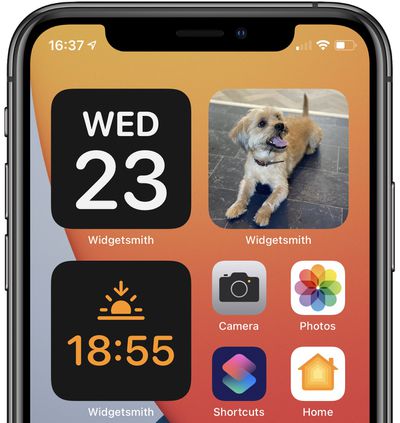
The app offers a large number of different widgets with numerous options for customization, helping you to fine-tune the appearance of your home screen. Currently, the app offers these customizable widgets for:
- Time
- Date
- Photos
- Photos in Album
- Custom Text
- Blank Space
- Calendar
- Reminders
- Weather ($)
- Health & Activity
- Tides ($)
- Astronomy
Is it Free?
The app is free to download (get it now). It does contain an optional premium subscription, which opens access to the weather widget, tides, and exclusive widget styles, but it is still very much usable without spending any money.
Popularity
The reason Widgetsmith has become such a popular tool for iOS 14 home screens comes down to its flexibility. Specific photos and color schemes can let you curate the exact look you want. In this example, the user went all in with different color schemes and sorted their icons onto separate color pages. Then, with Widgetsmith, she was able to add decorative elements that matched:
mine a lil straight but it'll do 😂 #widgetsmith pic.twitter.com/HOLvm4DcIZ — Quiannaaa ' 💋 (@oweequii) September 20, 2020
Timed Widgets
There are a multitude of further options to make sure there is a widget to meet your needs. Widgetsmith also allows you to schedule widgets to appear following defined rules, and widgets can be activated by tapping on them like any other app. It integrates with existing stock apps such as Photos, Calendar, Reminders, Health, and Fitness to deliver information at a glance.
Color Theming
This is perhaps the most flexible part of Widgetsmith. While its widgets seen simple at first glance, the ability to pick your own personal colors for backgrounds and borders means you can organize the perfect look for your home screen.
This user spent time in customizing a very clean white look and matched his Widgetsmith widgets. He also changed his app icons but that's an entirely separate tutorial.
Spent about an hour on mine 😅 pic.twitter.com/BLMfFl2njq — Ben (@BenZhu8) September 20, 2020
Photo Widget
Apple made the strange decision not to let users customize the standard Photo widget. You can't pick your own photo with Apple's Photo widget!
Fortunately, Widgetsmith allows you to perform this very basic task by both allowing you to set a specific photo or to rotate through an album. You can also set timed widgets so a different photo appears at different times of the day.
While your first instinct might be to include a photo of your dog or cat, the more creative uses we've seen involve more decorative and artistic elements to spruce up your home screen.
More Ideas
The wide range of options in Widgetsmith affords you the flexibility to make home screens as you see fit. Below are some ideas for widget combinations for different themes in Widgetsmith, but the choice is yours.
- Sports: Activity Bar, Step Count, and Precipitation %.
- Productivity: Upcoming Calendar Events, Calendar Month, Outlook, and Reminders.
- Photography: Weather Conditions, Sunrise and Sunset, and Photos in Album.
- Sailing: Tide Graph, Tide Clock, and Sunrise and Sunset.
- Astronomy: Moon Phase, Starfield, Sunrise and Sunset, and Wealther Conditions.
The app comes with three calendar widgets pre-set, and you should add one of the three sizes to your home screen. It does not matter whether you do this before or after customizing your widgets in the app. To learn how you can add a widget to your home screen, see our in-depth guide.
How to Set up a Basic Widgetsmith Widget
The following steps outline how to create widgets with Widgetsmith. Although you may wish to create a different widget, the process is largely the same, with slightly different visual options offered at each stage of the process.
Before following these steps, download the Widgetsmith from the App Store.
- Open the Widgetsmith app.
- Choose whether you want to make a Small Widget, Medium Widget, or Large Widget. To make a brand new widget in addition to the preset calendar widget, select Add... Widget for your chosen size. In this case, we are editing the preset calendar widget. To change the preset calendar widget of your chosen size, select it.
- Select Default Widget. To make the widget appear at a scheduled time, simply tap Timed Widget instead of Default Widget.
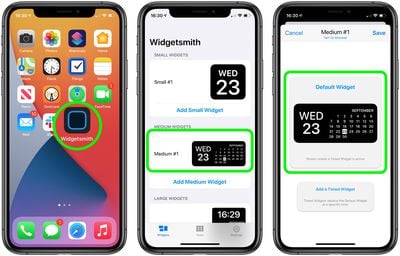
How to Customize Widget Font and Colors
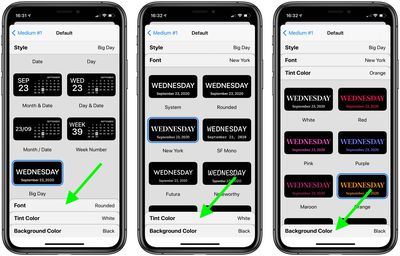
- Under Style, scroll through the list and select the widget of your choice.
- Select the Font bar toward the bottom of the screen. Note that depending on the widget you chose, the option bars may be different.
- Under Font, scroll through the list and select a font.
- Select the Tint Color bar toward the bottom of the screen. Again, your option bars may be slightly different.
- Under Tint Color, scroll through the list and select a tint.
- Select the Background Color bar toward the bottom of the screen.
- Under Background Color, scroll through the list and select a background color.
- Tap the back arrow in the top left corner.
- Tap Save.
- Return to the home screen.
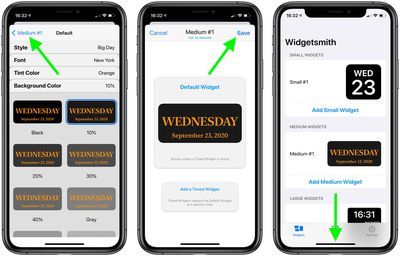
Our final product:
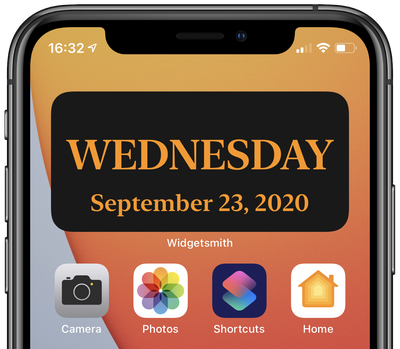
If you have not already done so, add the widget of your chosen size from Widgetsmith to your home screen, and drag it to your preferred location. If you have made multiple widgets in Widgetsmith, you may need to hold down on the widget, tap Edit Widget, and then select the correct widget.
You may wish to hide the Widgetsmith app in your App Library once you have completed these steps.
Widgetsmith gives you the versatility to create unique widgets from hundreds of combinations as per your specific needs, but whether you choose to use it to add a single photo to your home screen, or a complex system of timed widgets with Calendar and Activity integrations, is up to you.
For more information about widgets in iOS 14, see our Home Screen Widgets How To or our full Home Screen Guide.





















![Apple Pulls Keynote, Pages and Numbers From App Store [Update: Back]](https://images.macrumors.com/t/Okb7kitB_gNr6qe5Pex9nQIysD8=/112x112/article-new/2026/01/Apple-Creator-Studio-iWork-suite.jpg)





















